This time we’re going bigger than ever. Fabric, Power BI, SQL, AI and more. We're covering it all. You won't want to miss it.
Learn moreDid you hear? There's a new SQL AI Developer certification (DP-800). Start preparing now and be one of the first to get certified. Register now
Using the Web.BrowserContents() function to get some scraped data from a web page is turning into an overall disappointing journey. I like the first steps on how they've made it easy to scrape web pages with this method and I have no complains there.
However.
I'm using an URL with RelativePath and parsing 100 id's into the URL and calling the URL 1 time per row. I invoke the custom function for a list of 100 ids. Basically it's baseURL/id
First I spend almost half an hour getting data for 100 rows in Power Query, then when I want to load the already "pre-loaded" data into my model everything starts all over again. I thought the Power Query result would be cached.
Is there a way to cache each record called upon using the Web.BrowserContents() ?
I've tried the Table.Buffer() function but honestly I have no clear idea how that works.
Hi @Yggdrasill ,
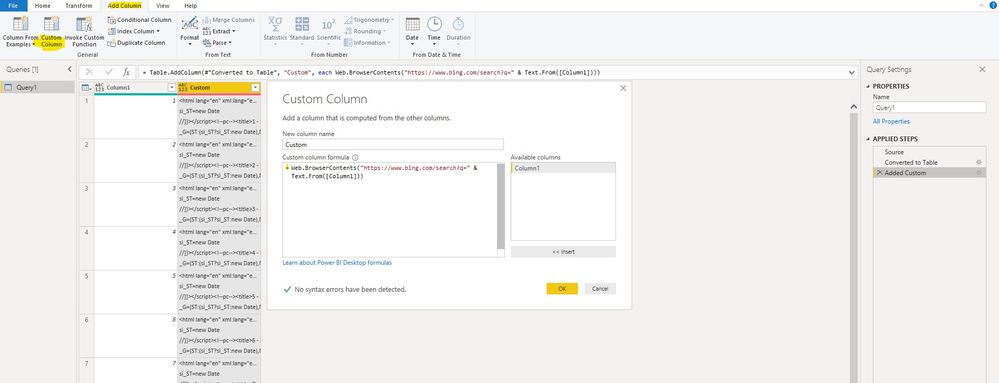
We can create another custom column to store the result of Web.BowserContens() functon, then we can use the content in this column to invoke other custom function.
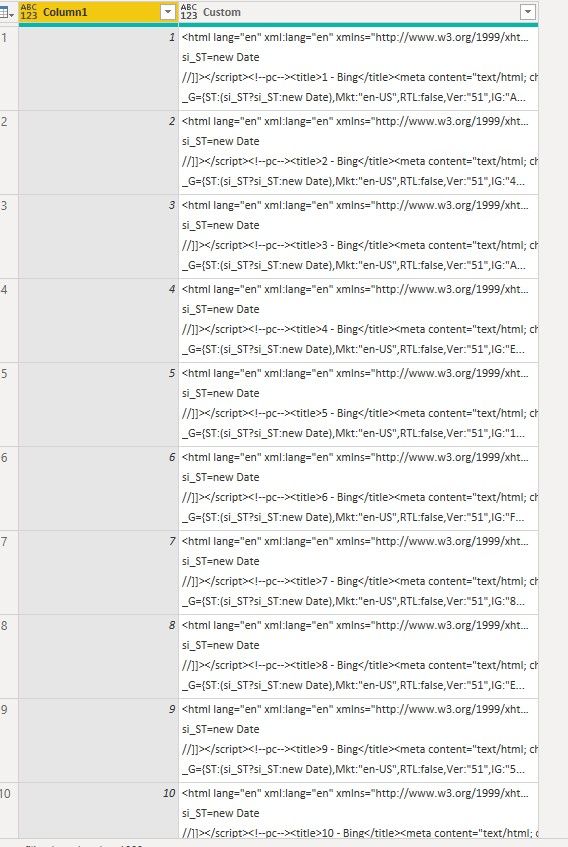
The content in Custom column is cached as simple text with html format, this column can be used multi times in power query without recall origin page, but it will be called again if refresh the model to keep the model up-to-date.If you do not want to refresh this table, for example it does not update frequently, we can disable "include in report refresh" .
Best regards,
Check out the April 2026 Power BI update to learn about new features.
Sign up to receive a private message when registration opens and key events begin.
If you have recently started exploring Fabric, we'd love to hear how it's going. Your feedback can help with product improvements.
| User | Count |
|---|---|
| 7 | |
| 5 | |
| 4 | |
| 3 | |
| 3 |