Don't miss your chance to take the Fabric Data Engineer (DP-700) exam on us!
Learn moreWe've captured the moments from FabCon & SQLCon that everyone is talking about, and we are bringing them to the community, live and on-demand. Starts on April 14th. Register now
Hi Guys
I am trying to find a solution that exist in EXCEL (WORKDAYS function) that can do the same thing in Power Query
Below I have a Delivery Date and I want to substract Shipping and WHS days but only days that are working days.
So in column Release date it is substructing all days including Weekends but what I want to acheive is the Releas date WORKING DAYS ONLY that is substrating only working days.
Hopefully you can help me
Thank you for your efforts
| Del date | Shipping | WHS | Substract | Releas date Del date - (shipping +WHS) | Releas date WORKING DAYS ONLY Del date - (shipping +WHS) |
| 27-03-20 | 2 | 3 | 5 | 22-03-20 | 20-03-20 |
| 13-04-20 | 3 | 1 | 4 | 09-04-20 | 07-04-20 |
| 06-04-20 | 4 | 1 | 5 | 01-04-20 | 30-03-20 |
| 02-04-20 | 2 | 2 | 4 | 29-03-20 | 27-03-20 |
| 02-04-20 | 3 | 1 | 4 | 29-03-20 | 27-03-20 |
| 02-04-20 | 1 | 1 | 2 | 31-03-20 | 31-03-20 |
| 02-04-20 | 3 | 2 | 5 | 28-03-20 | 26-03-20 |
| 02-04-20 | 5 | 1 | 6 | 27-03-20 | 25-03-20 |
Solved! Go to Solution.
Take a look at the M code below. Put it in a blank query. It returns this table:
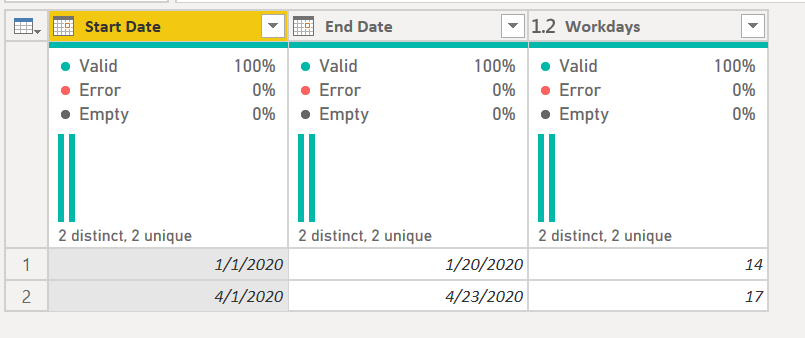
1) In Power Query, select New Source, then Blank Query
2) On the Home ribbon, select "Advanced Editor" button
3) Remove everything you see, then paste the M code I've given you in that box.
4) Press Done
let
Source = Table.FromRows(Json.Document(Binary.Decompress(Binary.FromText("i45WMtQ31DcyMDJQ0lECMSDsWJ1oJROEhIm+kTFUIhYA", BinaryEncoding.Base64), Compression.Deflate)), let _t = ((type text) meta [Serialized.Text = true]) in type table [#"Start Date" = _t, #"End Date" = _t]),
#"Changed Type" = Table.TransformColumnTypes(Source,{{"Start Date", type date}, {"End Date", type date}}),
#"Added Index" = Table.AddIndexColumn(#"Changed Type", "Index", 0, 1),
#"Added Date Range" = Table.AddColumn(#"Added Index", "Date Range", each {Number.From([Start Date])..Number.From([End Date])}),
#"Expanded Date Range" = Table.ExpandListColumn(#"Added Date Range", "Date Range"),
#"Changed Type1" = Table.TransformColumnTypes(#"Expanded Date Range",{{"Date Range", type date}}),
#"Added Custom" = Table.AddColumn(#"Changed Type1", "Is workday", each if Date.DayOfWeek([Date Range],Day.Monday) <= 4 then 1 else 0),
#"Grouped Rows" = Table.Group(#"Added Custom", {"Start Date", "End Date", "Index"}, {{"Workdays", each List.Sum([Is workday]), type number}}),
#"Removed Other Columns" = Table.SelectColumns(#"Grouped Rows",{"Start Date", "End Date", "Workdays"})
in
#"Removed Other Columns"
You should be able to modify it to suite your specific scenario. Ping back if you cannot or need help.
DAX is for Analysis. Power Query is for Data Modeling
Proud to be a Super User!
MCSA: BI ReportingTake a look at the M code below. Put it in a blank query. It returns this table:
1) In Power Query, select New Source, then Blank Query
2) On the Home ribbon, select "Advanced Editor" button
3) Remove everything you see, then paste the M code I've given you in that box.
4) Press Done
let
Source = Table.FromRows(Json.Document(Binary.Decompress(Binary.FromText("i45WMtQ31DcyMDJQ0lECMSDsWJ1oJROEhIm+kTFUIhYA", BinaryEncoding.Base64), Compression.Deflate)), let _t = ((type text) meta [Serialized.Text = true]) in type table [#"Start Date" = _t, #"End Date" = _t]),
#"Changed Type" = Table.TransformColumnTypes(Source,{{"Start Date", type date}, {"End Date", type date}}),
#"Added Index" = Table.AddIndexColumn(#"Changed Type", "Index", 0, 1),
#"Added Date Range" = Table.AddColumn(#"Added Index", "Date Range", each {Number.From([Start Date])..Number.From([End Date])}),
#"Expanded Date Range" = Table.ExpandListColumn(#"Added Date Range", "Date Range"),
#"Changed Type1" = Table.TransformColumnTypes(#"Expanded Date Range",{{"Date Range", type date}}),
#"Added Custom" = Table.AddColumn(#"Changed Type1", "Is workday", each if Date.DayOfWeek([Date Range],Day.Monday) <= 4 then 1 else 0),
#"Grouped Rows" = Table.Group(#"Added Custom", {"Start Date", "End Date", "Index"}, {{"Workdays", each List.Sum([Is workday]), type number}}),
#"Removed Other Columns" = Table.SelectColumns(#"Grouped Rows",{"Start Date", "End Date", "Workdays"})
in
#"Removed Other Columns"
You should be able to modify it to suite your specific scenario. Ping back if you cannot or need help.
DAX is for Analysis. Power Query is for Data Modeling
Proud to be a Super User!
MCSA: BI ReportingHi @Anonymous ,
You may try using a custom function to get the workdays. There is a recent thread here: https://community.powerbi.com/t5/Power-Query/WorkDays-Function-in-Power-Query-M/m-p/1007028#M34312
I do not know a solution for Power Query, @ImkeF or @edhans might.
The DAX version is here: https://community.powerbi.com/t5/Quick-Measures-Gallery/Net-Work-Days/td-p/367362
If you have recently started exploring Fabric, we'd love to hear how it's going. Your feedback can help with product improvements.
A new Power BI DataViz World Championship is coming this June! Don't miss out on submitting your entry.
Share feedback directly with Fabric product managers, participate in targeted research studies and influence the Fabric roadmap.
| User | Count |
|---|---|
| 5 | |
| 3 | |
| 3 | |
| 2 | |
| 2 |
| User | Count |
|---|---|
| 9 | |
| 8 | |
| 7 | |
| 7 | |
| 5 |