cancel
Showing results for 
Search instead for 
Did you mean: 

Data Days is here! Join us now for 60+ days of learning, challenges, and connection. Learn more

Reply
GraceTCL
Helper II
Helper II

View Native Query always disabled

Hi


Why is the View Native Query option always grayed out / disabled in Power Query?  I use SQL Server Database and tested with simple queries.  Zero transformations, filters, field name aliases, etc...  No matter what, I have never been able to View Native Query.  It's always disabled.  


This is even if I disable "include relationship columns" check box and specify the timeperiods to import the data.

1 ACCEPTED SOLUTION
edhans
Community Champion
Community Champion

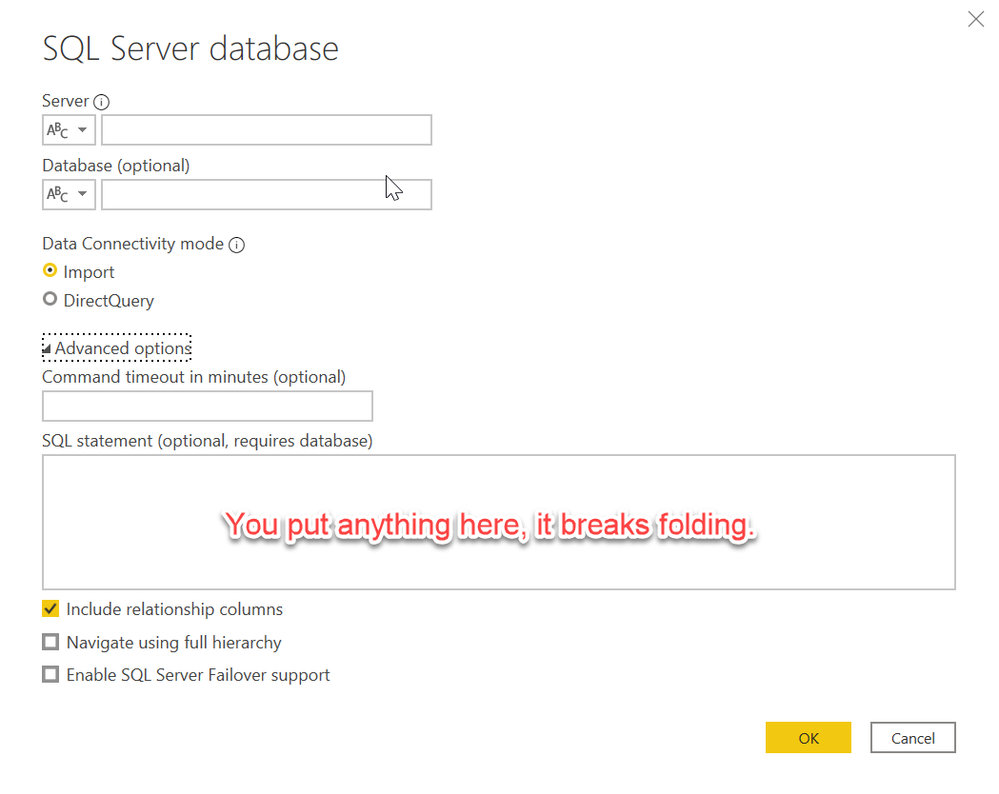
Are you putting any queries in the Advanced dialog box?

edhans_0-1619827066507.png

No folding will happen, and the View Native Query will be grayed out. Leave that box blank, connect directly to the table or view, then do further transformations in Power Query itself. Some things will fold, some won't. That is a much larger thread.


Did I answer your question? Mark my post as a solution!
Did my answers help arrive at a solution? Give it a kudos by clicking the Thumbs Up!

DAX is for Analysis. Power Query is for Data Modeling


Proud to be a Super User!

MCSA: BI Reporting

View solution in original post

2 REPLIES 2
edhans
Community Champion
Community Champion

Are you putting any queries in the Advanced dialog box?

edhans_0-1619827066507.png

No folding will happen, and the View Native Query will be grayed out. Leave that box blank, connect directly to the table or view, then do further transformations in Power Query itself. Some things will fold, some won't. That is a much larger thread.


Did I answer your question? Mark my post as a solution!
Did my answers help arrive at a solution? Give it a kudos by clicking the Thumbs Up!

DAX is for Analysis. Power Query is for Data Modeling


Proud to be a Super User!

MCSA: BI Reporting
Anonymous
Not applicable

Could we have a look at the query?

Helpful resources

Announcements
Fabric Data Days is here Carousel

Fabric Data Days 2026

Don't miss out on Data Days, June 15 through August 7. Learn Fabric, Power BI, SQL, AI and more.

May Power BI Update Carousel

Power BI Monthly Update - May 2026

Check out the May 2026 Power BI update to learn about new features.

Power BI DataViz World Championships carousel

Power BI DataViz World Championships - June 2026

A new Power BI DataViz World Championship is coming this June! Don't miss out on submitting your entry.