Join us at FabCon Atlanta from March 16 - 20, 2026, for the ultimate Fabric, Power BI, AI and SQL community-led event. Save $200 with code FABCOMM.
Register now!The Power BI Data Visualization World Championships is back! It's time to submit your entry. Live now!
Hello everyone,
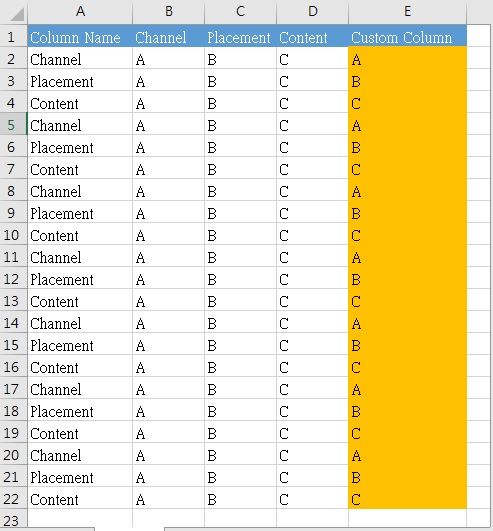
Following is my assumption, I have 4 columns in my raw data - Column Name, Channel, Placement and Content.
I want to use data in "Column Name" as column names and use data in that column cell accordingly to generate "Custom Column".
Is there a way of doing so in Power Query?
I understand a column is expressed in square brackets, but what expression should I use to achieve the above?
Thank you so much for your time and help.
Solved! Go to Solution.
Try this custom column from Query Editor
=Record.Field(_,[ColumnName])
Try this custom column from Query Editor
=Record.Field(_,[ColumnName])
Didn't know this expression! Work like charm! Thank you!
| User | Count |
|---|---|
| 20 | |
| 10 | |
| 8 | |
| 8 | |
| 7 |