Join us in Barcelona for FabCon and SQLCon, September 28 - October 1, 2026.
This is best Fabric, Power BI, SQL and AI community event. How do we know? The last event sold out! Save €200 with code FABCMTY200.
Register now- Power BI forums
- Get Help with Power BI
- Desktop
- Service
- Report Server
- Power Query
- Mobile Apps
- Developer
- DAX Commands and Tips
- Custom Visuals Development Discussion
- Health and Life Sciences
- Power BI Spanish forums
- Translated Spanish Desktop
- Training and Consulting
- Instructor Led Training
- Dashboard in a Day for Women, by Women
- Galleries
- Data Stories Gallery
- Themes Gallery
- Contests Gallery
- QuickViz Gallery
- Quick Measures Gallery
- Visual Calculations Gallery
- Fabric Apps Gallery
- Notebook Gallery
- Translytical Task Flow Gallery
- TMDL Gallery
- R Script Showcase
- Webinars and Video Gallery
- Ideas
- Custom Visuals Ideas (read-only)
- Issues
- Issues
- Events
- Upcoming Events
The Fabric community is upgrading! Read all of the details including the timeline and what you can expect. Learn more
- Power BI forums
- Forums
- Get Help with Power BI
- Power Query
- Re: Using previous row in current row calculation
- Subscribe to RSS Feed
- Mark Topic as New
- Mark Topic as Read
- Float this Topic for Current User
- Bookmark
- Subscribe
- Printer Friendly Page


- Mark as New
- Bookmark
- Subscribe
- Mute
- Subscribe to RSS Feed
- Permalink
- Report Inappropriate Content
Using previous row in current row calculation
Hello, trying to create an outstanding column using data from the previous row.
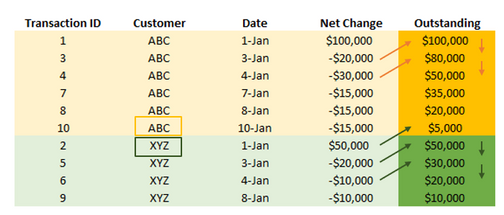
See example below for situation.
ID #1 has no previous data, so the outstanding balance is the Net change of $100,000. However ID #3 has an outstanding balance from the previous step, so the new outstanding balance is the difference. $80,000
ID #2 has previous data, but it is for a different customer. Therefore, the outstanding balance should be reset to 0 and the net change becomes the starting balance. $50,000. ID #5 has a previous outstanding balance with the same customer, so the net change is added to the previous row oustanding for an outstanding amount of $30,000
And so on for many transactions and numerous customers. Any thoughts on how to best do this in either the query editor or as a calcualted column would be much appreciated.
Solved! Go to Solution.

- Mark as New
- Bookmark
- Subscribe
- Mute
- Subscribe to RSS Feed
- Permalink
- Report Inappropriate Content
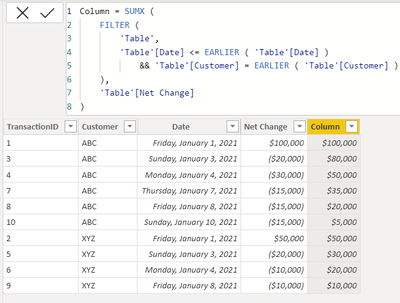
@Fraze can you try this
Column = SUMX (
    FILTER (
        'Table',
        'Table'[Date] <= EARLIER ( 'Table'[Date] )
            && 'Table'[Customer] = EARLIER ( 'Table'[Customer] )
    ),
    'Table'[Net Change]
)
========================
Did I answer your question? Mark my post as a solution!
Proud to be a Super User
My Custom Visualization Projects
• Plotting Live Sound: Live Sound
• Beautiful News: Women in Parliament, Energy Mix, Shrinking Armies
• Visual Capitalist: Working Hrs
• Others: Easing Graph, Animated Calendar
MayViz Submissions
• Week 1: View
• Week 2: View
• Week 3: View
• Week 4: View
========================


- Mark as New
- Bookmark
- Subscribe
- Mute
- Subscribe to RSS Feed
- Permalink
- Report Inappropriate Content
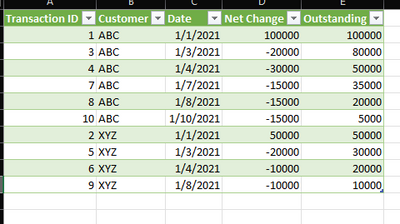
It appears that you want to add a "running balance" column to each "group" of customers.
You can do that in M Code by Grouping, then using a custom aggregation to create the new subtable.
Please read the code comments for more detailed explanation:
let
    Source = Excel.CurrentWorkbook(){[Name="Table35"]}[Content],
    typeIt=Table.TransformColumnTypes(Source, {
        {"Transaction ID", Int64.Type},{"Customer",Text.Type},{"Date",Date.Type},{"Net Change",Currency.Type}
    }),

//Group by Customer
    grp = Table.Group(typeIt,{"Customer"},{

//then add running balance column to each subtable
    {"runningBalance", (t)=> Table.FromColumns(
    Table.ToColumns(t) &
    {List.Generate(
        ()=>[rb=t[Net Change]{0}, idx = 0],
        each [idx]< Table.RowCount(t),
        each [rb = [rb]+ t[Net Change]{[idx]+1}, idx = [idx]+1],
        each [rb]
    )})}}),

//Remove original customer table
//Then expand the grouped table
    #"Removed Columns" = Table.RemoveColumns(grp,{"Customer"}),
    #"Expanded runningBalance" = Table.ExpandTableColumn(#"Removed Columns", "runningBalance",
        {"Column1", "Column2", "Column3", "Column4", "Column5"},
        Table.ColumnNames(Source) & {"Outstanding"}),

//reset the data types
// could set up a more restricted environment than #shared if necessary
    types = List.Transform(Table.Schema(typeIt)[TypeName] & {"Currency.Type"}, each Expression.Evaluate(_,#shared)  ),
    reType = Table.TransformColumnTypes(#"Expanded runningBalance",List.Zip({Table.ColumnNames(#"Expanded runningBalance"),types}))
in
   reType
- Mark as New
- Bookmark
- Subscribe
- Mute
- Subscribe to RSS Feed
- Permalink
- Report Inappropriate Content
@Fraze you can create a measure like this
Outstanding =
VAR _filter =
    FILTER (
        ALL ( 'Table' ),
        'Table'[Transaction ID] <= MAX ( 'Table'[Transaction ID] )
            && 'Table'[Customer] = MAX ( 'Table'[Customer] )
    )
RETURN
    CALCULATE ( SUM ( 'Table'[NetChange] ), _filter )
or a calculated column like this
Column =
SUMX (
    FILTER (
        'Table',
        'Table'[Transaction ID] <= EARLIER ( 'Table'[Transaction ID] )
            && 'Table'[Customer] = EARLIER ( 'Table'[Customer] )
    ),
    'Table'[NetChange]
)
========================
Did I answer your question? Mark my post as a solution!
Proud to be a Super User
My Custom Visualization Projects
• Plotting Live Sound: Live Sound
• Beautiful News: Women in Parliament, Energy Mix, Shrinking Armies
• Visual Capitalist: Working Hrs
• Others: Easing Graph, Animated Calendar
MayViz Submissions
• Week 1: View
• Week 2: View
• Week 3: View
• Week 4: View
========================
- Mark as New
- Bookmark
- Subscribe
- Mute
- Subscribe to RSS Feed
- Permalink
- Report Inappropriate Content
I tried this approach, but row 2 jumped 35k rather than 20k

- Mark as New
- Bookmark
- Subscribe
- Mute
- Subscribe to RSS Feed
- Permalink
- Report Inappropriate Content
@Fraze can you try this
Column = SUMX (
    FILTER (
        'Table',
        'Table'[Date] <= EARLIER ( 'Table'[Date] )
            && 'Table'[Customer] = EARLIER ( 'Table'[Customer] )
    ),
    'Table'[Net Change]
)
========================
Did I answer your question? Mark my post as a solution!
Proud to be a Super User
My Custom Visualization Projects
• Plotting Live Sound: Live Sound
• Beautiful News: Women in Parliament, Energy Mix, Shrinking Armies
• Visual Capitalist: Working Hrs
• Others: Easing Graph, Animated Calendar
MayViz Submissions
• Week 1: View
• Week 2: View
• Week 3: View
• Week 4: View
========================
- Mark as New
- Bookmark
- Subscribe
- Mute
- Subscribe to RSS Feed
- Permalink
- Report Inappropriate Content
@AlexisOlson on the above, I have noticed that. if the TransactionID is text, the running total goes sideways, if my partition is on ID

However, it behaves properly I change that back to integer.
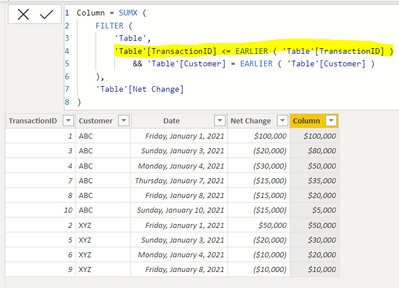
I thought DAx stores the text values as per the CHAR value
========================
Did I answer your question? Mark my post as a solution!
Proud to be a Super User
My Custom Visualization Projects
• Plotting Live Sound: Live Sound
• Beautiful News: Women in Parliament, Energy Mix, Shrinking Armies
• Visual Capitalist: Working Hrs
• Others: Easing Graph, Animated Calendar
MayViz Submissions
• Week 1: View
• Week 2: View
• Week 3: View
• Week 4: View
========================

- Mark as New
- Bookmark
- Subscribe
- Mute
- Subscribe to RSS Feed
- Permalink
- Report Inappropriate Content
I'm not sure what you mean by "stores the text values as per the CHAR value" but the problem is that "1", "10", and "3" are all <= "3" sorted alphabetically.
- Mark as New
- Bookmark
- Subscribe
- Mute
- Subscribe to RSS Feed
- Permalink
- Report Inappropriate Content
@AlexisOlson got it !!! many Thanks !!!!
========================
Did I answer your question? Mark my post as a solution!
Proud to be a Super User
My Custom Visualization Projects
• Plotting Live Sound: Live Sound
• Beautiful News: Women in Parliament, Energy Mix, Shrinking Armies
• Visual Capitalist: Working Hrs
• Others: Easing Graph, Animated Calendar
MayViz Submissions
• Week 1: View
• Week 2: View
• Week 3: View
• Week 4: View
========================
- Mark as New
- Bookmark
- Subscribe
- Mute
- Subscribe to RSS Feed
- Permalink
- Report Inappropriate Content
You may be interested in these prior similar posts:
https://community.powerbi.com/t5/Desktop/Calculating-Daily-values-from-Cumulative-Total/m-p/2198969
- Mark as New
- Bookmark
- Subscribe
- Mute
- Subscribe to RSS Feed
- Permalink
- Report Inappropriate Content
Good idea. But rather than extrapolating the cumultive totals, i need to create the cumulative totals by customer. Creating an index would not work because it would only match the previous value, rather than the cumulative previous values. happy to be wrong though if I am not seeing something
- Mark as New
- Bookmark
- Subscribe
- Mute
- Subscribe to RSS Feed
- Permalink
- Report Inappropriate Content
Whoops. I had the goal backward in my head (the links I gave wanted to deconstruct an existing cumulative column).
Here's how you can get the running total:
https://community.powerbi.com/t5/Desktop/How-to-do-a-running-Sum-by-group-in-Power-Query/m-p/290123

Helpful resources

FabCon & SQLCon – Barcelona 2026
Join us in Barcelona for FabCon and SQLCon, the Fabric, Power BI, SQL, and AI community event. Save €200 with code FABCMTY200.

Power BI DataViz World Championships - June 2026
A new Power BI DataViz World Championship is coming this June! Don't miss out on submitting your entry.


