cancel
Showing results for 
Search instead for 
Did you mean: 

We've captured the moments from FabCon & SQLCon that everyone is talking about, and we are bringing them to the community, live and on-demand. Starts on April 14th. Register now

Reply
Anonymous
Not applicable

Using no-SQL data sources

Hi, 


I'm not very familiar with no-SQL databases as data sources and I'm trying to figure out how to flatten my model with a Cosmos DB source in a way that will work. 


The documents I'm working with are JSON files with a dynamic structure. I used the Cosmos DB Connector, and I seem to be able to transform the Records in the initial tableinto other tables via the Transform into Table button: 


Initial table:

Initial tableInitial table

Expanded Record in row 1:

Alienvolm_1-1623854611968.png

Clicked on the Convert into table button:

Alienvolm_2-1623854691693.png

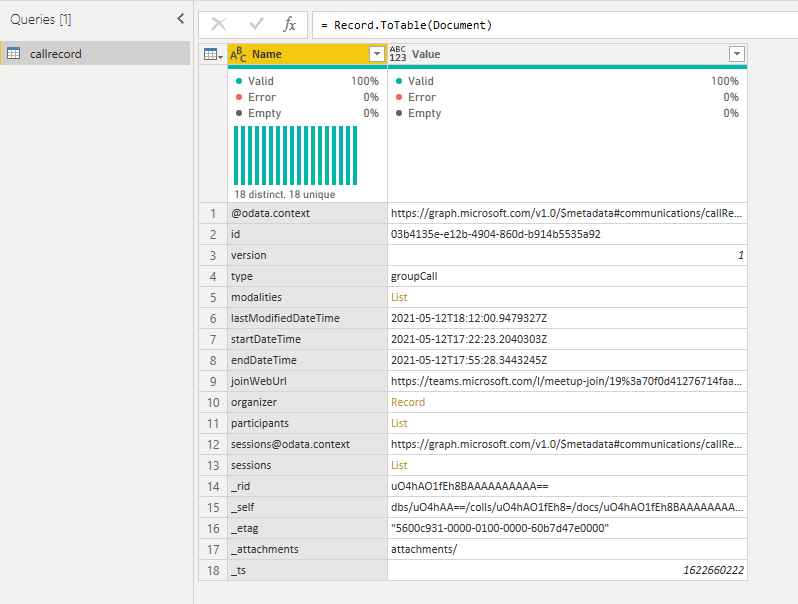
Resulting table:

Alienvolm_3-1623854728831.png


Now... I have some questions on how to proceed from here: 

1) Do I have to go through thisprocess for all the rows?

2) My resulting table still has some Lists and Records in it. So, if I go ahead and transform them all into tables, that might work for this specific document. But when a new JSON file comes in, and there is a different number of rows, does that mean that I need a different query for each new document? 


I'm trying to wrap my head around it and I'm quite confised on how to make this work...


Thanks in advance for your help and suggestions! 

1 ACCEPTED SOLUTION
Anonymous
Not applicable

Hi @Anonymous ,


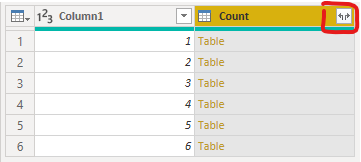
You can try to click the button circled in red, and then expand all at once.

Screenshot 2021-06-18 134545.pngScreenshot 2021-06-18 134529.png


If new data is imported, you need to do this operation again.


Best Regards,

Stephen Tao


If this post helps, then please consider Accept it as the solution to help the other members find it more quickly.

View solution in original post

1 REPLY 1
Anonymous
Not applicable

Hi @Anonymous ,


You can try to click the button circled in red, and then expand all at once.

Screenshot 2021-06-18 134545.pngScreenshot 2021-06-18 134529.png


If new data is imported, you need to do this operation again.


Best Regards,

Stephen Tao


If this post helps, then please consider Accept it as the solution to help the other members find it more quickly.

Helpful resources

Announcements
New to Fabric survey Carousel

New to Fabric Survey

If you have recently started exploring Fabric, we'd love to hear how it's going. Your feedback can help with product improvements.

Power BI DataViz World Championships carousel

Power BI DataViz World Championships - June 2026

A new Power BI DataViz World Championship is coming this June! Don't miss out on submitting your entry.

Join our Fabric User Panel

Join our Fabric User Panel

Share feedback directly with Fabric product managers, participate in targeted research studies and influence the Fabric roadmap.

March Power BI Update Carousel

Power BI Community Update - March 2026

Check out the March 2026 Power BI update to learn about new features.