Don't miss your chance to take the Fabric Data Engineer (DP-600) exam for FREE! Find out how by watching the DP-600 session on-demand now through April 28th.
Learn moreJoin the FabCon + SQLCon recap series. Up next: Power BI, Real-Time Intelligence, IQ and AI, and Data Factory take center stage. All sessions are available on-demand after the live show. Register now
Hello.
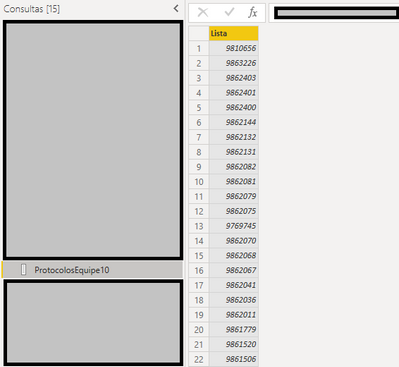
I'm not sure how to use a list as a parameter of an SQL query. The list I have is of integers:
I'm trying to use it as a "WHERE IN" parameter inside an SQL query through the advanced editor:
let
Fonte = Sql.Database("test", "test_readonly", [Query="SELECT *#(lf)FROM TEST tst#(lf)WHERE tst.field IN (" &ProtocolosEquipe10& ")"])
in
Fonte
What I want to reproduce in the SQL query is:
SELECT *
FROM TEST tst
WHERE tst.field IN (9875825, 9872576, 9870536, 9870530, 9870524, 9870482, 9870455, 9870449, 9870391, 9870383, 9870375, 9870371, 9870159, 9870086, 9870078, 9870074, 9870071, 9869966, 9869845, 9869838)
How can I do this without having to generate a parameter inside Power Query?
Solved! Go to Solution.
You are just there. Just replace ProtocolosEquipe10 by following
Text.Combine(ProtocolosEquipe10,", ")
let
Fonte = Sql.Database("test", "test_readonly", [Query="SELECT *#(lf)FROM TEST tst#(lf)WHERE tst.field IN (" & Text.Combine(ProtocolosEquipe10,", ") & ")"])
in
Fonte
How do you avoid the:
Formula.Firewall: Query 'QUERYNAME' (step 'Source') references other queries or steps, so it may not directly access a data source. Please rebuild this data combination.
.. error, that this generates ??
You are just there. Just replace ProtocolosEquipe10 by following
Text.Combine(ProtocolosEquipe10,", ")
let
Fonte = Sql.Database("test", "test_readonly", [Query="SELECT *#(lf)FROM TEST tst#(lf)WHERE tst.field IN (" & Text.Combine(ProtocolosEquipe10,", ") & ")"])
in
Fonte
Hi, @Vijay_A_Verma! Thanks for your reply.
I got this error, right on the first iteration of the list:
Expression.Error: We were unable to convert the value 9810656 to type Text.
Details:
Value=9810656
Type=[Type]
EDIT:
I converted my data type to text before converting it to list and I was able to perform the query. I don't know if it's the most appropriate way, but it worked.
Check out the April 2026 Power BI update to learn about new features.
If you have recently started exploring Fabric, we'd love to hear how it's going. Your feedback can help with product improvements.
A new Power BI DataViz World Championship is coming this June! Don't miss out on submitting your entry.
| User | Count |
|---|---|
| 3 | |
| 3 | |
| 2 | |
| 2 | |
| 2 |
| User | Count |
|---|---|
| 5 | |
| 4 | |
| 4 | |
| 4 | |
| 4 |