cancel
Showing results for 
Search instead for 
Did you mean: 

Data Days is here! Join us now for 60+ days of learning, challenges, and connection. Learn more

Reply
Anonymous
Not applicable

Using SQL statement Source in DirectQuery causes "not supported" errors

Hello all,


  1. I have two DirectQuery SQL Server source tables
    1. one uses a Navigation to my credit_notes table (no SQL statement)
    2. one uses an SQL statement to select ALL from credit_notes (SELECT * FROM table_name).
  2. Insert a "Rename Columns" step with both tables
    1. The Navigation source table works fine
    2. The SQL statement table gets "This step results in a query that is not supported in DirectQuery mode"


Can anyone help me figure out why Rename Columns (and other supported DirectQuery functions) don't work with my SQL statement tables?


Thanks in advance!

1 ACCEPTED SOLUTION
v-jingzhang
Community Support
Community Support

Hi @Anonymous , I can reproduce this. 


To my knowledge, to ensure the performance of DirectQuery, the Power Query query must achieve query folding for a DirectQuery or Dual storage mode table. It means a Power Query query will generate all the steps you make in Query Editor into a single query statement to retrieve and transform source data. This is achieved in your Navigation source table. However, this is not achieved in your SQL statement table because Power Query cannot modify your SQL statement. It treats the specific SQL query statement "as provided", without an attempt to rewrite it. 


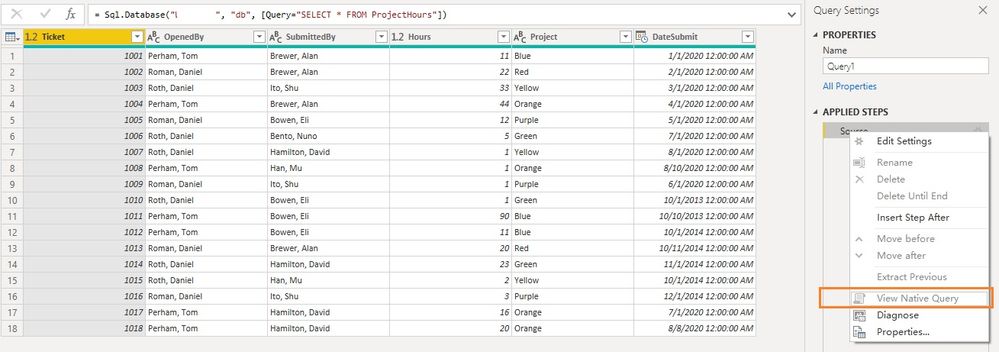
You can click View Native Query to check whether it is able to achieve query folding. However, the first Source step is already not query folding, but the table is in DirectQuery mode.
021506.jpg


Reference:

Query folding guidance in Power BI Desktop - Power BI | Microsoft Docs

DirectQuery model troubleshooting in Power BI Desktop - Power BI | Microsoft Docs


Regards,
Community Support Team _ Jing Zhang
If this post helps, please consider Accept it as the solution to help other members find it.

View solution in original post

3 REPLIES 3
v-jingzhang
Community Support
Community Support

Hi @Anonymous , I can reproduce this. 


To my knowledge, to ensure the performance of DirectQuery, the Power Query query must achieve query folding for a DirectQuery or Dual storage mode table. It means a Power Query query will generate all the steps you make in Query Editor into a single query statement to retrieve and transform source data. This is achieved in your Navigation source table. However, this is not achieved in your SQL statement table because Power Query cannot modify your SQL statement. It treats the specific SQL query statement "as provided", without an attempt to rewrite it. 


You can click View Native Query to check whether it is able to achieve query folding. However, the first Source step is already not query folding, but the table is in DirectQuery mode.

021506.jpg


Reference:

Query folding guidance in Power BI Desktop - Power BI | Microsoft Docs

DirectQuery model troubleshooting in Power BI Desktop - Power BI | Microsoft Docs


Regards,
Community Support Team _ Jing Zhang
If this post helps, please consider Accept it as the solution to help other members find it.

Anonymous
Not applicable

Great explanation, thanks!!


In case anyone reads this, the most telling line from that MS Doc:

"It's important to understand that the Power Query mashup engine can't fold later query steps, and so you should include all—or as much—transformation logic in the native query statement."

Jimmy801
Community Champion
Community Champion

Hello @Anonymous 


which function you use for renaming your columns?


BR


Jimmy

Helpful resources

Announcements
Fabric Data Days is here Carousel

Fabric Data Days 2026

Don't miss out on Data Days, June 15 through August 7. Learn Fabric, Power BI, SQL, AI and more.

May Power BI Update Carousel

Power BI Monthly Update - May 2026

Check out the May 2026 Power BI update to learn about new features.

Power BI DataViz World Championships carousel

Power BI DataViz World Championships - June 2026

A new Power BI DataViz World Championship is coming this June! Don't miss out on submitting your entry.