My customer wants to query paycheck data in realtime so they can make sure remitance data balances between systems. I am trying to use Dynamic Parameters with Direct Query to create the WHERE CHEKDATE DATE BETWEEN parameter1 and parameter2. The M Code builds and runs perfect. But I can only trigger the parameters to update properly when when the dates are in a list or dropdown slicer. I've tried everything to get them to work in a Calendar slicer. I have added a second date to the calendar table that matches the column tied to the parameters and while that let's me have a calendar slicer, it never triggers the parameter to update. The query kicks off and runs with the date set in the parameters current value. If I use the date tied to the parameter in the list it works correctly.
I've rewritten the code a hundred different ways. This latest version was more about being able to troubleshoot.
let
selectedCheckDateStartConvert = DateTime.Date(prmCheckDateStart),
selectedCheckDateStart = Text.Combine({"'", Date.ToText(selectedCheckDateStartConvert), "'"}),
selectedCheckDateEndConvert = DateTime.Date(prmCheckDateEnd),
selectedCheckDateEnd = Text.Combine({"'", Date.ToText(selectedCheckDateEndConvert), "'"}),
query = "SELECT * FROM REFINED.VW_RPT_JULY_RETIREE_PAYOUT_REMITTANCE",
dynamicFilter = Text.Combine({" WHERE [Check Date] BETWEEN CAST(" ,selectedCheckDateStart," AS DATE) AND CAST(",selectedCheckDateEnd," AS DATE)"}),
finalQuery = Text.Combine({query, dynamicFilter}),
Source = Sql.Database(#"prmServerName", #"prmDatabaseName", [Query=finalQuery])
in
Source
Also, The article here: Dynamic M query parameters in Power BI Desktop - Power BI | Microsoft Docs says ... "in Power BI Desktop". I am hoping that doesn't mean this functionality is limited to the Desktop app and that it won't work in the service.
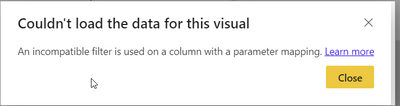
This is another error I get when trying to force the slicer by swapping the date column with the duplicate date column that is tied to the parameter.
Thanks!


