cancel
Showing results forย 
Search instead forย 
Did you mean:ย 

July 28 - August 9 | Final Round of the Power BI Dataviz World Championships. This is your chance. Learn more

Reply
PAPutzback2
Helper II
Helper II

Using Dynamic M Query with Date type Parameters breaks the calendar slicer. Datasource is SQL Server

My customer wants to query paycheck data in realtime so they can make sure remitance data balances between systems. I am trying to use Dynamic Parameters with Direct Query to create the WHERE CHEKDATE DATE BETWEEN parameter1 and parameter2. The M Code builds and runs perfect. But I can only trigger the parameters to update properly when when the dates are in a list or dropdown slicer. I've tried everything to get them to work in a Calendar slicer. I have added a second date to the calendar table that matches the column tied to the parameters and while that let's me have a calendar slicer, it never triggers the parameter to update. The query kicks off and runs with the date set in the parameters current value. If I use the date tied to the parameter in the list it works correctly.

I've rewritten the code a hundred different ways. This latest version was more about being able to troubleshoot.
let
selectedCheckDateStartConvert = DateTime.Date(prmCheckDateStart),
selectedCheckDateStart = Text.Combine({"'", Date.ToText(selectedCheckDateStartConvert), "'"}),
selectedCheckDateEndConvert = DateTime.Date(prmCheckDateEnd),
selectedCheckDateEnd = Text.Combine({"'", Date.ToText(selectedCheckDateEndConvert), "'"}),
query = "SELECT * FROM REFINED.VW_RPT_JULY_RETIREE_PAYOUT_REMITTANCE",
dynamicFilter = Text.Combine({" WHERE [Check Date] BETWEEN CAST(" ,selectedCheckDateStart," AS DATE) AND CAST(",selectedCheckDateEnd," AS DATE)"}),
finalQuery = Text.Combine({query, dynamicFilter}),
Source = Sql.Database(#"prmServerName", #"prmDatabaseName", [Query=finalQuery])
in
Source

Also, The article here: Dynamic M query parameters in Power BI Desktop - Power BI | Microsoft Docs says ... "in Power BI Desktop". I am hoping that doesn't mean this functionality is limited to the Desktop app and that it won't work in the service.

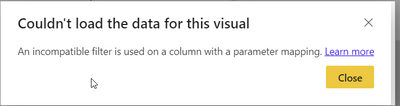
This is another error I get when trying to force the slicer by swapping the date column with the duplicate date column that is tied to the parameter.
PAPutzback2_0-1653098752291.png


Thanks!


1 ACCEPTED SOLUTION
AlexisOlson
Super User
Super User

I may be misunderstanding something but it doesn't seem like you should need dynamic M query parameters in order to do standard filtering. It should automatically apply the slicer filtering to the table (assuming the slicer table has a relationship with the data table).


I recommend this article on DirectQuery:

https://radacad.com/directquery-connection-in-power-bi-how-does-it-work-limitations-and-advantages

View solution in original post

1 REPLY 1
AlexisOlson
Super User
Super User

I may be misunderstanding something but it doesn't seem like you should need dynamic M query parameters in order to do standard filtering. It should automatically apply the slicer filtering to the table (assuming the slicer table has a relationship with the data table).


I recommend this article on DirectQuery:

https://radacad.com/directquery-connection-in-power-bi-how-does-it-work-limitations-and-advantages

Helpful resources

Announcements
FabCon and SQLCon Barcelona 2026

FabCon & SQLCon โ€“ Barcelona 2026

Join us in Barcelona for FabCon and SQLCon, the Fabric, Power BI, SQL, and AI community event. Save โ‚ฌ200 with code FABCMTY200.

Fabric Community Sticker Design Challenge Barcelona Carousel

Fabric Community Sticker Challenge - Barcelona 2026

If you love stickers, then you will definitely want to check out our community sticker challenge, Barcelona edition!

July Power BI Update Carousel

Power BI Monthly Update - July 2026

Check out the July 2026 Power BI update to learn about new features.

Power BI DataViz World Championships carousel

Power BI DataViz World Championships - June 2026

A new Power BI DataViz World Championship is coming this June! Don't miss out on submitting your entry.