This is best Fabric, Power BI, SQL and AI community event. How do we know? The last event sold out! Save €200 with code FABCMTY200.
Register nowA new Data Days event is coming soon! This time we’re going bigger than ever. Fabric, Power BI, SQL, AI and more. Don't miss out.
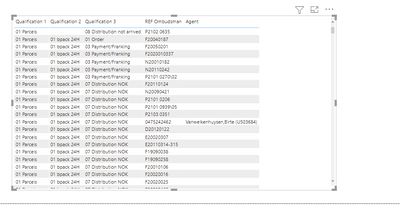
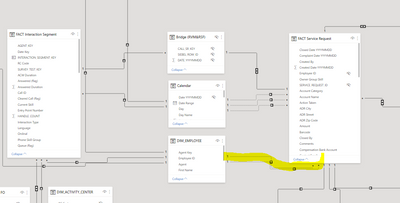
Hello, I have one question in my table in AGENT name I have no data beacause my table "Employee" is in no active relation with my fact table because I have to fact table . For the measure I use USERELATIONSHIP( but if i want see the AGENT in table and no in measure I can't ... One idea ?
Solved! Go to Solution.
Are you asking why you have no active relationship between your Employee and FACT table? It is because of those bi-directional relationships. Your model has ambiguity and it deactivates any relationships it cannot use automatically. In order to use them in a measure, you use the USERELATIONSHIP() modifier within a CALCULATE() but it only works in CALCULATE measures, and that can cause issues depending on how you want to create visuals like slicers. You cannot activate relationships for slicers and filters.
Microsoft recommends minimizing use of both Many-to-Many and Bi-Directional Relationships. In other words, unless you are a DAX expert, find another way to remodel your data to conform to a Star Schema and don't use these two features. I avoid them both at all costs.
Microsoft Guidance on Many-To-Many Relationships
Microsoft Guidance on Bi-Directional Relationships
Microsoft Guidance on Importance of Star Schema
DAX is for Analysis. Power Query is for Data Modeling
Proud to be a Super User!
MCSA: BI ReportingAre you asking why you have no active relationship between your Employee and FACT table? It is because of those bi-directional relationships. Your model has ambiguity and it deactivates any relationships it cannot use automatically. In order to use them in a measure, you use the USERELATIONSHIP() modifier within a CALCULATE() but it only works in CALCULATE measures, and that can cause issues depending on how you want to create visuals like slicers. You cannot activate relationships for slicers and filters.
Microsoft recommends minimizing use of both Many-to-Many and Bi-Directional Relationships. In other words, unless you are a DAX expert, find another way to remodel your data to conform to a Star Schema and don't use these two features. I avoid them both at all costs.
Microsoft Guidance on Many-To-Many Relationships
Microsoft Guidance on Bi-Directional Relationships
Microsoft Guidance on Importance of Star Schema
DAX is for Analysis. Power Query is for Data Modeling
Proud to be a Super User!
MCSA: BI ReportingCheck out the May 2026 Power BI update to learn about new features.
Sign up to receive a private message when registration opens and key events begin.
If you have recently started exploring Fabric, we'd love to hear how it's going. Your feedback can help with product improvements.