This time we’re going bigger than ever. Fabric, Power BI, SQL, AI and more. We're covering it all. You won't want to miss it.
Learn moreDid you hear? There's a new SQL AI Developer certification (DP-800). Start preparing now and be one of the first to get certified. Register now
Hello all,
I need some help here. I am trying to user PowerQuery to do some analysis. Basically, I have about 70,000 files that I want to copy elements from them....elements as in specific cells, c4, c7, c10:c14. The normal process I would have adopted would have been VBA, but everyone feels it bears a risk given i am the only one able to script in the language.
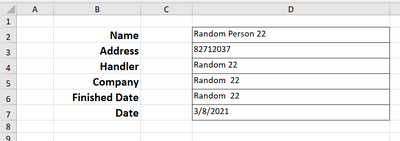
The image below illustrates (the data/fields contained are dummy figures)
Each file is in THIS template. I am trying to pick (D2) to (D7) from all the files and post in a table as below:
| Name | Address | Handler | Company | FInished Date | Date |
| Random Person 22 | 82712037 | Random 22 | Random 22 | Random 22 | 3/8/2021 |
I am clear on how to import same field from multiple files, but THIS transformation is just not working.
Any assistance will be appreciated.
No it doesn't. But thanks
Thanks so much Pete. Will certainly try this method out and revert...Looks like solution
Hi @Anonymous ,
If you want to pick the same cells from each of your individual files, then check out my solution on this thread:
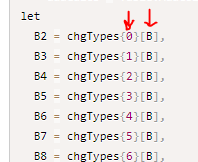
If you want to pick individual cells from each file differently, you could have a look at how I've done it in this thread:
https://community.powerbi.com/t5/Power-Query/Excel-formulas-in-Power-Query/m-p/2114211#M62325
where I've used references in curly braces and square brackets to reference specific row and column coordinates respectively:
Pete
Proud to be a Datanaut!
Check out the April 2026 Power BI update to learn about new features.
Sign up to receive a private message when registration opens and key events begin.
If you have recently started exploring Fabric, we'd love to hear how it's going. Your feedback can help with product improvements.