

Share feedback directly with Fabric product managers, participate in targeted research studies and influence the Fabric roadmap.
Sign up nowGet Fabric certified for FREE! Don't miss your chance! Learn more
On a daily basis, I receive a PDF report that I would like to upload via Power Query.
However, the data is not always structured the same way. After the necessary cleaning, this is where I stranded:
What needs to happen is that the value in column 9 should end up in column 8 (which I currently do by mergng the 2 columns).
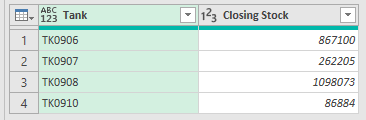
And the final result should look like this ((column 2 and column 9)
However, as the number of columns isn't always the same, this provokes errors when I get new pdf's in:
What is also good to know is that sometimes all data is nicely under each other (same column), sometimes it's not. And also the number of records that should be extracted from the pdf, is not always the same either (sometimes it's 1, sometimes it's 4, ...)
Solved! Go to Solution.
Hi @Anonymous ,
To my knowledge, we could not smartly know where the data structure has changed.
If the original column names change, the subsequent reference steps should be manually changed accordingly.
For more detailed explanation, please refer to: Dealing with errors - Power Query | Microsoft Docs
Best Regards,
Eyelyn Qin
If this post helps, then please consider Accept it as the solution to help the other members find it more quickly.
Hi @Anonymous ,
To my knowledge, we could not smartly know where the data structure has changed.
If the original column names change, the subsequent reference steps should be manually changed accordingly.
For more detailed explanation, please refer to: Dealing with errors - Power Query | Microsoft Docs
Best Regards,
Eyelyn Qin
If this post helps, then please consider Accept it as the solution to help the other members find it more quickly.
If you love stickers, then you will definitely want to check out our Community Sticker Challenge!
Check out the January 2026 Power BI update to learn about new features.
| User | Count |
|---|---|
| 13 | |
| 11 | |
| 11 | |
| 7 | |
| 6 |