Get certified for free when you join Fabric Data Days 2026 and dive into Fabric, Power BI, SQL, AI, and other essential data skills.
Join nowJuly 7 - July 17 | Round 2 of the Power BI Dataviz World Championships. Don't miss your chance! Learn more
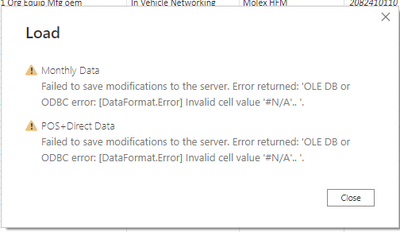
I am trying to unpivot columns to get the dates as a value access, yet once I try to load the new table in to create graphics, I get the error below. I had removed all errors with the data before the unpivot, so I am unsure why a new one comes up after only doing the one transformation.
Solved! Go to Solution.
Hi @nathanmais ,
Power Query in Power BI simply does not support values that represent errors such as: "# N / A", "# N / A". You have some "#N/A" cells thats why you get this error.
Try to replacing these cells with some data or remove them (Transform > Replace Errors should do the job of cleaning #N/A from a single column or an entire table). It should resovle your issue.
If the problem is still not resolved, please provide detailed error information or the expected result you expect. Let me know immediately, looking forward to your reply.
Best Regards,
Winniz
If this post helps, then please consider Accept it as the solution to help the other members find it more quickly.
Hi @nathanmais ,
Power Query in Power BI simply does not support values that represent errors such as: "# N / A", "# N / A". You have some "#N/A" cells thats why you get this error.
Try to replacing these cells with some data or remove them (Transform > Replace Errors should do the job of cleaning #N/A from a single column or an entire table). It should resovle your issue.
If the problem is still not resolved, please provide detailed error information or the expected result you expect. Let me know immediately, looking forward to your reply.
Best Regards,
Winniz
If this post helps, then please consider Accept it as the solution to help the other members find it more quickly.
Join us in Barcelona for FabCon and SQLCon, the Fabric, Power BI, SQL, and AI community event. Save €200 with code FABCMTY200.
Check out the July 2026 Power BI update to learn about new features.
Join Data Days 2026: 60 days of free live/on-demand sessions, challenges, study groups, and certification opportunities.