cancel
Showing results for 
Search instead for 
Did you mean: 

The Power BI Data Visualization World Championships is back! Get ahead of the game and start preparing now! Learn more

Reply
MahiK
Regular Visitor

Unique sum using DAX

PCode PNAME VALUE VC
CE ABC 100 XX
CE ABC 100
XY MNO 200 YY
XM PQR 100 ZZ
I want total sum for VALUE column it should only sum values for unique PCode,PName and Value combination like it should only sum CE ABC 100 only one time as it is duplicated, VALUE column is coming from table2 and Pcode and PNAme is coming from table1

4 REPLIES 4
MS_Sum
Frequent Visitor

Hi @MahiK

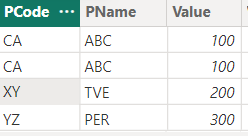
PTable


MS_Sum_0-1682098051980.png

Output: 600

Formula:

Total Sum =
SUMX (
    SUMMARIZE (
        'PTable',
        'PTable'[PCode],
        'PTable'[PName],
        'PTable'[Value],
        "Count", CALCULATE (
                    COUNTROWS('PTable'),
                    'PTable'[PCode] = EARLIER('PTable'[PCode]),
                    'PTable'[PName] = EARLIER('PTable'[PName]),
                    'PTable'[Value] = EARLIER('PTable'[Value])
                )
    ),
    IF([Count] = 1, PTable[Value], 'PTable'[Value])
)


Try and see if it works for you. If yes could you please mark it as a solution and give a kudo 🙂

Thanks but The value column is coming from different table so in summarize we can not have all three columns which is causing the issue

MS_Sum
Frequent Visitor

Assuming you are retrieving values based on PCode matching in both tables, if so merging (Left Outer Join) should work and can summarize with the values. If not let me know in what condition the "values" will be fetched.

Total Sum =
SUMX (
    SUMMARIZE (
        'PTable',
        'PTable'[PCode],
        'PTable'[PName],
        'PTable'[QTable.Value],
        "Count", CALCULATE (
                    COUNTROWS('PTable'),
                    'PTable'[PCode] = EARLIER('PTable'[PCode]),
                    'PTable'[PName] = EARLIER('PTable'[PName]),
                    'PTable'[QTable.Value] = EARLIER('PTable'[QTable.Value])
                )
    ),
    IF([Count] = 1, PTable[QTable.Value], 'PTable'[QTable.Value])
)
 
Let me know if that works with a kudo and marking the suggestion as a solution.
BA_Pete
Super User
Super User

Hi @MahiK ,


You could use a measure something like this:

_sum_PCode_PName_Value =
SUMX(
    yourTable,
    MAX(yourTable[Value])
)


You'd need to make sure you use it with the correct dimensions in a visual, otherwise it may give unexpected results.


Pete


Now accepting Kudos! If my post helped you, why not give it a thumbs-up?

Proud to be a Datanaut!


Helpful resources

Announcements
Power BI DataViz World Championships

Power BI Dataviz World Championships

The Power BI Data Visualization World Championships is back! Get ahead of the game and start preparing now!

December 2025 Power BI Update Carousel

Power BI Monthly Update - December 2025

Check out the December 2025 Power BI Holiday Recap!

FabCon Atlanta 2026 carousel

FabCon Atlanta 2026

Join us at FabCon Atlanta, March 16-20, for the ultimate Fabric, Power BI, AI and SQL community-led event. Save $200 with code FABCOMM.

Top Solution Authors