Get Fabric or SQL Certified for Free.
Get certified for free when you join Fabric Data Days 2026 and dive into Fabric, Power BI, SQL, AI, and other essential data skills.
Join now- Power BI forums
- Get Help with Power BI
- Desktop
- Service
- Report Server
- Power Query
- Mobile Apps
- Developer
- DAX Commands and Tips
- Custom Visuals Development Discussion
- Health and Life Sciences
- Power BI Spanish forums
- Translated Spanish Desktop
- Training and Consulting
- Instructor Led Training
- Dashboard in a Day for Women, by Women
- Galleries
- Data Stories Gallery
- Themes Gallery
- Contests Gallery
- QuickViz Gallery
- Quick Measures Gallery
- Visual Calculations Gallery
- Notebook Gallery
- Translytical Task Flow Gallery
- TMDL Gallery
- R Script Showcase
- Webinars and Video Gallery
- Ideas
- Custom Visuals Ideas (read-only)
- Issues
- Issues
- Events
- Upcoming Events
Try your skills in the Power BI Dataviz World Championship! Round one ends June 26. Join now
- Power BI forums
- Forums
- Get Help with Power BI
- Power Query
- Unable to import certain columns from SQL Server V...
- Subscribe to RSS Feed
- Mark Topic as New
- Mark Topic as Read
- Float this Topic for Current User
- Bookmark
- Subscribe
- Printer Friendly Page


- Mark as New
- Bookmark
- Subscribe
- Mute
- Subscribe to RSS Feed
- Permalink
- Report Inappropriate Content
Unable to import certain columns from SQL Server View
Hello All, Thank you for your time. I am trying to import data into Power BI from a SQL Server database view.
However, some of the columns in the view are not eventually loading in power bi. These columns don't even show in the data preview or query editor. I am able to see the columns and data when I query the db table directly in SQL Server.
Any suggestions?
Thanks Ram

- Mark as New
- Bookmark
- Subscribe
- Mute
- Subscribe to RSS Feed
- Permalink
- Report Inappropriate Content
I struggled with this, and it was just deleting the cache that made it for me.
In Power BI you will find the option under File > Options and settings > Options > Data Load > Data Cache Management Options > Clear Cache.


- Mark as New
- Bookmark
- Subscribe
- Mute
- Subscribe to RSS Feed
- Permalink
- Report Inappropriate Content
Hi @ramz45,
1. How do you connect to this SQL view from Power BI desktop, in DirectQuery mode or Import mode? Do missing columns have any different properties from other columns?
2. Which permission do you grant for this user which is used to get data in Power BI desktop. Please try to grant the user "view definition" on the entire database with "use databasename; grant view definition to username" mentioned in this thread.
3. Please run the latest Power BI desktop version 2.51.4885.701 64-bit (October 2017).
Best Regards,
Qiuyun Yu
If this post helps, then please consider Accept it as the solution to help the other members find it more quickly.
- Mark as New
- Bookmark
- Subscribe
- Mute
- Subscribe to RSS Feed
- Permalink
- Report Inappropriate Content
Thank you for your prompt reply. I was trying to connect using Import Mode. However, I was able to pull in the data when explicitly writing a straightforward select statement(not direct query) when importing instead of just connecting to the source and letting power bi pull in the information. I am not sure how one is different from the other. To the best of my knowlege the missing columns don't have anything special. I am querying a "View". In another example the table showed Zero records when importing, but displayed data when I used a SQL query.
Thanks again!

- Mark as New
- Bookmark
- Subscribe
- Mute
- Subscribe to RSS Feed
- Permalink
- Report Inappropriate Content
This worked for me - went from 71 to 119 columns after clearing the cacahe and refreshing. Thank you!
- Mark as New
- Bookmark
- Subscribe
- Mute
- Subscribe to RSS Feed
- Permalink
- Report Inappropriate Content
Hi @ramz45,
I have tested in my desktop but can't reproduce it. Have you tried other view? Does the issue happen to this specific view only?
Best Regards,
Qiuyun Yu
If this post helps, then please consider Accept it as the solution to help the other members find it more quickly.
- Mark as New
- Bookmark
- Subscribe
- Mute
- Subscribe to RSS Feed
- Permalink
- Report Inappropriate Content
Thanks again for helping me. I faced the issue with 2 views so far. The first one with columns missing and the second one showed completely empty. Both times I was able to bypass the issue by explicity specifying the sql during import. I will investigate further to provide more information.
- Mark as New
- Bookmark
- Subscribe
- Mute
- Subscribe to RSS Feed
- Permalink
- Report Inappropriate Content
Hi @ramz45,
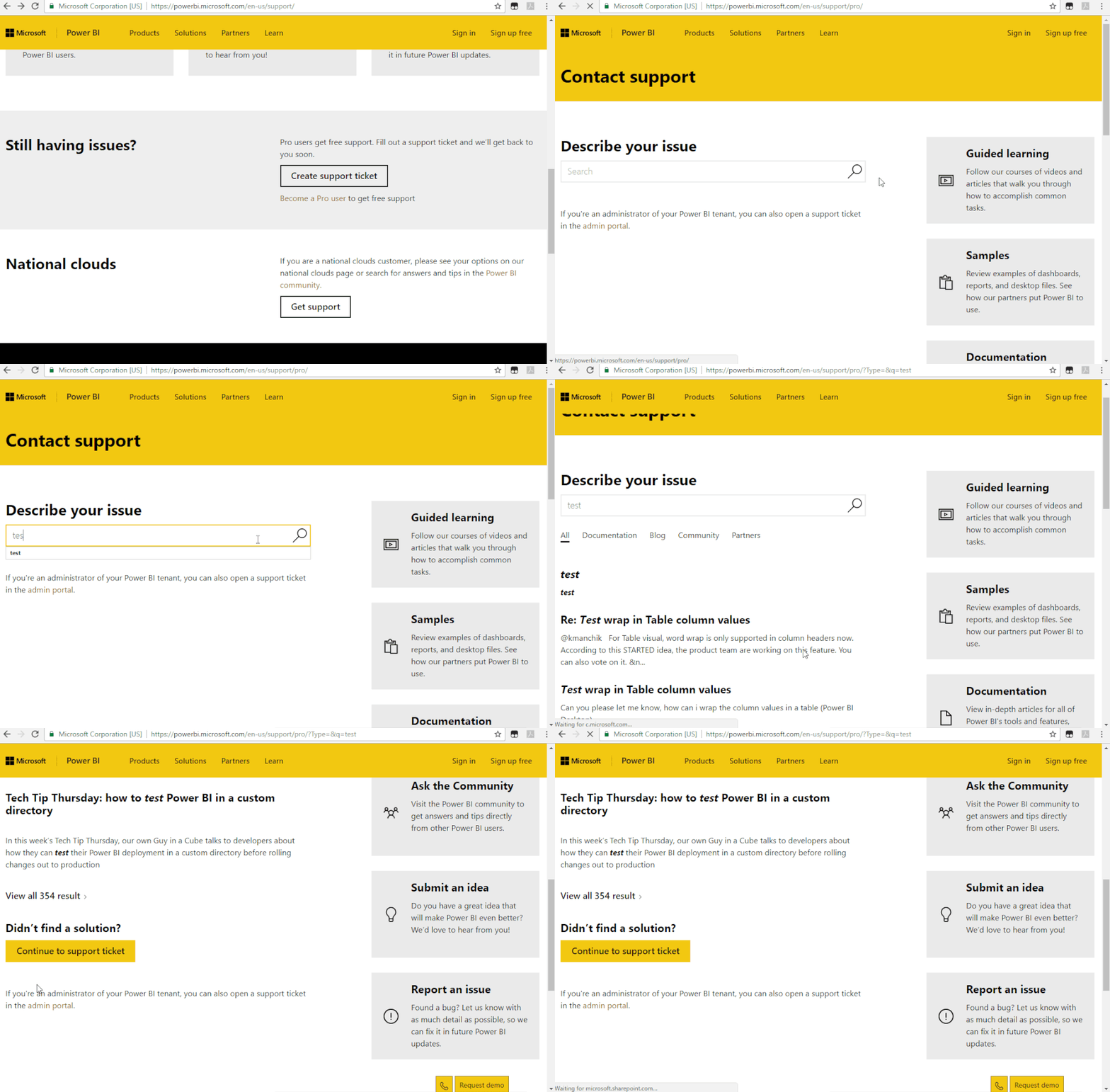
I would suggest you create a support ticket to let engineer look into these two views to see what happens:
Best Regards,
Qiuyun Yu
If this post helps, then please consider Accept it as the solution to help the other members find it more quickly.
- Mark as New
- Bookmark
- Subscribe
- Mute
- Subscribe to RSS Feed
- Permalink
- Report Inappropriate Content
Thank you sir. Much appreciated

Helpful resources

Data Days 2026
Don't miss out on Data Days, June 15 through August 7. Learn Fabric, Power BI, SQL, AI and more.

Power BI DataViz World Championships - June 2026
A new Power BI DataViz World Championship is coming this June! Don't miss out on submitting your entry.


| User | Count |
|---|---|
| 12 | |
| 6 | |
| 6 | |
| 5 | |
| 5 |


