Get Fabric or SQL Certified for Free.
Get certified for free when you join Fabric Data Days 2026 and dive into Fabric, Power BI, SQL, AI, and other essential data skills.
Join now- Power BI forums
- Get Help with Power BI
- Desktop
- Service
- Report Server
- Power Query
- Mobile Apps
- Developer
- DAX Commands and Tips
- Custom Visuals Development Discussion
- Health and Life Sciences
- Power BI Spanish forums
- Translated Spanish Desktop
- Training and Consulting
- Instructor Led Training
- Dashboard in a Day for Women, by Women
- Galleries
- Data Stories Gallery
- Themes Gallery
- Contests Gallery
- QuickViz Gallery
- Quick Measures Gallery
- Visual Calculations Gallery
- Fabric Apps Gallery
- Notebook Gallery
- Translytical Task Flow Gallery
- TMDL Gallery
- R Script Showcase
- Webinars and Video Gallery
- Ideas
- Custom Visuals Ideas (read-only)
- Issues
- Issues
- Events
- Upcoming Events
July 28 - August 9 | Final Round of the Power BI Dataviz World Championships. This is your chance. Learn more
- Power BI forums
- Forums
- Get Help with Power BI
- Power Query
- Re: Turn api call into a query function
- Subscribe to RSS Feed
- Mark Topic as New
- Mark Topic as Read
- Float this Topic for Current User
- Bookmark
- Subscribe
- Printer Friendly Page


- Mark as New
- Bookmark
- Subscribe
- Mute
- Subscribe to RSS Feed
- Permalink
- Report Inappropriate Content
Turn api call into a query function
I have a call to a the Zoom API I need to turn into a query function to use another table's column as one of the parameters in the URL.
let

apiUrl = "https://api.zoom.us/v2/users/{Userid}/meetings",

token="Token1.token2",

options = [Headers=[Authorization="Bearer " & token ]],

result = Json.Document(Web.Contents(apiUrl , options)),
    meetings = result[meetings],
    #"Converted to Table" = Table.FromList(meetings, Splitter.SplitByNothing(), null, null, ExtraValues.Error),
    #"Expanded Column1" = Table.ExpandRecordColumn(#"Converted to Table", "Column1", {"uuid", "id", "host_id", "topic", "type", "start_time", "duration", "timezone", "agenda", "created_at", "join_url"}, {"Column1.uuid", "Column1.id", "Column1.host_id", "Column1.topic", "Column1.type", "Column1.start_time", "Column1.duration", "Column1.timezone", "Column1.agenda", "Column1.created_at", "Column1.join_url"})
in
    #"Expanded Column1"
In the M code above, the {userID} part of the URL needs to be every iteration of a colum in another table. I've done this before using :
(UserID as text) =>
Let
Webcontent(URL)
[RelativePath=]
But in those cases I didn't have an authentication token and the parameter was simply the end of the url, not a middle part.
Any help is appreciated.
Solved! Go to Solution.


- Mark as New
- Bookmark
- Subscribe
- Mute
- Subscribe to RSS Feed
- Permalink
- Report Inappropriate Content
Hi @GuillaumeB
To use in PBI Service you have to provide a 'static' URL and add the rest of the path using RelativePath.
Change the function to this.
(UserID) =>

let
    apiUrl = "https://api.zoom.us/v2/users/",

    token="Token1.token2",

    options = [ Headers = [Authorization="Bearer " & token ] , RelativePath = Text.From(UserID) & "/meetings" ],

    result = Json.Document(Web.Contents(apiUrl , options)),

    meetings = result[meetings],
    #"Converted to Table" = Table.FromList(meetings, Splitter.SplitByNothing(), null, null, ExtraValues.Error),
    #"Expanded Column1" = Table.ExpandRecordColumn(#"Converted to Table", "Column1", {"uuid", "id", "host_id", "topic", "type", "start_time", "duration", "timezone", "agenda", "created_at", "join_url"}, {"Column1.uuid", "Column1.id", "Column1.host_id", "Column1.topic", "Column1.type", "Column1.start_time", "Column1.duration", "Column1.timezone", "Column1.agenda", "Column1.created_at", "Column1.join_url"})
in
    #"Expanded Column1"
Regards
Phil
Did I answer your question? Then please mark my post as the solution.
If I helped you, click on the Thumbs Up to give Kudos.
Blog :: YouTube Channel :: Connect on Linkedin
Proud to be a Super User!
- Mark as New
- Bookmark
- Subscribe
- Mute
- Subscribe to RSS Feed
- Permalink
- Report Inappropriate Content
Hi @GuillaumeB
To use in PBI Service you have to provide a 'static' URL and add the rest of the path using RelativePath.
Change the function to this.
(UserID) =>

let
    apiUrl = "https://api.zoom.us/v2/users/",

    token="Token1.token2",

    options = [ Headers = [Authorization="Bearer " & token ] , RelativePath = Text.From(UserID) & "/meetings" ],

    result = Json.Document(Web.Contents(apiUrl , options)),

    meetings = result[meetings],
    #"Converted to Table" = Table.FromList(meetings, Splitter.SplitByNothing(), null, null, ExtraValues.Error),
    #"Expanded Column1" = Table.ExpandRecordColumn(#"Converted to Table", "Column1", {"uuid", "id", "host_id", "topic", "type", "start_time", "duration", "timezone", "agenda", "created_at", "join_url"}, {"Column1.uuid", "Column1.id", "Column1.host_id", "Column1.topic", "Column1.type", "Column1.start_time", "Column1.duration", "Column1.timezone", "Column1.agenda", "Column1.created_at", "Column1.join_url"})
in
    #"Expanded Column1"
Regards
Phil
Did I answer your question? Then please mark my post as the solution.
If I helped you, click on the Thumbs Up to give Kudos.
Blog :: YouTube Channel :: Connect on Linkedin
Proud to be a Super User!
- Mark as New
- Bookmark
- Subscribe
- Mute
- Subscribe to RSS Feed
- Permalink
- Report Inappropriate Content
- Mark as New
- Bookmark
- Subscribe
- Mute
- Subscribe to RSS Feed
- Permalink
- Report Inappropriate Content
No worries 🙂
Did I answer your question? Then please mark my post as the solution.
If I helped you, click on the Thumbs Up to give Kudos.
Blog :: YouTube Channel :: Connect on Linkedin
Proud to be a Super User!
- Mark as New
- Bookmark
- Subscribe
- Mute
- Subscribe to RSS Feed
- Permalink
- Report Inappropriate Content
Hi @GuillaumeB
Download sample PBIX file with this code
You can turn the API call into a function by putting this code into it's own query, I called the query fxZoomAPI
(UserID) =>

let

    apiUrl = "https://api.zoom.us/v2/users/" & Text.From(UserID) & "/meetings",

    token="Token1.token2",

    options = [Headers=[Authorization="Bearer " & token ]],

    result = Json.Document(Web.Contents(apiUrl , options)),

    meetings = result[meetings],
    #"Converted to Table" = Table.FromList(meetings, Splitter.SplitByNothing(), null, null, ExtraValues.Error),
    #"Expanded Column1" = Table.ExpandRecordColumn(#"Converted to Table", "Column1", {"uuid", "id", "host_id", "topic", "type", "start_time", "duration", "timezone", "agenda", "created_at", "join_url"}, {"Column1.uuid", "Column1.id", "Column1.host_id", "Column1.topic", "Column1.type", "Column1.start_time", "Column1.duration", "Column1.timezone", "Column1.agenda", "Column1.created_at", "Column1.join_url"})
in
    #"Expanded Column1"
If you wish you could take the steps from meetings onward and leave them in your main query so that you do all of that processing after all the API calls are made.
I created some dummy data to represent UserID's

In your main query you'd call the function by adding a Custom Column like this to get API data for each of these UserID's
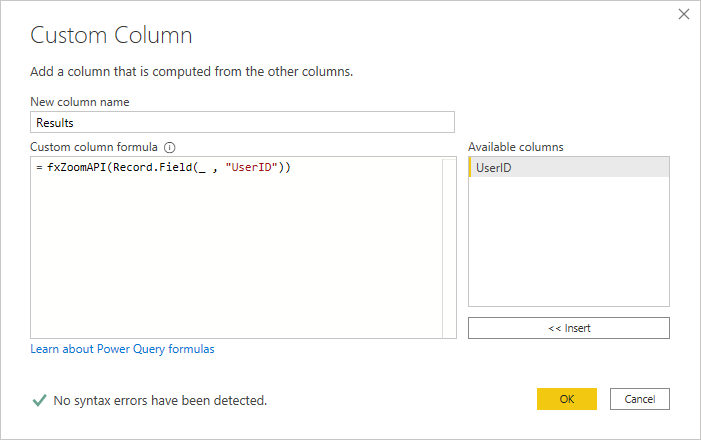
Post back if you get stuck. @ mention me or I'llmiss your reply. Type @ then select my name
Regards
Phil
Did I answer your question? Then please mark my post as the solution.
If I helped you, click on the Thumbs Up to give Kudos.
Blog :: YouTube Channel :: Connect on Linkedin
Proud to be a Super User!
- Mark as New
- Bookmark
- Subscribe
- Mute
- Subscribe to RSS Feed
- Permalink
- Report Inappropriate Content
@PhilipTreacy Awesome the M code worked!
However when I try to refresh the data from the service it gives me an error about how Dynamic Queries can't be refreshed from the service.
Apologies because it's been a few years since I last worked with restAPI within PBI but I remember there being a workaround for this, are you familiar with it?

Helpful resources

Fabric Community Sticker Challenge - Barcelona 2026
If you love stickers, then you will definitely want to check out our community sticker challenge, Barcelona edition!

Power BI Monthly Update - July 2026
Check out the July 2026 Power BI update to learn about new features.

Power BI DataViz World Championships - June 2026
A new Power BI DataViz World Championship is coming this June! Don't miss out on submitting your entry.


