Join us at FabCon Atlanta from March 16 - 20, 2026, for the ultimate Fabric, Power BI, AI and SQL community-led event. Save $200 with code FABCOMM.
Register now!The Power BI Data Visualization World Championships is back! Get ahead of the game and start preparing now! Learn more
Hi,
I have a table with a 1000's of rows of file paths. I'm only intersted in folders.
Say i have a folder path:
s:\shared\folder1\folder2\ThisFile.txt
And i want to drop the filename:
s:\shared\folder1\folder2\
Any ideas? I guess the logic is drop all text after the final "/" but not sure how to do it.
Thanks
Andrew
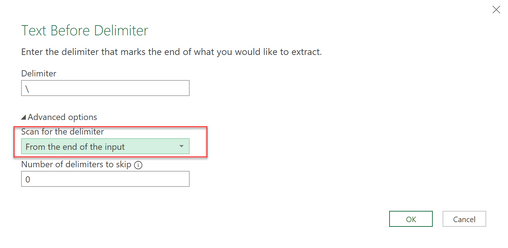
You'd extract the Text.BeforeDelimiter "\" with option "From the end of the input" and then add it back like so: & "\".
Imke Feldmann (The BIccountant)
If you liked my solution, please give it a thumbs up. And if I did answer your question, please mark this post as a solution. Thanks!
How to integrate M-code into your solution -- How to get your questions answered quickly -- How to provide sample data -- Check out more PBI- learning resources here -- Performance Tipps for M-queries
Hi,
Looks like that may work. How do I find that windows?
Thanks
The Power BI Data Visualization World Championships is back! Get ahead of the game and start preparing now!
Check out the November 2025 Power BI update to learn about new features.
| User | Count |
|---|---|
| 10 | |
| 6 | |
| 5 | |
| 4 | |
| 2 |