Get Fabric or SQL Certified for Free.
Get certified for free when you join Fabric Data Days 2026 and dive into Fabric, Power BI, SQL, AI, and other essential data skills.
Join now- Power BI forums
- Get Help with Power BI
- Desktop
- Service
- Report Server
- Power Query
- Mobile Apps
- Developer
- DAX Commands and Tips
- Custom Visuals Development Discussion
- Health and Life Sciences
- Power BI Spanish forums
- Translated Spanish Desktop
- Training and Consulting
- Instructor Led Training
- Dashboard in a Day for Women, by Women
- Galleries
- Data Stories Gallery
- Themes Gallery
- Contests Gallery
- QuickViz Gallery
- Quick Measures Gallery
- Visual Calculations Gallery
- Fabric Apps Gallery
- Notebook Gallery
- Translytical Task Flow Gallery
- TMDL Gallery
- R Script Showcase
- Webinars and Video Gallery
- Ideas
- Custom Visuals Ideas (read-only)
- Issues
- Issues
- Events
- Upcoming Events
July 28 - August 9 | Final Round of the Power BI Dataviz World Championships. This is your chance. Learn more
- Power BI forums
- Forums
- Get Help with Power BI
- Power Query
- Re: Transpose
- Subscribe to RSS Feed
- Mark Topic as New
- Mark Topic as Read
- Float this Topic for Current User
- Bookmark
- Subscribe
- Printer Friendly Page

- Mark as New
- Bookmark
- Subscribe
- Mute
- Subscribe to RSS Feed
- Permalink
- Report Inappropriate Content
Transpose
Hi all,
Today, I need your help and advice I have some invoices in PDF that I would like to consolidate using PQ
I would like to have the key elements of the invoice : date, invoice number, product, price and quantity
They are very simple invoices and I found a way but, sometimes I order one product from this company and sometimes two products which implies that I do not have the same number of rows if I order one product of I order two products
My solution works only for one of them as it involves some Transpose in the steps and it causes issues
I will post my code that works if I choose to consolidate my invoices with two products but as soon as I put an invoice with one product, the query stops working which is normal
let
Source = Pdf.Tables(Paramètre1, [Implementation="1.3"]),
#"Lignes filtrées" = Table.SelectRows(Source, each ([Id] = "Table001" or [Id] = "Table002")),
#"Data développé" = Table.ExpandTableColumn(#"Lignes filtrées", "Data", {"Column1", "Column2", "Column3", "Column4", "Column5", "Column6"}, {"Column1", "Column2", "Column3", "Column4", "Column5", "Column6"}),
#"Autres colonnes supprimées" = Table.SelectColumns(#"Data développé",{"Column1", "Column2", "Column3", "Column4", "Column5", "Column6"}),
#"Table transposée" = Table.Transpose(#"Autres colonnes supprimées"),
#"Colonnes fusionnées" = Table.CombineColumns(#"Table transposée",{"Column6", "Column7"},Combiner.CombineTextByDelimiter(" ", QuoteStyle.None),"Fusionné"),
#"Colonnes fusionnées1" = Table.CombineColumns(#"Colonnes fusionnées",{"Column8", "Column9"},Combiner.CombineTextByDelimiter(" ", QuoteStyle.None),"Fusionné.1"),
#"Autres colonnes supprimées1" = Table.SelectColumns(#"Colonnes fusionnées1",{"Column1", "Column2", "Column3", "Column5", "Fusionné", "Fusionné.1"}),
#"Colonnes fusionnées2" = Table.CombineColumns(#"Autres colonnes supprimées1",{"Column1", "Column2", "Column3"},Combiner.CombineTextByDelimiter(" ", QuoteStyle.None),"Fusionné.2"),
#"Table transposée1" = Table.Transpose(#"Colonnes fusionnées2"),
#"Autres colonnes supprimées2" = Table.SelectColumns(#"Table transposée1",{"Column1", "Column2", "Column3", "Column4", "Column5"}),
#"Personnalisée ajoutée" = Table.AddColumn(#"Autres colonnes supprimées2", "Personnalisé", each Text.BeforeDelimiter([Column3]," ")),
#"Personnalisée ajoutée1" = Table.AddColumn(#"Personnalisée ajoutée", "Personnalisé.1", each Text.BetweenDelimiters([Column3]," "," ")),
#"Personnalisée ajoutée2" = Table.AddColumn(#"Personnalisée ajoutée1", "Personnalisé.2", each #"Personnalisée ajoutée"{0}[Personnalisé]),
#"Personnalisée ajoutée3" = Table.AddColumn(#"Personnalisée ajoutée2", "Personnalisé.3", each #"Personnalisée ajoutée1"{0}[Personnalisé.1]),
#"Colonnes supprimées" = Table.RemoveColumns(#"Personnalisée ajoutée3",{"Personnalisé", "Personnalisé.1"}),
#"Premières lignes supprimées" = Table.Skip(#"Colonnes supprimées",1),
#"Colonnes permutées" = Table.ReorderColumns(#"Premières lignes supprimées",{"Personnalisé.3", "Personnalisé.2", "Column1", "Column2", "Column3", "Column4", "Column5"}),
#"Autres colonnes supprimées3" = Table.SelectColumns(#"Colonnes permutées",{"Personnalisé.3", "Personnalisé.2", "Column1", "Column4", "Column5"}),
#"Premières lignes supprimées1" = Table.Skip(#"Autres colonnes supprimées3",1),
#"Colonnes renommées" = Table.RenameColumns(#"Premières lignes supprimées1",{{"Personnalisé.3", "Invoice Date"}, {"Personnalisé.2", "Invoice Number"}, {"Column1", "Description"}, {"Column4", "Quantity"}, {"Column5", "Price"}}),
#"Type modifié" = Table.TransformColumnTypes(#"Colonnes renommées",{{"Invoice Date", type date}, {"Invoice Number", Int64.Type}, {"Description", type text}, {"Quantity", Int64.Type}, {"Price", Currency.Type}})
in
#"Type modifié"
So my questions to you this morning
1. Is there a better way to do what I did to keep invoice date and invoice number ?
2. Could you help me to be able to consolidate all these invoices even if the number of products is different, let's say tomorrow I receive an invoice with 3 products, will it work
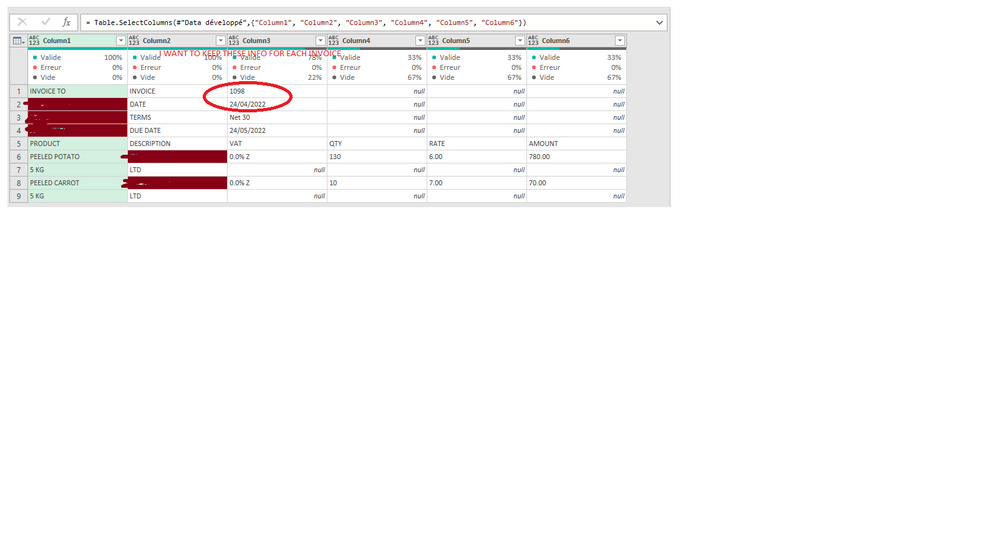
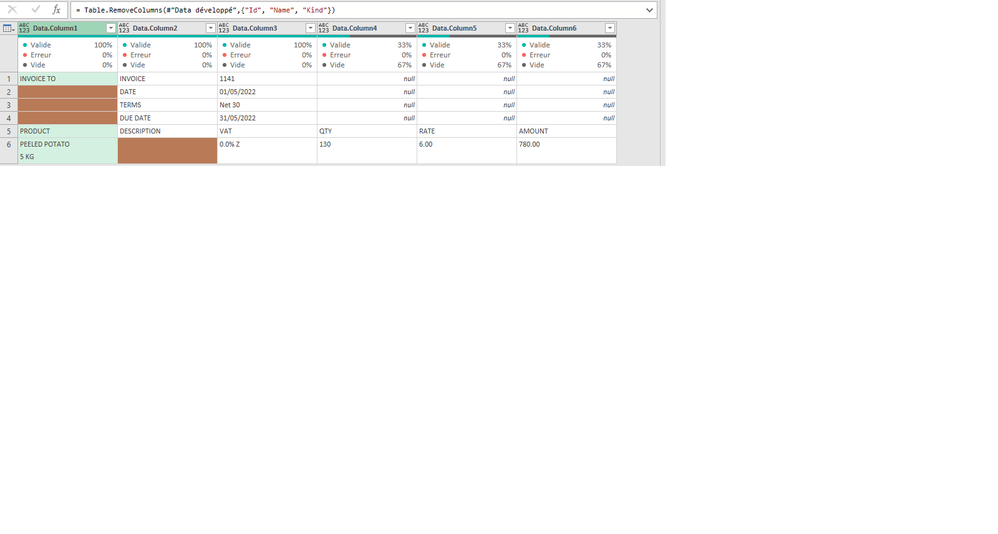
Many thanks for your time and your help
Solved! Go to Solution.


- Mark as New
- Bookmark
- Subscribe
- Mute
- Subscribe to RSS Feed
- Permalink
- Report Inappropriate Content
Hi @danishefa ,
Would you be able to update the code below to "GapList" step?
= Table.AddColumn(
Record,
"ContentGap",
each List.RemoveFirstN(
List.Select(
List.Transform(
Table.ToColumns(
Table.Range(Record,List.PositionOf(Table.ToList(Table.SelectColumns(Record, List.Select(Table.ColumnNames(Record), each List.Contains(Table.Column(Record,_), "INVOICE")))), "INVOICE"),4)
),
each Text.Combine(
List.Transform(_,Text.From),
"|")
),
each _ <> ""
),
1)
)
- Mark as New
- Bookmark
- Subscribe
- Mute
- Subscribe to RSS Feed
- Permalink
- Report Inappropriate Content
Many thanks for your time. I have tried your solution, I pasted it where you told me to do it but unfortunately, I have quite a few errors and am not sure how to handle them, the best would be to to attach the pdf so that you can work it out but I cannot attach file, if you have a way for me to attach them to this post, let me know
Also, maybe I was not clear enough yesterday, so I attach a picture of what I expect as outcome
Hope it helps

- Mark as New
- Bookmark
- Subscribe
- Mute
- Subscribe to RSS Feed
- Permalink
- Report Inappropriate Content
Hi @danishefa ,
Open a blank query and overwrite the default code with below:
Code:
let
Source = Pdf.Tables(File.Contents("filepath"), [Implementation="1.2"]),
#"Filtered Rows" = Table.SelectRows(Source, each ([Kind] = "Page")),
Data = Table.Combine(#"Filtered Rows"[Data]),
//Replace code
Record = Table.AddColumn(
Data,
"Record",
each List.ContainsAny(
Record.ToList(_),
{"AMOUNT", "PRODUCT"}
)
),
GapList = Table.AddColumn(
Record,
"ContentGap",
each List.RemoveFirstN(
List.Select(
List.Transform(
Table.ToColumns(
Table.Range(Data,1,4)
),
each Text.Combine(
List.Transform(_,Text.From),
"|")
),
each _ <> ""
),
1)
),
GapFilled = Table.AddColumn(
GapList,
"Headers",
each if [Record]=true
then [ContentGap]{0}
else [ContentGap]{1}
),
SkippedRows = Table.Skip(
GapFilled,
List.PositionOfAny(GapFilled[Record],{true}
)
),
RemovedColumns = Table.RemoveColumns(
SkippedRows,
{"Record", "ContentGap"}
),
PromoteHeaders = Table.PromoteHeaders(
RemovedColumns,
[PromoteAllScalars=true]
),
#"Removed Columns1" = Table.RemoveColumns(PromoteHeaders,{"DATE"},MissingField.Ignore),
SplitColumn = Table.SplitColumn(
#"Removed Columns1",
"INVOICE|DATE|TERMS|DUE DATE",
Splitter.SplitTextByDelimiter("|", QuoteStyle.Csv),
List.Count(
Text.Split("INVOICE|DATE|TERMS|DUE DATE","|")
)
),
RenamedSpliColumns = Table.RenameColumns(
SplitColumn,
List.Transform(
List.Select(
Table.ColumnNames(SplitColumn),
each Text.Contains(_,"INVOICE|DATE|TERMS|DUE DATE")
),
each {_, Text.Split(Text.BeforeDelimiter(_,"."),"|"){Number.FromText(Text.AfterDelimiter(_,"."))-1}}
)
),
#"Added Index" = Table.AddIndexColumn(
RenamedSpliColumns,
"Index",
0,
1,
Int64.Type
),
MergedRows_Product = Table.ReplaceValue(
#"Added Index",
each #"Added Index"[AMOUNT]{[Index]+1} = null,
each #"Added Index"[PRODUCT]{[Index]} & " " & #"Added Index"[PRODUCT]{[Index]+1},
(x,y,z)=> if y
then z
else x,
{"PRODUCT"}
),
MergedRows_Description = Table.ReplaceValue(
MergedRows_Product,
each MergedRows_Product[AMOUNT]{[Index]+1} = null,
each MergedRows_Product[DESCRIPTION]{[Index]} & " " & MergedRows_Product[DESCRIPTION]{[Index]+1},
(x,y,z)=> if y
then z
else x,
{"DESCRIPTION"}
),
#"Filtered Rows1" = Table.SelectRows(
MergedRows_Description,
each ([QTY] <> null)
),
#"Removed Other Columns" = Table.SelectColumns(#"Filtered Rows1",{"PRODUCT", "QTY", "RATE", "INVOICE", "DATE"}),
#"Changed Type" = Table.TransformColumnTypes(
#"Removed Other Columns",
{{"DATE", type datetime}, {"INVOICE", type number}, {"RATE", type number}, {"QTY", type number}}
),
#"Renamed Columns" = Table.RenameColumns(#"Changed Type",{{"PRODUCT", "Description"}, {"INVOICE", "Invoice Number"}, {"DATE", "Invoice Date"}, {"QTY", "Quantity"}, {"RATE", "Price"}}),
#"Reordered Columns" = Table.ReorderColumns(#"Renamed Columns",{"Invoice Date", "Invoice Number", "Description", "Quantity", "Price"}),
#"Replaced Value" = Table.ReplaceValue(#"Reordered Columns","#(lf)","",Replacer.ReplaceText,{"Description"})
in
#"Replaced Value"
Regards
KT
- Mark as New
- Bookmark
- Subscribe
- Mute
- Subscribe to RSS Feed
- Permalink
- Report Inappropriate Content
Hi @danishefa ,
Would you be able to update the code below to "GapList" step?
= Table.AddColumn(
Record,
"ContentGap",
each List.RemoveFirstN(
List.Select(
List.Transform(
Table.ToColumns(
Table.Range(Record,List.PositionOf(Table.ToList(Table.SelectColumns(Record, List.Select(Table.ColumnNames(Record), each List.Contains(Table.Column(Record,_), "INVOICE")))), "INVOICE"),4)
),
each Text.Combine(
List.Transform(_,Text.From),
"|")
),
each _ <> ""
),
1)
)
- Mark as New
- Bookmark
- Subscribe
- Mute
- Subscribe to RSS Feed
- Permalink
- Report Inappropriate Content
Many thanks, I have tried the above code, and it works 🙂
Really appreciate your time and your help
However, I did not amend the code with the filepath as text, because I am not sure how it works
I assume I should have a cell (formated in a table name filepath) in my spreadsheet with the file path ?
- Mark as New
- Bookmark
- Subscribe
- Mute
- Subscribe to RSS Feed
- Permalink
- Report Inappropriate Content
Hi @danishefa ,
if you turn the query into a custom function (see below)

Double on fxPDF (i.e. the custom function) and you will get :
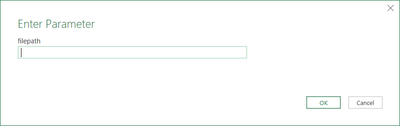
paste over the filepath

click ok and you will get the transformed table.
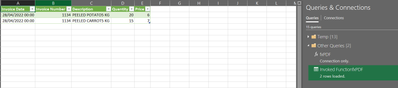
Regards
KT
- Mark as New
- Bookmark
- Subscribe
- Mute
- Subscribe to RSS Feed
- Permalink
- Report Inappropriate Content
Hi @danishefa ,
To have this query become a custom function (aka transformation sample).
Replace below code:
let
Source = Pdf.Tables(File.Contents("filepath"), [Implementation="1.2"]),
to
(filepath as text)=>
let
Source = Pdf.Tables(File.Contents(filepath), [Implementation="1.2"]),
- Mark as New
- Bookmark
- Subscribe
- Mute
- Subscribe to RSS Feed
- Permalink
- Report Inappropriate Content
Hi @danishefa ,
I mock up data for test based on the provided coded and screenshot. I have scrapped off the code and re-wrote them. Please see below dynamic code which has tested and will accommodate cases: one/two products or more
let
//Original code
Source = Pdf.Tables(Paramètre1, [Implementation="1.3"]),
#"Lignes filtrées" = Table.SelectRows(Source,
each ([Id] = "Table001" or [Id] = "Table002")
),
#"Data développé" = Table.ExpandTableColumn(
#"Lignes filtrées",
"Data",
{"Column1", "Column2", "Column3", "Column4", "Column5", "Column6"},
{"Column1", "Column2", "Column3", "Column4", "Column5", "Column6"}
),
#"Autres colonnes supprimées" = Table.SelectColumns(
#"Data développé",
{"Column1", "Column2", "Column3", "Column4", "Column5", "Column6"}
),
//Replace code
Record = Table.AddColumn(
#"Autres colonnes supprimées",
"Record",
each List.ContainsAny(
Record.ToList(_),
{"VAT", "PRODUCT"}
)
),
GapList = Table.AddColumn(
Record,
"ContentGap",
each List.RemoveFirstN(
List.Select(
List.Transform(
Table.ToColumns(
Table.Range(Source,0,4)
),
each Text.Combine(
List.Transform(_,Text.From
),
"|")
),
each _ <> ""
),
1)
),
GapFilled = Table.AddColumn(
GapList,
"Headers",
each if [Record]=true
then [ContentGap]{0}
else [ContentGap]{1}
),
SkippedRows = Table.Skip(
GapFilled,
List.PositionOfAny(GapFilled[Record],{true}
)
),
RemovedColumns = Table.RemoveColumns(
SkippedRows,
{"Record", "ContentGap"}
),
PromoteHeaders = Table.PromoteHeaders(
RemovedColumns,
[PromoteAllScalars=true]
),
SplitColumn = Table.SplitColumn(
PromoteHeaders,
"INVOICE|DATE|TERMS|DUE DATE",
Splitter.SplitTextByDelimiter("|", QuoteStyle.Csv),
List.Count(
Text.Split("INVOICE|DATE|TERMS|DUE DATE","|")
)
),
RenamedSpliColumns = Table.RenameColumns(
SplitColumn,
List.Transform(
List.Select(
Table.ColumnNames(SplitColumn),
each Text.Contains(_,"INVOICE|DATE|TERMS|DUE DATE")
),
each {_, Text.Split(Text.BeforeDelimiter(_,"."),"|"){Number.FromText(Text.AfterDelimiter(_,"."))-1}}
)
),
#"Added Index" = Table.AddIndexColumn(
RenamedSpliColumns,
"Index",
0,
1,
Int64.Type
),
MergedRows_Product = Table.ReplaceValue(
#"Added Index",
each #"Added Index"[AMOUNT]{[Index]+1} = null,
each #"Added Index"[PRODUCT]{[Index]} & " " & #"Added Index"[PRODUCT]{[Index]+1},
(x,y,z)=> if y
then z
else x,
{"PRODUCT"}
),
MergedRows_Description = Table.ReplaceValue(
MergedRows_Product,
each MergedRows_Product[AMOUNT]{[Index]+1} = null,
each MergedRows_Product[DESCRIPTION]{[Index]} & " " & MergedRows_Product[DESCRIPTION]{[Index]+1},
(x,y,z)=> if y
then z
else x,
{"DESCRIPTION"}
),
#"Filtered Rows" = Table.SelectRows(
MergedRows_Description,
each ([AMOUNT] <> null)
),
#"Removed Columns" = Table.RemoveColumns(
#"Filtered Rows",{"Index"}
),
#"Changed Type" = Table.TransformColumnTypes(
#"Removed Columns",
{{"DATE", type datetime}, {"INVOICE", type number}, {"AMOUNT", type number}, {"RATE", type number}, {"QTY", type number}, {"DUE DATE", type datetime}}
)
in
#"Changed Type"
Test result:
one product:
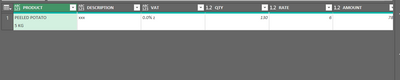
Two or more products:
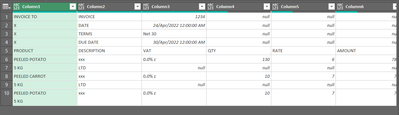
Test source:
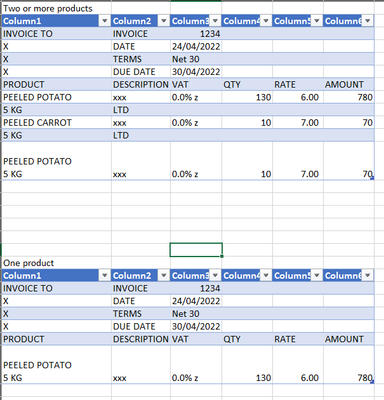
Regards
KT

Helpful resources

FabCon & SQLCon – Barcelona 2026
Join us in Barcelona for FabCon and SQLCon, the Fabric, Power BI, SQL, and AI community event. Save €200 with code FABCMTY200.

Fabric Community Sticker Challenge - Barcelona 2026
If you love stickers, then you will definitely want to check out our community sticker challenge, Barcelona edition!

Power BI Monthly Update - July 2026
Check out the July 2026 Power BI update to learn about new features.

Power BI DataViz World Championships - June 2026
A new Power BI DataViz World Championship is coming this June! Don't miss out on submitting your entry.


