cancel
Showing results for 
Search instead for 
Did you mean: 

Vote for your favorite vizzies from the Power BI Dataviz World Championship submissions. Vote now!

Reply
Anonymous
Not applicable

Transpose and pivot columns?

Hi all,


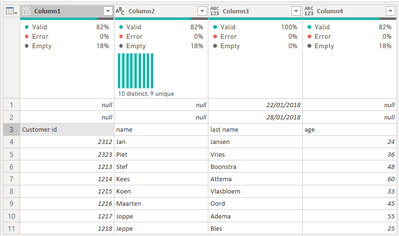
I have a table with the dates "above" the actual table. Like the image below

willemynjansen_0-1684153612739.png

I want to have the dates in a column next to the columns customer id, name, last name and age. 

I have tried to transpose, unpivot and pivot the table, but it won't work.


Can someone help me?

Thanks!

1 ACCEPTED SOLUTION
BA_Pete
Super User
Super User

Hi @Anonymous ,


If the two dates ALWAYS appear in the first two rows of the table, then you can use the following as new custom column calculations:


// First date
= previousStepName[Column3]{0}

// Second date
= previousStepName[Column3]{1}


Pete


Now accepting Kudos! If my post helped you, why not give it a thumbs-up?

Proud to be a Datanaut!


View solution in original post

4 REPLIES 4
BA_Pete
Super User
Super User

Hi @Anonymous ,


If the two dates ALWAYS appear in the first two rows of the table, then you can use the following as new custom column calculations:


// First date
= previousStepName[Column3]{0}

// Second date
= previousStepName[Column3]{1}


Pete


Now accepting Kudos! If my post helped you, why not give it a thumbs-up?

Proud to be a Datanaut!


Anonymous
Not applicable

Hi Pete,


It gives an error as below:

We cannot convert the value #date(2018, 1, 22) to type List.


Could you help me with this?


Apologies. I forgot to add the reference to the name of your previous query step.

I've updated my original response to include this.


Pete


Now accepting Kudos! If my post helped you, why not give it a thumbs-up?

Proud to be a Datanaut!


Anonymous
Not applicable

Thank you very much, that did the trick!

Helpful resources

Announcements
Power BI DataViz World Championships

Power BI Dataviz World Championships

Vote for your favorite vizzies from the Power BI World Championship submissions!

Sticker Challenge 2026 Carousel

Join our Community Sticker Challenge 2026

If you love stickers, then you will definitely want to check out our Community Sticker Challenge!

January Power BI Update Carousel

Power BI Monthly Update - January 2026

Check out the January 2026 Power BI update to learn about new features.

FabCon Atlanta 2026 carousel

FabCon Atlanta 2026

Join us at FabCon Atlanta, March 16-20, for the ultimate Fabric, Power BI, AI and SQL community-led event. Save $200 with code FABCOMM.