Join us at FabCon Atlanta from March 16 - 20, 2026, for the ultimate Fabric, Power BI, AI and SQL community-led event. Save $200 with code FABCOMM.
Register now!The Power BI Data Visualization World Championships is back! It's time to submit your entry. Live now!
Hi All,
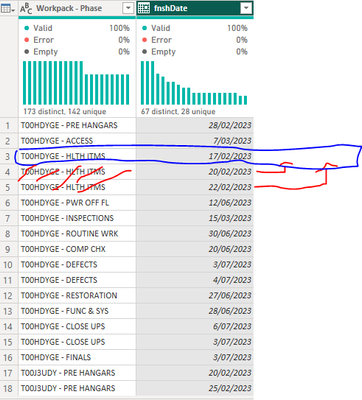
I have a simple issue which I seem to struggle with. I know there is a sequence for transpose/pivot/unpivot to have a single row for each "Workpack - Phase" with the "fnshDate" in separate columns as such:
Much grateful for some help,
B.
Solved! Go to Solution.
NewStep=Table.Combine(Table.Group(PreviousStepName," Workpack - Phase",{"n",each Table.RemoveLastN(Table.FromColumns(Table.ToColumns(_)&{List.Skip([fnshDate])},Table.ColumnNames(_)&{"Custom"}),1)})[n])
Why not just use Table.Group?
| User | Count |
|---|---|
| 19 | |
| 13 | |
| 9 | |
| 8 | |
| 7 |