cancel
Showing results for 
Search instead for 
Did you mean: 

July 7 - July 17 | Round 2 of the Power BI Dataviz World Championships. Don't miss your chance! Learn more

Reply
Anonymous
Not applicable

Translate query

If someone can help build below query I can use in pbi pl?


{"_id":"cal","startUrl":["https://trendlyne.com/equity/calendar/all/all/?start_date=2021-11-09&end_date=2021-12-31&corporate_actions=Results"],"selectors":[{"id":"cal","parentSelectors":["_root"],"type":"SelectorTable","delay":0,"multiple":true,"selector":"table#DataTables_Table_0","tableDataRowSelector":"tbody tr","tableHeaderRowSelector":"thead tr","columns":[{"extract":true,"header":"Stock","name":"Stock"},{"extract":true,"header":"Ex-date","name":"Ex-date"},{"extract":true,"header":"Event","name":"Event"},{"extract":true,"header":"Notes","name":"Notes"}]},{"id":"caldetails","parentSelectors":["_root"],"type":"SelectorLink","selector":".DTFC_Cloned a[target]","multiple":true,"delay":0}]}


2 ACCEPTED SOLUTIONS
Anonymous
Not applicable

super helpful to get to below!

is there any other efficient way to list data content rather than open each link to discover!!


saurabhsharma19_0-1639097511832.png


View solution in original post

hi @Anonymous 


Try below code. You have to do expand to new rows couple of times as your data is nested. But this will be one time as PQ will redo all steps when you refresh data.


let
Source = Table.FromRows(Json.Document(Binary.Decompress(Binary.FromText("nZLNbsIwEIRfBblXQn4qVWok1AO06qHqAegJR5GJVyWqE6f2piWqePdunAIJHJB6iJLszGfPer1esx/O0lxyFnOWCcXZmDOLwuCboZ94zdkWsbKx76OBUqqmhEmmCx8+6xwbnxCqCuMLpdzz4OBUCoRpFEShF4ZecM/rIIjuyNkXIu827IRMm0obUlKRYa5LO12ArRVazpI2DyjIUBvbBqK8Z3ErQclw2TdRT0Zr7HBsKnDAwbISGwUOlaBEQ1pA3wVtmFetEKOpobevg7GFbuYChcNt6l5p4NZxYqst9PdyQG20bEZoTq5nEBLMhW9L5YMv06ouykO3sENDx3KKtXUrdB2hzj4cU4oC+qX9+Ar6uPPaWQzhY/E6/kVnfgZ3pavoq0awQ/SvtE8cfJqvBBS5sv8b80tedmczmONkvnqapTOlS5Ajsabb+g6YON/lDTjeD0rGkuQX", BinaryEncoding.Base64), Compression.Deflate)), let _t = ((type nullable text) meta [Serialized.Text = true]) in type table [Column1 = _t]),
#"Changed Type" = Table.TransformColumnTypes(Source,{{"Column1", type text}}),
#"Parsed JSON" = Table.TransformColumns(#"Changed Type",{},Json.Document),
#"Expanded Column1" = Table.ExpandRecordColumn(#"Parsed JSON", "Column1", {"_id", "startUrl", "selectors"}, {"Column1._id", "Column1.startUrl", "Column1.selectors"}),
#"Expanded Column1.startUrl" = Table.ExpandListColumn(#"Expanded Column1", "Column1.startUrl"),
#"Expanded Column1.selectors" = Table.ExpandListColumn(#"Expanded Column1.startUrl", "Column1.selectors"),
#"Expanded Column1.selectors1" = Table.ExpandRecordColumn(#"Expanded Column1.selectors", "Column1.selectors", {"id", "parentSelectors", "type", "delay", "multiple", "selector", "tableDataRowSelector", "tableHeaderRowSelector", "columns"}, {"Column1.selectors.id", "Column1.selectors.parentSelectors", "Column1.selectors.type", "Column1.selectors.delay", "Column1.selectors.multiple", "Column1.selectors.selector", "Column1.selectors.tableDataRowSelector", "Column1.selectors.tableHeaderRowSelector", "Column1.selectors.columns"}),
#"Expanded Column1.selectors.parentSelectors" = Table.ExpandListColumn(#"Expanded Column1.selectors1", "Column1.selectors.parentSelectors"),
#"Expanded Column1.selectors.columns" = Table.ExpandListColumn(#"Expanded Column1.selectors.parentSelectors", "Column1.selectors.columns"),
#"Expanded Column1.selectors.columns1" = Table.ExpandRecordColumn(#"Expanded Column1.selectors.columns", "Column1.selectors.columns", {"extract", "header", "name"}, {"Column1.selectors.columns.extract", "Column1.selectors.columns.header", "Column1.selectors.columns.name"})
in
#"Expanded Column1.selectors.columns1"

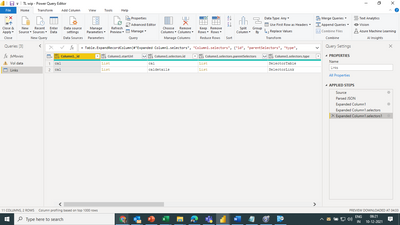
View solution in original post

4 REPLIES 4
Thingsclump
Resolver V
Resolver V

Hi @Anonymous 


Looks like JASON format data. Try this

  • Paste the data in a single cell
  • Go to transform tab in powerquery editor
  • Select the column and then click on parse and Jason
  • Expand or extract values

Let me know if you need more help.


Thanks

Thingsclump

www.thingsclump.com 

Anonymous
Not applicable

Appreciate. Just the last  bit - there are links within links. is there a way to get to data pls as shows error...

hi @Anonymous 


Try below code. You have to do expand to new rows couple of times as your data is nested. But this will be one time as PQ will redo all steps when you refresh data.


let
Source = Table.FromRows(Json.Document(Binary.Decompress(Binary.FromText("nZLNbsIwEIRfBblXQn4qVWok1AO06qHqAegJR5GJVyWqE6f2piWqePdunAIJHJB6iJLszGfPer1esx/O0lxyFnOWCcXZmDOLwuCboZ94zdkWsbKx76OBUqqmhEmmCx8+6xwbnxCqCuMLpdzz4OBUCoRpFEShF4ZecM/rIIjuyNkXIu827IRMm0obUlKRYa5LO12ArRVazpI2DyjIUBvbBqK8Z3ErQclw2TdRT0Zr7HBsKnDAwbISGwUOlaBEQ1pA3wVtmFetEKOpobevg7GFbuYChcNt6l5p4NZxYqst9PdyQG20bEZoTq5nEBLMhW9L5YMv06ouykO3sENDx3KKtXUrdB2hzj4cU4oC+qX9+Ar6uPPaWQzhY/E6/kVnfgZ3pavoq0awQ/SvtE8cfJqvBBS5sv8b80tedmczmONkvnqapTOlS5Ajsabb+g6YON/lDTjeD0rGkuQX", BinaryEncoding.Base64), Compression.Deflate)), let _t = ((type nullable text) meta [Serialized.Text = true]) in type table [Column1 = _t]),
#"Changed Type" = Table.TransformColumnTypes(Source,{{"Column1", type text}}),
#"Parsed JSON" = Table.TransformColumns(#"Changed Type",{},Json.Document),
#"Expanded Column1" = Table.ExpandRecordColumn(#"Parsed JSON", "Column1", {"_id", "startUrl", "selectors"}, {"Column1._id", "Column1.startUrl", "Column1.selectors"}),
#"Expanded Column1.startUrl" = Table.ExpandListColumn(#"Expanded Column1", "Column1.startUrl"),
#"Expanded Column1.selectors" = Table.ExpandListColumn(#"Expanded Column1.startUrl", "Column1.selectors"),
#"Expanded Column1.selectors1" = Table.ExpandRecordColumn(#"Expanded Column1.selectors", "Column1.selectors", {"id", "parentSelectors", "type", "delay", "multiple", "selector", "tableDataRowSelector", "tableHeaderRowSelector", "columns"}, {"Column1.selectors.id", "Column1.selectors.parentSelectors", "Column1.selectors.type", "Column1.selectors.delay", "Column1.selectors.multiple", "Column1.selectors.selector", "Column1.selectors.tableDataRowSelector", "Column1.selectors.tableHeaderRowSelector", "Column1.selectors.columns"}),
#"Expanded Column1.selectors.parentSelectors" = Table.ExpandListColumn(#"Expanded Column1.selectors1", "Column1.selectors.parentSelectors"),
#"Expanded Column1.selectors.columns" = Table.ExpandListColumn(#"Expanded Column1.selectors.parentSelectors", "Column1.selectors.columns"),
#"Expanded Column1.selectors.columns1" = Table.ExpandRecordColumn(#"Expanded Column1.selectors.columns", "Column1.selectors.columns", {"extract", "header", "name"}, {"Column1.selectors.columns.extract", "Column1.selectors.columns.header", "Column1.selectors.columns.name"})
in
#"Expanded Column1.selectors.columns1"

Anonymous
Not applicable

super helpful to get to below!

is there any other efficient way to list data content rather than open each link to discover!!


saurabhsharma19_0-1639097511832.png


Helpful resources

Announcements
FabCon and SQLCon Barcelona 2026

FabCon & SQLCon – Barcelona 2026

Join us in Barcelona for FabCon and SQLCon, the Fabric, Power BI, SQL, and AI community event. Save €200 with code FABCMTY200.

Fabric Community Sticker Design Challenge Barcelona Carousel

Fabric Community Sticker Challenge - Barcelona 2026

If you love stickers, then you will definitely want to check out our community sticker challenge, Barcelona edition!

July Power BI Update Carousel

Power BI Monthly Update - July 2026

Check out the July 2026 Power BI update to learn about new features.

Power BI DataViz World Championships carousel

Power BI DataViz World Championships - June 2026

A new Power BI DataViz World Championship is coming this June! Don't miss out on submitting your entry.

Top Solution Authors