Don't miss your chance to take the Fabric Data Engineer (DP-600) exam for FREE! Find out how by watching the DP-600 session on-demand now through April 28th.
Learn moreJoin the FabCon + SQLCon recap series. Up next: Power BI, Real-Time Intelligence, IQ and AI, and Data Factory take center stage. All sessions are available on-demand after the live show. Register now
Hi folks,
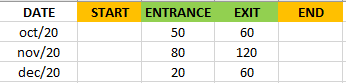
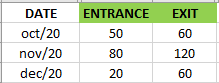
I have a table data:
I need create two more columns like this:
and fill in the START and END columns following the formula:
START = END OF PREVIOUS MONTH (in this case the month of september)
END = (START + ENTRANCE) - EXIT
The dates are varied, they can comprise several periods according to the user's parameter date filter. I always have the START number for the first month given through a "STARTDATE" measure DAX.
I imagine the path is to do in M, can you give me a light?
Thanks for any help.
Solved! Go to Solution.
Hi @credencial ,
Here is the whole M syntax:
let
Source = Table.FromRows(Json.Document(Binary.Decompress(Binary.FromText("i45WKk4t0DcyUNJRgiBDAwOlWJ1opfzkEoiwKYgwAysAiefll0HELUCEoRFcIiU1GSJhhKQhFgA=", BinaryEncoding.Base64), Compression.Deflate)), let _t = ((type nullable text) meta [Serialized.Text = true]) in type table [Date = _t, Entrance = _t, Exit = _t, End = _t]),
#"Changed Type" = Table.TransformColumnTypes(Source,{{"Date", type text}, {"Entrance", Int64.Type}, {"Exit", Int64.Type}, {"End", Int64.Type}}),
#"Added Index" = Table.AddIndexColumn(#"Changed Type", "Index", 0, 1, Int64.Type),
#"Added Custom" = Table.AddColumn(#"Added Index", "Custom", each try #"Added Index" [End] {[Index] - 1} otherwise null),
#"Filled Down" = Table.FillDown(#"Added Custom",{"End"}),
#"Added Custom1" = Table.AddColumn(#"Filled Down", "Custom.1", each if [Index]=0 then [End] else [End]+List.Sum(List.Range(#"Filled Down"[Entrance],1,[Index]))-List.Sum(List.Range(#"Filled Down"[Exit],1,[Index]))),
#"Removed Columns" = Table.RemoveColumns(#"Added Custom1",{"Custom"}),
#"Added Custom2" = Table.AddColumn(#"Removed Columns", "Custom", each try #"Added Custom1" [Custom.1]{[Index] - 1} otherwise null),
#"Removed Columns1" = Table.RemoveColumns(#"Added Custom2",{"Index", "End"}),
#"Renamed Columns" = Table.RenameColumns(#"Removed Columns1",{{"Custom.1", "End"}, {"Custom", "Start"}})
in
#"Renamed Columns"
The final result is this.
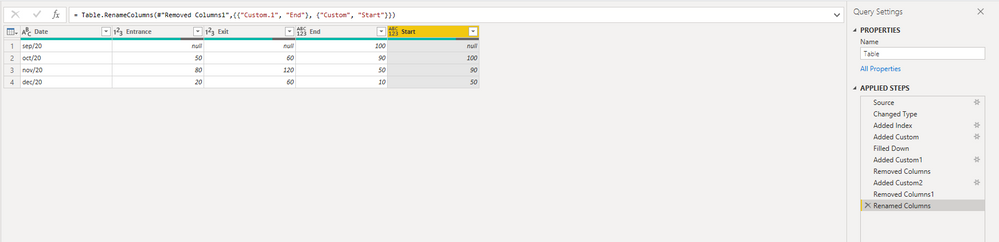
Best Regards,
Stephen Tao
If this post helps, then please consider Accept it as the solution to help the other members find it more quickly.
Thanks for solution @Anonymous. Perfect.
Here's one way to do it in the query editor. To see how it works, just create a blank query, open the Advanced Editor and replace the text there with the M code below. Did you mean to do + Exit - Entrance, since the End date is before the Start date with the formula above? You can adapt this, if so.
let
Source = Table.FromRows(Json.Document(Binary.Decompress(Binary.FromText("i45Wyk8u0TcyUNJRMgURZgZKsTrRSnn5ZRBBCxBhaAQRTUlNhogawZTGAgA=", BinaryEncoding.Base64), Compression.Deflate)), let _t = ((type nullable text) meta [Serialized.Text = true]) in type table [Date = _t, Entrance = _t, Exit = _t]),
#"Added Custom" = Table.AddColumn(Source, "DateForCalc", each "1/"&[Date]),
#"Changed Type" = Table.TransformColumnTypes(#"Added Custom",{{"Entrance", Int64.Type}, {"Exit", Int64.Type}, {"DateForCalc", type date}}),
#"Added Custom1" = Table.AddColumn(#"Changed Type", "Start", each Date.EndOfMonth(Date.AddMonths([DateForCalc], -1)), type date),
#"Added Custom2" = Table.AddColumn(#"Added Custom1", "End", each Date.AddDays([Start], [Entrance] - [Exit]), type date)
in
#"Added Custom2"
Pat
To learn more about Power BI, follow me on Twitter or subscribe on YouTube.
Thanks @mahoneypat .
I tested your suggestion, but I didn't get the result. Maybe I didn't explain it right. I need this result:
Hi @credencial ,
Here is the whole M syntax:
let
Source = Table.FromRows(Json.Document(Binary.Decompress(Binary.FromText("i45WKk4t0DcyUNJRgiBDAwOlWJ1opfzkEoiwKYgwAysAiefll0HELUCEoRFcIiU1GSJhhKQhFgA=", BinaryEncoding.Base64), Compression.Deflate)), let _t = ((type nullable text) meta [Serialized.Text = true]) in type table [Date = _t, Entrance = _t, Exit = _t, End = _t]),
#"Changed Type" = Table.TransformColumnTypes(Source,{{"Date", type text}, {"Entrance", Int64.Type}, {"Exit", Int64.Type}, {"End", Int64.Type}}),
#"Added Index" = Table.AddIndexColumn(#"Changed Type", "Index", 0, 1, Int64.Type),
#"Added Custom" = Table.AddColumn(#"Added Index", "Custom", each try #"Added Index" [End] {[Index] - 1} otherwise null),
#"Filled Down" = Table.FillDown(#"Added Custom",{"End"}),
#"Added Custom1" = Table.AddColumn(#"Filled Down", "Custom.1", each if [Index]=0 then [End] else [End]+List.Sum(List.Range(#"Filled Down"[Entrance],1,[Index]))-List.Sum(List.Range(#"Filled Down"[Exit],1,[Index]))),
#"Removed Columns" = Table.RemoveColumns(#"Added Custom1",{"Custom"}),
#"Added Custom2" = Table.AddColumn(#"Removed Columns", "Custom", each try #"Added Custom1" [Custom.1]{[Index] - 1} otherwise null),
#"Removed Columns1" = Table.RemoveColumns(#"Added Custom2",{"Index", "End"}),
#"Renamed Columns" = Table.RenameColumns(#"Removed Columns1",{{"Custom.1", "End"}, {"Custom", "Start"}})
in
#"Renamed Columns"
The final result is this.
Best Regards,
Stephen Tao
If this post helps, then please consider Accept it as the solution to help the other members find it more quickly.
Check out the April 2026 Power BI update to learn about new features.
If you have recently started exploring Fabric, we'd love to hear how it's going. Your feedback can help with product improvements.
A new Power BI DataViz World Championship is coming this June! Don't miss out on submitting your entry.
| User | Count |
|---|---|
| 3 | |
| 3 | |
| 2 | |
| 2 | |
| 2 |
| User | Count |
|---|---|
| 5 | |
| 4 | |
| 4 | |
| 4 | |
| 4 |