
Share feedback directly with Fabric product managers, participate in targeted research studies and influence the Fabric roadmap.
Sign up nowGet Fabric certified for FREE! Don't miss your chance! Learn more
Hi Community!!
I have the following table that shows for each ID a number of serials (every ID has between 1 and 5 serials):
I need to run a transformation so I get a table with one column that contains all serials (from the 5 serials columns, but all in one column) and for each serial the ID. Each serial will be unique, but the same ID can appear for more than one serials (for cases where currently the ID has more than 1 serial, as the ID 12863 in the example).
Any ideas of how to do this?
Thanks!!!
Solved! Go to Solution.
Hi @Anonymous
You can select all your Serial columns and goto Transform Ribbon and Click Unpivot
Hi @Anonymous ,
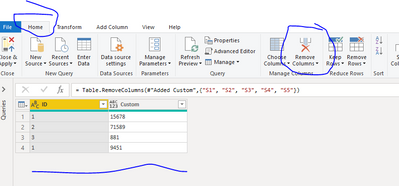
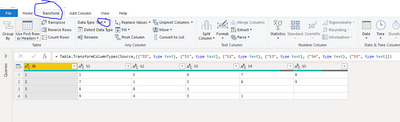
Not sure if understand exactly what you are asking, but try this from the bottom picture. Original table, then convert data type to text if not already done, then create custom column using &, then delete all but the first and the last.
Let me know if you have any questions.
If this solves your issues, please mark it as the solution, so that others can find it easily. Kudos 👍are nice too.
Nathaniel
Proud to be a Super User!
Hi @Anonymous
You can select all your Serial columns and goto Transform Ribbon and Click Unpivot
Perfect! Thanks!
If you love stickers, then you will definitely want to check out our Community Sticker Challenge!
Check out the January 2026 Power BI update to learn about new features.
| User | Count |
|---|---|
| 7 | |
| 5 | |
| 4 | |
| 4 | |
| 3 |
| User | Count |
|---|---|
| 13 | |
| 11 | |
| 10 | |
| 9 | |
| 6 |