cancel
Showing results for 
Search instead for 
Did you mean: 

The Power BI Data Visualization World Championships is back! Get ahead of the game and start preparing now! Learn more

Reply
Anonymous
Not applicable

Transform a specific value in a column

if the value of a certain column is in the same line or it's correspondent to a certain term on another column, how can that specific value be transformed or formated as percentile on power bi?


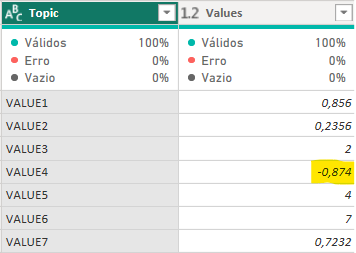
for example: a colum named "Topic" with multiple values, and has one value called "VALUE4" wich is correspodent to a value "-0,874" on the column called "Values" next to that one.

How do i transform that specific value in % (percentile) without affecting other values on that same column that are supposed to be a whole number, not percentile?

i thought about using the DAX formula "if", like if Topic = VALUE4, then the correspondent value on column "Values" ought to be

formated as % (percentile). But i have no idea on how to write or do this. For example, on the image below, how can i format the number painted in yellow as percentile (%) without affecting the other numbers that are supposed to be whole? I can't use the "substitute value" function because the database this sheet comes from it's updated with different values as time goes on. Thank you in advance for any help, and sorry if this is a dumb question.22850386-4cbf-4f94-a6ab-b2c5e4b78143.PNG

1 ACCEPTED SOLUTION
edhans
Super User
Super User

I think you will need to use the Table.TransformRows function here. See this code:


let
    Source = Table.FromRows(Json.Document(Binary.Decompress(Binary.FromText("i45WCkvMKU01VNJRMtQzNlGK1YGKGAFFjPRMzBEixmA1ZqYIEROwGlMjhIgpWI0JkogZWMTUAiFiDtZljmSXBVjEGGhyLAA=", BinaryEncoding.Base64), Compression.Deflate)), let _t = ((type nullable text) meta [Serialized.Text = true]) in type table [Topic = _t, Values = _t]),
    #"Changed Type" = Table.TransformColumnTypes(Source,{{"Values", type number}}),
    ConditionalTransform = 
        Table.FromRecords(
            Table.TransformRows(
                #"Changed Type",
                (x) => Record.TransformFields(
                    x, {"Values", each if x[Topic] = "Value4" then x[Values] /100 else x[Values]}
                )
            )
        )
in
    ConditionalTransform

I am just dividing any record with Value4 in the Topic column by 100, otherwise I am not touching it.
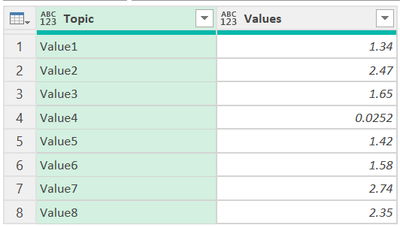
edhans_0-1697553981000.png

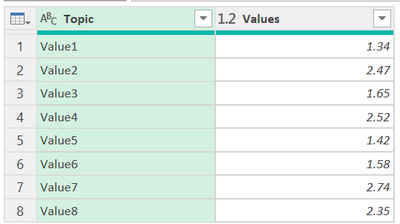
 becomes this:

edhans_1-1697554000532.png

How to use M code provided in a blank query:
1) In Power Query, select New Source, then Blank Query
2) On the Home ribbon, select "Advanced Editor" button
3) Remove everything you see, then paste the M code I've given you in that box.
4) Press Done
5) See this article if you need help using this M code in your model.


Did I answer your question? Mark my post as a solution!
Did my answers help arrive at a solution? Give it a kudos by clicking the Thumbs Up!

DAX is for Analysis. Power Query is for Data Modeling


Proud to be a Super User!

MCSA: BI Reporting

View solution in original post

3 REPLIES 3
Anonymous
Not applicable

Hi! Thank you so much for answering! Does this solution create another table or it can edit in the table itself? The table in the question is a simple example, i have a much more complex table that has many more columns, with this code, it only takes the two columns it refers to and creates another table. Is there a solution to this? thx

This creates a temporary table in memory to do the swap out, but replaces in the original table. I am not sure what your actual code is, but it should be adaptable to this. This creates a table of the entire record for the current row and does the if/then/else logic. It doesn't matter how many fields in the record, 2, 20, or 200.


Did I answer your question? Mark my post as a solution!
Did my answers help arrive at a solution? Give it a kudos by clicking the Thumbs Up!

DAX is for Analysis. Power Query is for Data Modeling


Proud to be a Super User!

MCSA: BI Reporting
edhans
Super User
Super User

I think you will need to use the Table.TransformRows function here. See this code:


let
    Source = Table.FromRows(Json.Document(Binary.Decompress(Binary.FromText("i45WCkvMKU01VNJRMtQzNlGK1YGKGAFFjPRMzBEixmA1ZqYIEROwGlMjhIgpWI0JkogZWMTUAiFiDtZljmSXBVjEGGhyLAA=", BinaryEncoding.Base64), Compression.Deflate)), let _t = ((type nullable text) meta [Serialized.Text = true]) in type table [Topic = _t, Values = _t]),
    #"Changed Type" = Table.TransformColumnTypes(Source,{{"Values", type number}}),
    ConditionalTransform = 
        Table.FromRecords(
            Table.TransformRows(
                #"Changed Type",
                (x) => Record.TransformFields(
                    x, {"Values", each if x[Topic] = "Value4" then x[Values] /100 else x[Values]}
                )
            )
        )
in
    ConditionalTransform

I am just dividing any record with Value4 in the Topic column by 100, otherwise I am not touching it.

edhans_0-1697553981000.png

 becomes this:

edhans_1-1697554000532.png

How to use M code provided in a blank query:
1) In Power Query, select New Source, then Blank Query
2) On the Home ribbon, select "Advanced Editor" button
3) Remove everything you see, then paste the M code I've given you in that box.
4) Press Done
5) See this article if you need help using this M code in your model.


Did I answer your question? Mark my post as a solution!
Did my answers help arrive at a solution? Give it a kudos by clicking the Thumbs Up!

DAX is for Analysis. Power Query is for Data Modeling


Proud to be a Super User!

MCSA: BI Reporting

Helpful resources

Announcements
Power BI DataViz World Championships

Power BI Dataviz World Championships

The Power BI Data Visualization World Championships is back! Get ahead of the game and start preparing now!

November Power BI Update Carousel

Power BI Monthly Update - November 2025

Check out the November 2025 Power BI update to learn about new features.

FabCon Atlanta 2026 carousel

FabCon Atlanta 2026

Join us at FabCon Atlanta, March 16-20, for the ultimate Fabric, Power BI, AI and SQL community-led event. Save $200 with code FABCOMM.