Share feedback directly with Fabric product managers, participate in targeted research studies and influence the Fabric roadmap.
Sign up nowGet Fabric certified for FREE! Don't miss your chance! Learn more
Merhaba
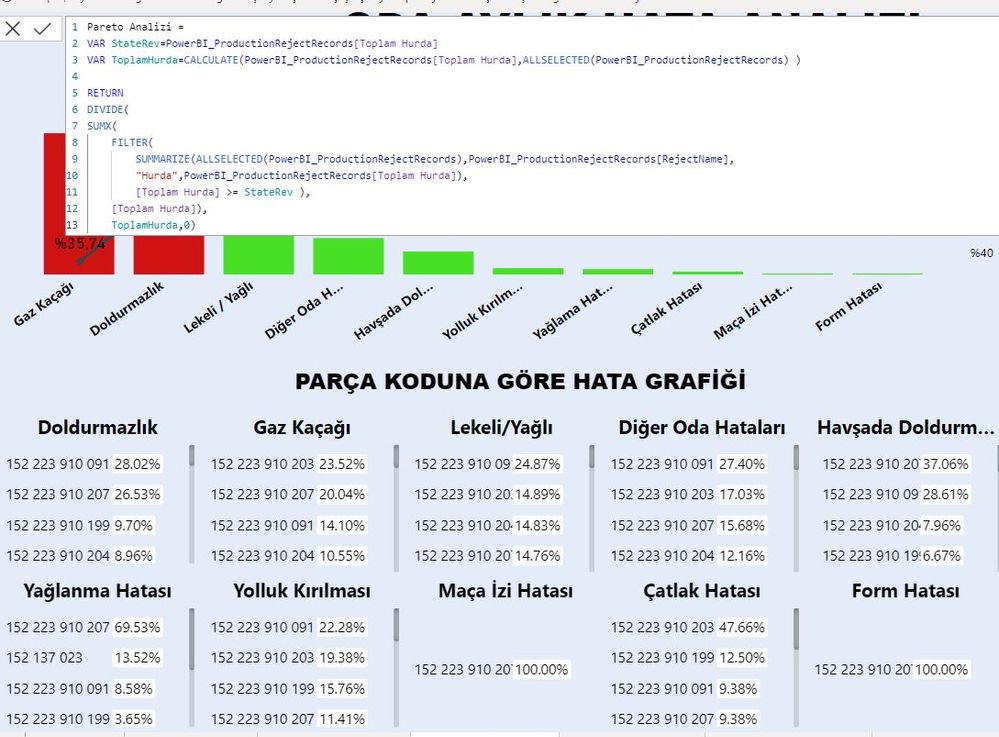
Bir pareto grafik yaptım ve %80 olarak renklendirme yaptım.Şimdi yapılan şey örnek veriyorum %80 denk gelen (Top2) sırala yapıp bir grafikte hemen 1. yada tek 2. olarak önlemeye.yardım edin.
Solved! Go to Solution.
Hi @verianalist2022 ,
It seems that you want to re-arrange the order based on the standard=0.8 in visuals. For example:
| measure value | expect rank |
| 0.87 | 3 |
| 0.9 | 2 |
| 0.92 | 1 |
|
0.76 |
6 |
| 0.54 | 5 |
| 0.23 | 4 |
If so, please try:
Rank =
var _1=RANKX(FILTER(ALL('Table'),[Measure]>=0.8),[Measure],,DESC,Dense)
return IF([Measure]<0.8, RANKX( FILTER(ALL('Table'),[Measure]<0.8),[Measure],,ASC,Dense)+_1, _1)
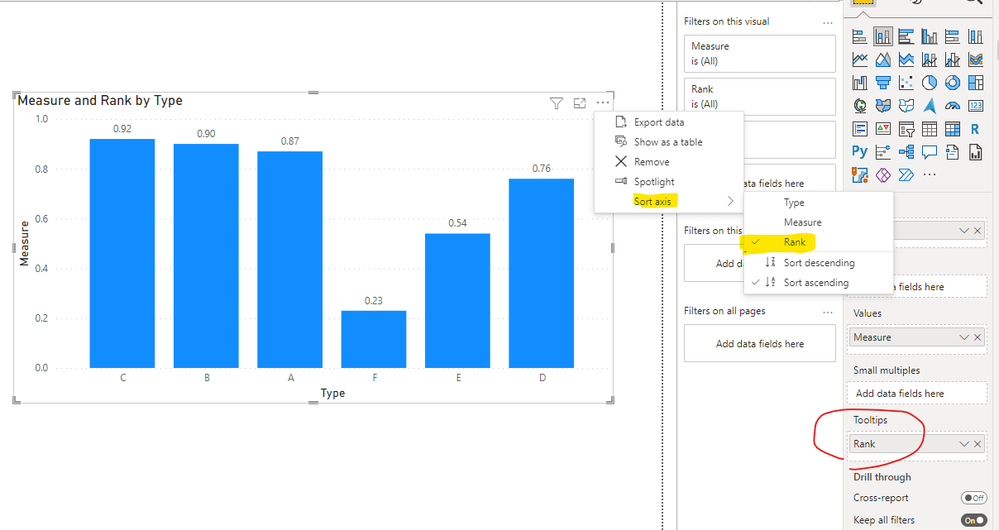
And apply it to Tooltips pane, and sort the axis by it:
If not, please provide me with more details about your table and your problem or share me with your pbix file after removing sensitive data.
Best Regards,
Eyelyn Qin
If this post helps, then please consider Accept it as the solution to help the other members find it more quickly.
Hi @verianalist2022 ,
It seems that you want to re-arrange the order based on the standard=0.8 in visuals. For example:
| measure value | expect rank |
| 0.87 | 3 |
| 0.9 | 2 |
| 0.92 | 1 |
|
0.76 |
6 |
| 0.54 | 5 |
| 0.23 | 4 |
If so, please try:
Rank =
var _1=RANKX(FILTER(ALL('Table'),[Measure]>=0.8),[Measure],,DESC,Dense)
return IF([Measure]<0.8, RANKX( FILTER(ALL('Table'),[Measure]<0.8),[Measure],,ASC,Dense)+_1, _1)
And apply it to Tooltips pane, and sort the axis by it:
If not, please provide me with more details about your table and your problem or share me with your pbix file after removing sensitive data.
Best Regards,
Eyelyn Qin
If this post helps, then please consider Accept it as the solution to help the other members find it more quickly.
Share feedback directly with Fabric product managers, participate in targeted research studies and influence the Fabric roadmap.
| User | Count |
|---|---|
| 7 | |
| 4 | |
| 4 | |
| 3 | |
| 3 |
| User | Count |
|---|---|
| 12 | |
| 11 | |
| 11 | |
| 7 | |
| 6 |