cancel
Showing results for 
Search instead for 
Did you mean: 

Level up your Power BI skills this month - build one visual each week and tell better stories with data! Get started

Reply
verianalist2022
Frequent Visitor

TopN Perecent

Merhaba 

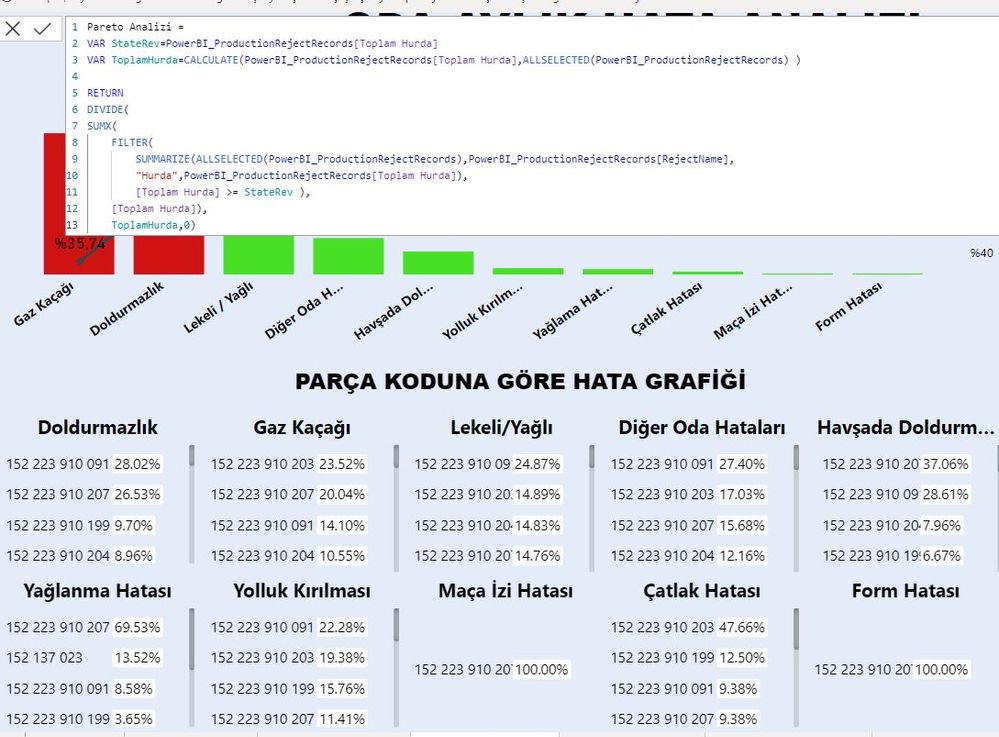
Bir pareto grafik yaptım ve %80 olarak renklendirme yaptım.Şimdi yapılan şey örnek veriyorum %80 denk gelen (Top2) sırala yapıp bir grafikte hemen 1. yada tek 2. olarak önlemeye.yardım edin.


2.JPG

1 ACCEPTED SOLUTION
Anonymous
Not applicable

Hi @verianalist2022 ,


It seems that you want to re-arrange the order based on the standard=0.8 in visuals. For example:

measure value expect rank
0.87 3
0.9 2
0.92 1

0.76

6
0.54 5
0.23 4


If so, please try:

Rank = 
var _1=RANKX(FILTER(ALL('Table'),[Measure]>=0.8),[Measure],,DESC,Dense)
return IF([Measure]<0.8, RANKX( FILTER(ALL('Table'),[Measure]<0.8),[Measure],,ASC,Dense)+_1, _1)

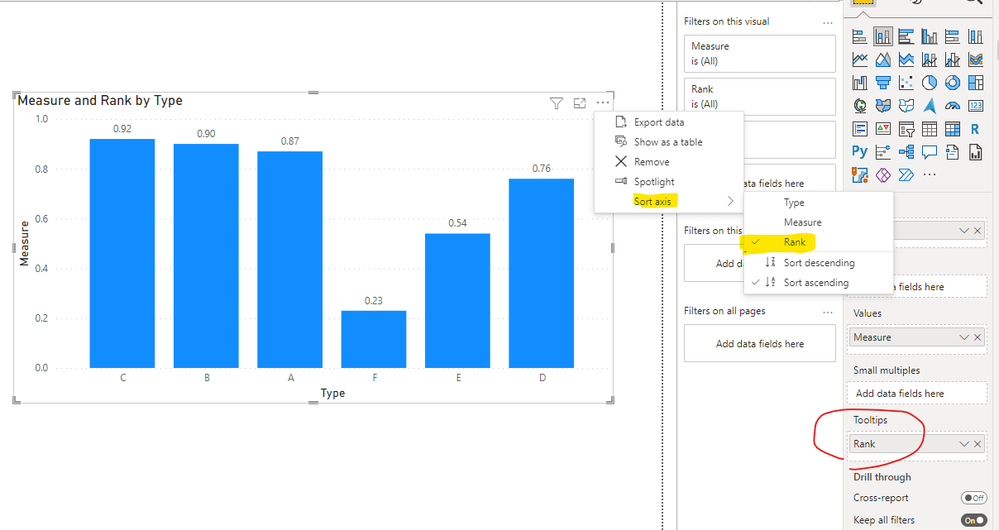
 And apply it to Tooltips pane, and sort the axis by it:

Eyelyn9_1-1645780608506.png


If not, please provide me with more details about your table and your problem or share me with your pbix file after removing sensitive data.


Best Regards,
Eyelyn Qin
If this post helps, then please consider Accept it as the solution to help the other members find it more quickly.

View solution in original post

1 REPLY 1
Anonymous
Not applicable

Hi @verianalist2022 ,


It seems that you want to re-arrange the order based on the standard=0.8 in visuals. For example:

measure value expect rank
0.87 3
0.9 2
0.92 1

0.76

6
0.54 5
0.23 4


If so, please try:

Rank = 
var _1=RANKX(FILTER(ALL('Table'),[Measure]>=0.8),[Measure],,DESC,Dense)
return IF([Measure]<0.8, RANKX( FILTER(ALL('Table'),[Measure]<0.8),[Measure],,ASC,Dense)+_1, _1)

 And apply it to Tooltips pane, and sort the axis by it:

Eyelyn9_1-1645780608506.png


If not, please provide me with more details about your table and your problem or share me with your pbix file after removing sensitive data.


Best Regards,
Eyelyn Qin
If this post helps, then please consider Accept it as the solution to help the other members find it more quickly.

Helpful resources

Announcements
April Power BI Update Carousel

Power BI Monthly Update - April 2026

Check out the April 2026 Power BI update to learn about new features.

Fabric SQL PBI Data Days

Data Days 2026 coming soon!

Sign up to receive a private message when registration opens and key events begin.

New to Fabric survey Carousel

New to Fabric Survey

If you have recently started exploring Fabric, we'd love to hear how it's going. Your feedback can help with product improvements.

Power BI DataViz World Championships carousel

Power BI DataViz World Championships - June 2026

A new Power BI DataViz World Championship is coming this June! Don't miss out on submitting your entry.

Top Solution Authors
Top Kudoed Authors