Hey all,
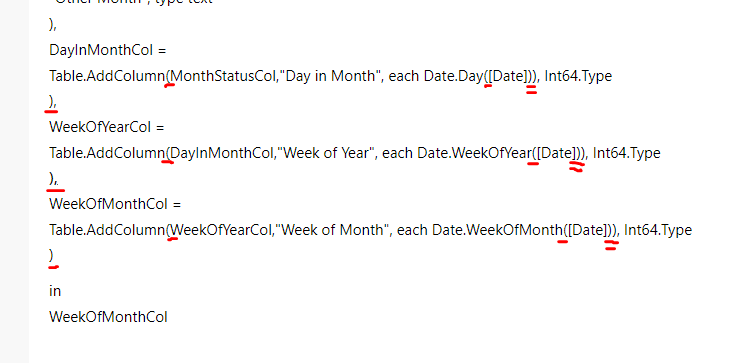
I'm getting Token Equal expected for the second to last column i'm adding (highlighted). Can't for life of me workout why though. Any tips would be much appreciated.
= let
Dates = BaseDateTable,
CurrentDate = DateTime.Date(DateTime.LocalNow()),
CurrentYear = Date.Year(DateTime.Date(DateTime.LocalNow())),
CurrentMonth = Date.Month(DateTime.Date(DateTime.LocalNow())),
FilteredDates =
Table.SelectRows(
Dates,
each [Date] >=
Date.AddYears(CurrentDate,-3) and [Date] <=CurrentDate
),
DateCol = Table.SelectColumns(FilteredDates,"Date"),
YearCol =
Table.AddColumn(
DateCol, "Year", each Date.Year([Date]), Int64.Type
),
MonthNameCol =
Table.AddColumn(
YearCol, "Month Name", each Date.MonthName([Date], type
text
),
YearMonthCol =
Table.AddColumn(
MonthNameCol, "Year-Mo", each Text.From([Year]) & "-" & [Month Name], type text
),
MonthNumberCol =
Table.AddColumn(
YearMonthCol, "Month Number", each Date.Month([Date]), Int64.Type
),
WeekdayNameCol =
Table.AddColumn(
MonthNumberCol, "Weekeday", each Date.DayOfWeekName([Date])
),
DayNumberofWeekCol =
Table.AddColumn(
WeekdayNameCol, "Weekday Number", each Date.EndOfWeek([Date]), Int64.Type
),
YearStatusCol =
Table.AddColumn(YearStatusCol, "Year Status", each if Date.IsInCurrentYear([Date]) = true then "Current Year" else
if [Year] = CurrentYear - 1 then "Prior Year" else "Other Year", type text
),
MonthStatusCol =
Table.AddColumn(YearStatusCol, "Month Status", each if [Year Status] = "Current Year" and [Month Number] = CurrentMonth then "Current Month" else
if [Year] = Date.Year(Date.AddMonths(DateTime.Date(DateTime.LocalNow()),-1)) and [Month Number] = Date.Month(Date.AddMonths(DateTime.Date(DateTime.LocalNow()),-1)) then "Prior Month" else
"Other Month", type text
),
DayInMonthCol =
Table.AddColumn(MonthStatusCol,"Day in Month", each Date.Day([Date])), Int64.Type
),
WeekOfYearCol =
Table.AddColumn(DayInMonthCol,"Week of Year", each Date.WeekOfYear([Date])), Int64.Type
),
WeekOfMonthCol =
Table.AddColumn(WeekOfYearCol,"Week of Month", each Date.WeekOfMonth([Date])), Int64.Type
)
in
WeekOfMonthCol