cancel
Showing results for 
Search instead for 
Did you mean: 

Learn from the best! Meet the four finalists headed to the FINALS of the Power BI Dataviz World Championships! Register now

Reply
brycedwhite
Frequent Visitor

Text.StartWith syntax help

I'm trying to replace values in a single text column that begin with a specifc character.  Something like

Table.ReplaceValue(#"Merged Columns","3%",null,Replacer.ReplaceValue,{"Column2"}), but I can't figure out the correct syntax.


Thanks in advance for any help.


Bryce

1 ACCEPTED SOLUTION
v-yanjiang-msft
Community Support
Community Support

Hi @brycedwhite ,

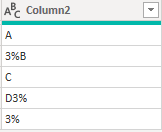
According to your description, I create a sample.

vkalyjmsft_0-1654770772525.png

In my understanding, if the cell begin with 3% then replace the cell to null. Here's my solution:


let
    Source = Table.FromRows(Json.Document(Binary.Decompress(Binary.FromText("i45WclSK1YlWMlZ1AtPOYNLFWBUqqhQbCwA=", BinaryEncoding.Base64), Compression.Deflate)), let _t = ((type nullable text) meta [Serialized.Text = true]) in type table [Column2 = _t]),
    #"Changed Type" = Table.TransformColumnTypes(Source,{{"Column2", type text}}),
    #"New" = Table.ReplaceValue(#"Changed Type",each [Column2], each if Text.StartsWith(Text.From([Column2]),"3%") then null else [Column2],Replacer.ReplaceValue,{"Column2"})
in
    #"New"


Get the correct result.

vkalyjmsft_1-1654770848493.png

I attach my sample below for reference.


Best Regards,
Community Support Team _ kalyj

If this post helps, then please consider Accept it as the solution to help the other members find it more quickly.

View solution in original post

2 REPLIES 2
v-yanjiang-msft
Community Support
Community Support

Hi @brycedwhite ,

According to your description, I create a sample.

vkalyjmsft_0-1654770772525.png

In my understanding, if the cell begin with 3% then replace the cell to null. Here's my solution:


let
    Source = Table.FromRows(Json.Document(Binary.Decompress(Binary.FromText("i45WclSK1YlWMlZ1AtPOYNLFWBUqqhQbCwA=", BinaryEncoding.Base64), Compression.Deflate)), let _t = ((type nullable text) meta [Serialized.Text = true]) in type table [Column2 = _t]),
    #"Changed Type" = Table.TransformColumnTypes(Source,{{"Column2", type text}}),
    #"New" = Table.ReplaceValue(#"Changed Type",each [Column2], each if Text.StartsWith(Text.From([Column2]),"3%") then null else [Column2],Replacer.ReplaceValue,{"Column2"})
in
    #"New"


Get the correct result.

vkalyjmsft_1-1654770848493.png

I attach my sample below for reference.


Best Regards,
Community Support Team _ kalyj

If this post helps, then please consider Accept it as the solution to help the other members find it more quickly.

ronrsnfld
Super User
Super User

Might be easier to use the Table.TransformColumns function:


= Table.TransformColumns(#"Merged Columns",{"Column2", each if Text.StartsWith(_,"3%")
        then null else _})


OR


#"Starts with" = Table.TransformColumns(#"Merged Columns",{"Column2", each if Text.StartsWith(_,"3%")
        then Text.ReplaceRange(_,0,2,"") else _})


Helpful resources

Announcements
Join our Fabric User Panel

Join our Fabric User Panel

Share feedback directly with Fabric product managers, participate in targeted research studies and influence the Fabric roadmap.

February Power BI Update Carousel

Power BI Monthly Update - February 2026

Check out the February 2026 Power BI update to learn about new features.

FabCon Atlanta 2026 carousel

FabCon Atlanta 2026

Join us at FabCon Atlanta, March 16-20, for the ultimate Fabric, Power BI, AI and SQL community-led event. Save $200 with code FABCOMM.

Top Solution Authors