
Get certified for free when you join Fabric Data Days 2026 and dive into Fabric, Power BI, SQL, AI, and other essential data skills.
Join nowJuly 7 - July 17 | Round 2 of the Power BI Dataviz World Championships. Don't miss your chance! Learn more
I have a table "Monthly Sales" that has the Sales Reps in rows and Months as Columns.
I need to calculate the current selected month sales amount per sales rep based on this data. The issue I am faced with is how do I tell Power Query that the columns are dates so I can write a measure to look for current selected month.
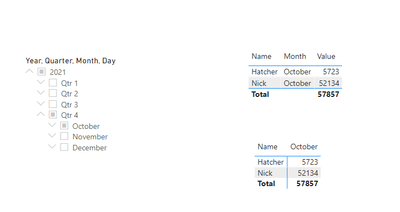
EX: If I selected a date of 10/20/2021 I would want to see the October amount for Nick and Hatcher.
Solved! Go to Solution.
Hi @Anonymous ,
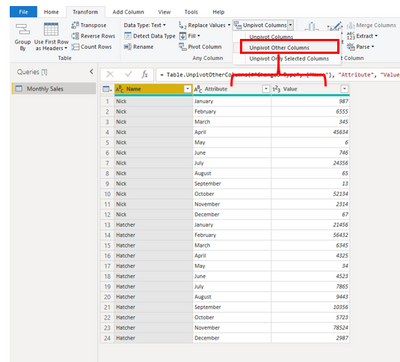
1.As @AlexisOlson suggested, please click the Name column --> Select Unpivot other columns:
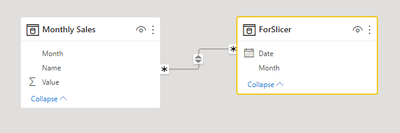
2. Create a date table, build relationships based on Month column. (I have renamed the Attribute column to Month)
ForSlicer = ADDCOLUMNS( CALENDAR(DATE(2021,1,1),DATE(2021,12,31)),"Month", FORMAT([Date],"mmmm"))
Output:
Best Regards,
Eyelyn Qin
If this post helps, then please consider Accept it as the solution to help the other members find it more quickly.
Hi @Anonymous ,
1.As @AlexisOlson suggested, please click the Name column --> Select Unpivot other columns:
2. Create a date table, build relationships based on Month column. (I have renamed the Attribute column to Month)
ForSlicer = ADDCOLUMNS( CALENDAR(DATE(2021,1,1),DATE(2021,12,31)),"Month", FORMAT([Date],"mmmm"))
Output:
Best Regards,
Eyelyn Qin
If this post helps, then please consider Accept it as the solution to help the other members find it more quickly.
Unpivot the month columns to make the data easier to work with.
Join us in Barcelona for FabCon and SQLCon, the Fabric, Power BI, SQL, and AI community event. Save €200 with code FABCMTY200.
Join Fabric Data Days 2026: 60 days of free live/on-demand sessions, challenges, study groups, and certification opportunities.