This time we’re going bigger than ever. Fabric, Power BI, SQL, AI and more. We're covering it all. You won't want to miss it.
Learn moreGet Fabric Certified for FREE during AI Skills Fest. This week only. Secure your voucher now.
I need to replace ":" with "" in column names but in a nested table (that I cannot expand yet)... 2 problems:
1) How do I get a nested table as table (1st argument of Table.TransformColumnNames)
2) Then how do i actually get the column names' text replaced
I tried along these lines:
= Table.TransformColumnNames( Table.Column(AddRemovedTopRowHeaderPromoted,"Ranges"), Text.Replace(_,":",""))
and
= Table.TransformColumnNames( Table.FromList(RemovedTopRowPromotedHeaders[Data], Splitter.SplitByNothing(), null, null, ExtraValues.Error), (_) as text => Text.Clean(Text.Replace(_,":","")))
and
RecordsToList = Table.AddColumn(#"Removed Other Columns1", "RecordsToList", each Record.ToList([Data]{1})),
RenRecordsToList = Table.AddColumn(RecordsToList, "RenRecordsToList", each List.ReplaceValue([RecordsToList],":","", Replacer.ReplaceText)),
Custom2 = Table.RenameColumns([Data], [RecordsToList],[RenRecordsToList] ),
AddRemTopRowHeaderPromoted = Table.AddColumn(Custom2, "Ranges", each Table.PromoteHeaders( Table.Skip([Data],1))),
Solved! Go to Solution.
Hi @ooptennoort ,
Ok, so there's two stages to this. The first is to perform the dynamic column name changes, the second is to then apply that to a nested table.
So, to do the dynamic change, you would use something like this:
= Table.RenameColumns(
prevStep,
List.Zip(
{
Table.ColumnNames(prevStep),
List.Transform(Table.ColumnNames(prevStep), each Text.Replace(_, ":", ""))
}
)
)
Now, to apply that to the nested tables, we need to wrap the whole lot in a Table.TransformColumns and change relevant references to the previous step ('prevStep') to the access operator ('_'):
Table.TransformColumns(
prevStep,
{
"nestedTableColumnName",
each Table.RenameColumns(
_,
List.Zip(
{
Table.ColumnNames(_),
List.Transform(Table.ColumnNames(_), each Text.Replace(_, ":", ""))
}
)
)
}
)
Full example query to turn this:
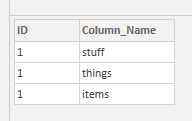
...into this:
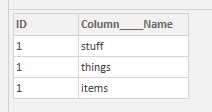
let
Source = Table.FromRows(Json.Document(Binary.Decompress(Binary.FromText("i45WMlTSUSouKU1LU4rVgfBKMjLz0ovh3MyS1FwIzwjIy80vSlVAqIcLIWmCi0F1xgIA", BinaryEncoding.Base64), Compression.Deflate)), let _t = ((type nullable text) meta [Serialized.Text = true]) in type table [ID = _t, Column_Name = _t]),
groupRows = Table.Group(Source, {"ID"}, {{"data", each _, type table [ID=nullable text, Column_Name=nullable text]}}),
renameNestedColumns = Table.TransformColumns(
groupRows,
{
"data",
each Table.RenameColumns(
_,
List.Zip(
{
Table.ColumnNames(_),
List.Transform(Table.ColumnNames(_), each Text.Replace(_, "_", "____"))
}
)
)
}
),
expandNestedData = Table.ExpandTableColumn(renameNestedColumns, "data", {"Column____Name"}, {"Column____Name"})
in
expandNestedData
Pete
Proud to be a Datanaut!
Wow, thank you!!! List.Zip! Will need to study closer how you did it! Thx
Hi @ooptennoort ,
Ok, so there's two stages to this. The first is to perform the dynamic column name changes, the second is to then apply that to a nested table.
So, to do the dynamic change, you would use something like this:
= Table.RenameColumns(
prevStep,
List.Zip(
{
Table.ColumnNames(prevStep),
List.Transform(Table.ColumnNames(prevStep), each Text.Replace(_, ":", ""))
}
)
)
Now, to apply that to the nested tables, we need to wrap the whole lot in a Table.TransformColumns and change relevant references to the previous step ('prevStep') to the access operator ('_'):
Table.TransformColumns(
prevStep,
{
"nestedTableColumnName",
each Table.RenameColumns(
_,
List.Zip(
{
Table.ColumnNames(_),
List.Transform(Table.ColumnNames(_), each Text.Replace(_, ":", ""))
}
)
)
}
)
Full example query to turn this:
...into this:
let
Source = Table.FromRows(Json.Document(Binary.Decompress(Binary.FromText("i45WMlTSUSouKU1LU4rVgfBKMjLz0ovh3MyS1FwIzwjIy80vSlVAqIcLIWmCi0F1xgIA", BinaryEncoding.Base64), Compression.Deflate)), let _t = ((type nullable text) meta [Serialized.Text = true]) in type table [ID = _t, Column_Name = _t]),
groupRows = Table.Group(Source, {"ID"}, {{"data", each _, type table [ID=nullable text, Column_Name=nullable text]}}),
renameNestedColumns = Table.TransformColumns(
groupRows,
{
"data",
each Table.RenameColumns(
_,
List.Zip(
{
Table.ColumnNames(_),
List.Transform(Table.ColumnNames(_), each Text.Replace(_, "_", "____"))
}
)
)
}
),
expandNestedData = Table.ExpandTableColumn(renameNestedColumns, "data", {"Column____Name"}, {"Column____Name"})
in
expandNestedData
Pete
Proud to be a Datanaut!
Check out the May 2026 Power BI update to learn about new features.
Sign up to receive a private message when registration opens and key events begin.
If you have recently started exploring Fabric, we'd love to hear how it's going. Your feedback can help with product improvements.
| User | Count |
|---|---|
| 5 | |
| 4 | |
| 3 | |
| 1 | |
| 1 |