Don't miss your chance to take the Fabric Data Engineer (DP-600) exam for FREE! Find out how by attending the DP-600 session on April 23rd (pacific time), live or on-demand.
Learn moreNext up in the FabCon + SQLCon recap series: The roadmap for Microsoft SQL and Maximizing Developer experiences in Fabric. All sessions are available on-demand after the live show. Register now
OK its the end of the week but and a simple sort is defeating me....
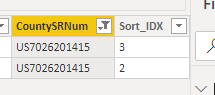
So I want to sort a table by two columns and then I will remove duplicate so keeping the top most one of each - works normally but today tried it again on a new data set and while I ask it to sort.Ascending it sorts it decending!
#"Wrangle DATReport2: Sort" = Table.Sort(#"Wrangle DATReport2: Create Sort IDX", {{"CountySRNum", Order.Ascending}, {"Sort_IDX", Order.Ascending}})
I always thourght 2 came before 3 !!
Anyone any ideas....
Thanks
Solved! Go to Solution.
Hi @Anonymous ,
Table.Sort (and List.Sort) won't keep their order without a Buffer-function around it:
https://community.powerbi.com/t5/Community-Blog/Bug-warning-for-Table-Sort-and-removing-duplicates-in-Power/ba-p/810390
Don't ask...
Imke Feldmann (The BIccountant)
If you liked my solution, please give it a thumbs up. And if I did answer your question, please mark this post as a solution. Thanks!
How to integrate M-code into your solution -- How to get your questions answered quickly -- How to provide sample data -- Check out more PBI- learning resources here -- Performance Tipps for M-queries
So the work around was to create a temp column with the columns wanted to sort.
But still none the wiser why the Sort method is not giving the expacted results.
Andrew
Hi @Anonymous ,
Table.Sort (and List.Sort) won't keep their order without a Buffer-function around it:
https://community.powerbi.com/t5/Community-Blog/Bug-warning-for-Table-Sort-and-removing-duplicates-in-Power/ba-p/810390
Don't ask...
Imke Feldmann (The BIccountant)
If you liked my solution, please give it a thumbs up. And if I did answer your question, please mark this post as a solution. Thanks!
How to integrate M-code into your solution -- How to get your questions answered quickly -- How to provide sample data -- Check out more PBI- learning resources here -- Performance Tipps for M-queries
If you have recently started exploring Fabric, we'd love to hear how it's going. Your feedback can help with product improvements.
A new Power BI DataViz World Championship is coming this June! Don't miss out on submitting your entry.
| User | Count |
|---|---|
| 5 | |
| 3 | |
| 3 | |
| 3 | |
| 2 |
| User | Count |
|---|---|
| 7 | |
| 6 | |
| 5 | |
| 5 | |
| 4 |