Get certified for free when you join Fabric Data Days 2026 and dive into Fabric, Power BI, SQL, AI, and other essential data skills.
Join nowData Days is here! Join us now for 60+ days of learning, challenges, and connection. Learn more
I am learning Table.Sort function, got blocked.
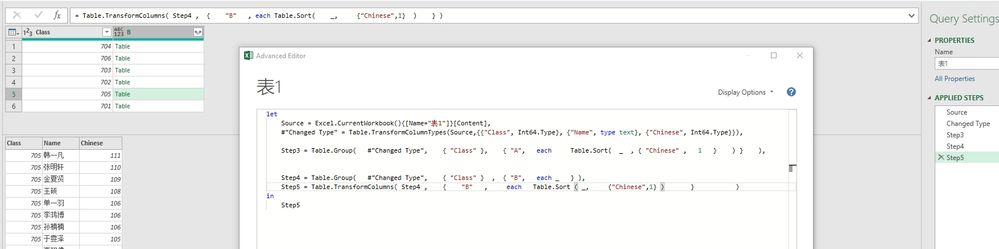
In Step3, the nested Table.Sort in Table.Group, it works
But when I try to split Step3 into 2 steps, I got blocked.
I think my understanding of the input and output of Table.Group and Table.Sort is still bit off.
Hope someone can help me understand better of "Table.Sort" function.
Thank you very much.
Solved! Go to Solution.
In step 3 you are sorting each entry in the group.
In step 5 you are trying to sort a column of grouped entries. This won't work.
If you want to break it up, step 5 is:
Table.TransformColumns(Step4, {"B", each Table.Sort(_, {"Chinese"}))
Hi @Anonymous ,
the sort order won't be kept until you use an additional Table.Buffer around it: https://community.powerbi.com/t5/Community-Blog/Bug-warning-for-Table-Sort-and-removing-duplicates-i...
Imke Feldmann (The BIccountant)
If you liked my solution, please give it a thumbs up. And if I did answer your question, please mark this post as a solution. Thanks!
How to integrate M-code into your solution -- How to get your questions answered quickly -- How to provide sample data -- Check out more PBI- learning resources here -- Performance Tipps for M-queries
In step 3 you are sorting each entry in the group.
In step 5 you are trying to sort a column of grouped entries. This won't work.
If you want to break it up, step 5 is:
Table.TransformColumns(Step4, {"B", each Table.Sort(_, {"Chinese"}))
Thanks for all the help @artemus , I trid your solution, it works.
Just my understanding of Table.Group and Table.Sort, the output and input, and the datatype required for eah parameter, is still a bit off.
Hi @Anonymous ,
It seems that you solve the problem, right? If so and if you'd like to, you could mark corresponding post as answer or share your solutions. That way, people who in this forum and have similar issue will benefit from it.
Best Regards,
Zoe Zhi
If this post helps, then please consider Accept it as the solution to help the other members find it more quickly.
Don't miss out on Data Days, June 15 through August 7. Learn Fabric, Power BI, SQL, AI and more.
Check out the May 2026 Power BI update to learn about new features.
| User | Count |
|---|---|
| 4 | |
| 4 | |
| 3 | |
| 2 | |
| 1 |
| User | Count |
|---|---|
| 11 | |
| 11 | |
| 5 | |
| 4 | |
| 3 |