Get certified for free when you join Fabric Data Days 2026 and dive into Fabric, Power BI, SQL, AI, and other essential data skills.
Join nowData Days is here! Join us now for 60+ days of learning, challenges, and connection. Learn more
Someone is going to ROFL on this one.
Three queries:
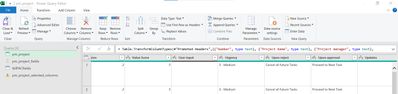
1. Query 1 : Table with all columns in a CSV
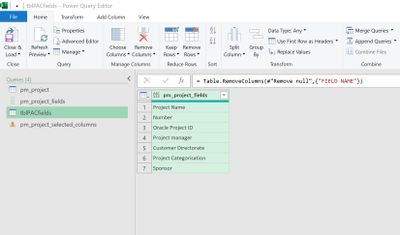
2. Query 2 : Table with one column with list of columns I want to keep in query 1
3. Query 3 : Query 1 Table with all columns removed excluding column names in the table in Query 2.
What is the syntax for Table.RemoveColumns or KeepColumns that allow me to end up with Query 3?
Solved! Go to Solution.
That seemed to do the trick, in the end I referenced the original query (pm_project) to create a 'Source', add a customised step with the following command and voila 🙂
= Table.SelectColumns(Source, tblPACfields[pm_project_fields])
Table.SelectColumns(Query1,Table.ToColumns(Query2){0},MissingField.UseNull)
Hi @pbyrne98 ,
Try the following for your Table3 query:
let
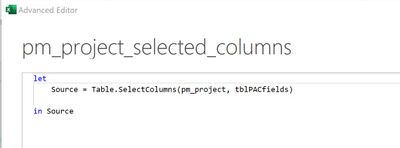
Source = Table.SelectColumns(Query1, Query2)
in
Source
Pete
Proud to be a Datanaut!
Thanks Pete,
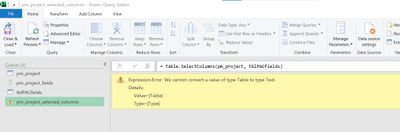
This is what pops up when I put it in, it maybe that the Query2 is a table and not a list?
Expression.Error: We cannot convert a value of type Table to type Text.
Details:
Value=[Table]
Type=[Type]
Added pictures of the Query 1, 2 and 3 to help.
You're nearly there. The issue is that tblPACfields is a table rather than a list like the function expects.
You can fix this by specifying the column from the table (since table columns are lists).
Table.SelectColumns(pm_project, tblPACfileds[pm_project_fields])
Or, assuming the query pm_project_fields is already the appropriate list (rather than a table).
Table.SelectColumns(pm_project, pm_project_fields)
That seemed to do the trick, in the end I referenced the original query (pm_project) to create a 'Source', add a customised step with the following command and voila 🙂
= Table.SelectColumns(Source, tblPACfields[pm_project_fields])
Don't miss out on Data Days, June 15 through August 7. Learn Fabric, Power BI, SQL, AI and more.
Check out the May 2026 Power BI update to learn about new features.
| User | Count |
|---|---|
| 5 | |
| 4 | |
| 3 | |
| 2 | |
| 1 |
| User | Count |
|---|---|
| 11 | |
| 11 | |
| 5 | |
| 4 | |
| 3 |