cancel
Showing results for 
Search instead for 
Did you mean: 

The Power BI Data Visualization World Championships is back! Get ahead of the game and start preparing now! Learn more

Reply
itsmebvk
Continued Contributor

Table Import error after applying Manage Aggregations


I am creating a basic model connecting to Synapse DB using Direct Query Mode. These are the steps I followed.


1) Using Direct Query loaded Fact_Table,Dim1, Dim2,Dim3 tables.

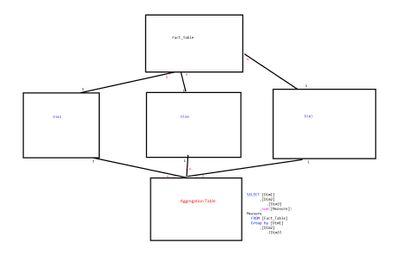
2) I created Aggregation Table using following SQL


SELECT [Dim1]

      ,[Dim2]

         ,[Dim3]

      ,sum([Measure]) Measure

  FROM [Fact_Table]

  Group by [Dim1]

      ,[Dim2]

         ,[Dim3]

3) Created relationships between tables as highlighted in the screenshot

0846BF34-63A2-44AB-8AF3-C10CABD4C1E8.jpeg


4) After that applied Manage Aggregations on “Aggregation Table” (Sum on Measure and Group by on Dim1,Dim2,Dim3)

C07BF536-00E8-473C-BA58-BD39C2FA494F.jpeg


5) Once I am done with Manage aggregation when change the “Storage Mode” to Import I am getting following error


Column 'Item_number' in Table ‘Dim1’ contains a duplicate value '00000000000001122'

and this is not allowed for columns on the one side of a many-to-one relationship or for columns that are used as the primary key of a table.“


By looking at the error I can sense that this is something to do with Duplicate values in Dim1 table,  but just for one report purpose I cannot really change the entire Dim1 table.


Please suggest any work arounds which can help to fix this issue?

1 ACCEPTED SOLUTION
Anonymous
Not applicable

@itsmebvk 

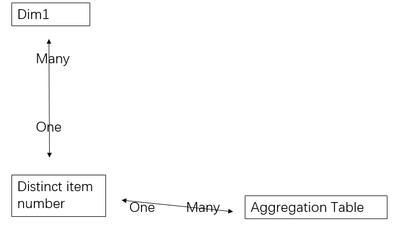
As the workaround, try create a distinct table as a bring to connect Dim1 and Aggregation Table.

Distinct item_number = Distinct(Dim1[Item_number])


V-pazhen-msft_0-1621822225821.png


Paul Zheng _ Community Support Team
If this post helps, please Accept it as the solution to help the other members find it more quickly.

View solution in original post

1 REPLY 1
Anonymous
Not applicable

@itsmebvk 

As the workaround, try create a distinct table as a bring to connect Dim1 and Aggregation Table.

Distinct item_number = Distinct(Dim1[Item_number])


V-pazhen-msft_0-1621822225821.png


Paul Zheng _ Community Support Team
If this post helps, please Accept it as the solution to help the other members find it more quickly.

Helpful resources

Announcements
Power BI DataViz World Championships

Power BI Dataviz World Championships

The Power BI Data Visualization World Championships is back! Get ahead of the game and start preparing now!

December 2025 Power BI Update Carousel

Power BI Monthly Update - December 2025

Check out the December 2025 Power BI Holiday Recap!

FabCon Atlanta 2026 carousel

FabCon Atlanta 2026

Join us at FabCon Atlanta, March 16-20, for the ultimate Fabric, Power BI, AI and SQL community-led event. Save $200 with code FABCOMM.