Don't miss your chance to take the Fabric Data Engineer (DP-600) exam for FREE! Find out how by attending the DP-600 session on April 23rd (pacific time), live or on-demand.
Learn moreJoin the FabCon + SQLCon recap series. Up next: Power BI, Real-Time Intelligence, IQ and AI, and Data Factory take center stage. All sessions are available on-demand after the live show. Register now
Hello,
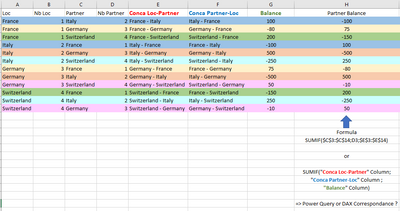
I'm trying to vlookup one text column "Conca Partner-Loc" on another text column "Conca Loc-Partner" to retrieve corresponding value "Balance"
See below an example :
I want to calculate "Partner balance" column which is simple SUMIF formula in excel (range, Criteria, Sum Range) where Range is "Conca Loc-Partner", Criteria "Conca Partner-Loc" and Sum Range "Balance"
Thank you
Solved! Go to Solution.
@CrisCros23 with DAX measures can be achieved two ways (maybe more I am sure of that)
Measure1 =
CALCULATE (
SUM ( t1[Balance] ),
TREATAS ( VALUES ( t1[Conca Loc-Partner] ), t1[Conca Partner-Loc] ), ALL(t1)
)
Measure2 =
CALCULATE (
SUM ( t1[Balance] ),
FILTER ( ALL ( t1 ), t1[Conca Partner-Loc] = MAX ( t1[Conca Loc-Partner] ) )
)
with PQ you need to self join the table on t1[Conca Loc-Partner] to t1[Conca Partner-Loc]
let
Source = Table.FromRows(Json.Document(Binary.Decompress(Binary.FromText("i45W8ixJzKlU0lFyTy3KTcwDsQwNDJRidaKRRIILEjPzgLQRVAbGh+k1BonHAgA=", BinaryEncoding.Base64), Compression.Deflate)), let _t = ((type nullable text) meta [Serialized.Text = true]) in type table [C1 = _t, C2 = _t, Value = _t]),
#"Changed Type" = Table.TransformColumnTypes(Source,{{"C1", type text}, {"C2", type text}, {"Value", Int64.Type}}),
#"Merged Queries" = Table.NestedJoin(#"Changed Type", {"C1"}, #"Changed Type", {"C2"}, "Changed Type", JoinKind.LeftOuter),
#"Expanded Changed Type" = Table.ExpandTableColumn(#"Merged Queries", "Changed Type", {"Value"}, {"Value.1"})
in
#"Expanded Changed Type"
pbix is attached
@CrisCros23 with DAX measures can be achieved two ways (maybe more I am sure of that)
Measure1 =
CALCULATE (
SUM ( t1[Balance] ),
TREATAS ( VALUES ( t1[Conca Loc-Partner] ), t1[Conca Partner-Loc] ), ALL(t1)
)
Measure2 =
CALCULATE (
SUM ( t1[Balance] ),
FILTER ( ALL ( t1 ), t1[Conca Partner-Loc] = MAX ( t1[Conca Loc-Partner] ) )
)
with PQ you need to self join the table on t1[Conca Loc-Partner] to t1[Conca Partner-Loc]
let
Source = Table.FromRows(Json.Document(Binary.Decompress(Binary.FromText("i45W8ixJzKlU0lFyTy3KTcwDsQwNDJRidaKRRIILEjPzgLQRVAbGh+k1BonHAgA=", BinaryEncoding.Base64), Compression.Deflate)), let _t = ((type nullable text) meta [Serialized.Text = true]) in type table [C1 = _t, C2 = _t, Value = _t]),
#"Changed Type" = Table.TransformColumnTypes(Source,{{"C1", type text}, {"C2", type text}, {"Value", Int64.Type}}),
#"Merged Queries" = Table.NestedJoin(#"Changed Type", {"C1"}, #"Changed Type", {"C2"}, "Changed Type", JoinKind.LeftOuter),
#"Expanded Changed Type" = Table.ExpandTableColumn(#"Merged Queries", "Changed Type", {"Value"}, {"Value.1"})
in
#"Expanded Changed Type"
pbix is attached
Check out the April 2026 Power BI update to learn about new features.
If you have recently started exploring Fabric, we'd love to hear how it's going. Your feedback can help with product improvements.
A new Power BI DataViz World Championship is coming this June! Don't miss out on submitting your entry.
| User | Count |
|---|---|
| 5 | |
| 3 | |
| 3 | |
| 3 | |
| 3 |
| User | Count |
|---|---|
| 7 | |
| 6 | |
| 5 | |
| 5 | |
| 4 |