cancel
Showing results for 
Search instead for 
Did you mean: 

Try your skills in the Power BI Dataviz World Championship! Round one ends June 26. Join now

Reply
CrisCros23
Frequent Visitor

Sumif on Text Columns

Hello,


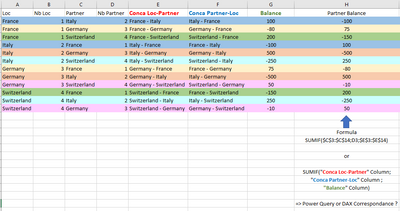
I'm trying to vlookup one text column "Conca Partner-Loc" on another text column "Conca Loc-Partner" to retrieve corresponding value "Balance"
See below an example :

CrisCros23_2-1637851527746.png


I want to calculate "Partner balance" column which is simple SUMIF formula in excel (range, Criteria, Sum Range) where Range is "Conca Loc-Partner", Criteria "Conca Partner-Loc" and Sum Range "Balance" 


Thank you

1 ACCEPTED SOLUTION
smpa01
Community Champion
Community Champion

@CrisCros23  with DAX measures can be achieved two ways (maybe more I am sure of that)


Measure1 =
CALCULATE (
    SUM ( t1[Balance] ),
    TREATAS ( VALUES ( t1[Conca Loc-Partner] ), t1[Conca Partner-Loc] ), ALL(t1)
)
Measure2 =
CALCULATE (
    SUM ( t1[Balance] ),
    FILTER ( ALL ( t1 ), t1[Conca Partner-Loc] = MAX ( t1[Conca Loc-Partner] ) )
)


with PQ you need to self join the table on t1[Conca Loc-Partner] to t1[Conca Partner-Loc]


let
    Source = Table.FromRows(Json.Document(Binary.Decompress(Binary.FromText("i45W8ixJzKlU0lFyTy3KTcwDsQwNDJRidaKRRIILEjPzgLQRVAbGh+k1BonHAgA=", BinaryEncoding.Base64), Compression.Deflate)), let _t = ((type nullable text) meta [Serialized.Text = true]) in type table [C1 = _t, C2 = _t, Value = _t]),
    #"Changed Type" = Table.TransformColumnTypes(Source,{{"C1", type text}, {"C2", type text}, {"Value", Int64.Type}}),
    #"Merged Queries" = Table.NestedJoin(#"Changed Type", {"C1"}, #"Changed Type", {"C2"}, "Changed Type", JoinKind.LeftOuter),
    #"Expanded Changed Type" = Table.ExpandTableColumn(#"Merged Queries", "Changed Type", {"Value"}, {"Value.1"})
in
    #"Expanded Changed Type"


pbix is attached


========================
Did I answer your question? Mark my post as a solution!
Proud to be a Super User
My Custom Visualization Projects
• Plotting Live Sound: Live Sound
• Beautiful News: Women in Parliament, Energy Mix, Shrinking Armies
• Visual Capitalist: Working Hrs
• Others: Easing Graph, Animated Calendar
MayViz Submissions
• Week 1: View
• Week 2: View
• Week 3: View
• Week 4: View
========================

View solution in original post

2 REPLIES 2
smpa01
Community Champion
Community Champion

@CrisCros23  with DAX measures can be achieved two ways (maybe more I am sure of that)


Measure1 =
CALCULATE (
    SUM ( t1[Balance] ),
    TREATAS ( VALUES ( t1[Conca Loc-Partner] ), t1[Conca Partner-Loc] ), ALL(t1)
)
Measure2 =
CALCULATE (
    SUM ( t1[Balance] ),
    FILTER ( ALL ( t1 ), t1[Conca Partner-Loc] = MAX ( t1[Conca Loc-Partner] ) )
)


with PQ you need to self join the table on t1[Conca Loc-Partner] to t1[Conca Partner-Loc]


let
    Source = Table.FromRows(Json.Document(Binary.Decompress(Binary.FromText("i45W8ixJzKlU0lFyTy3KTcwDsQwNDJRidaKRRIILEjPzgLQRVAbGh+k1BonHAgA=", BinaryEncoding.Base64), Compression.Deflate)), let _t = ((type nullable text) meta [Serialized.Text = true]) in type table [C1 = _t, C2 = _t, Value = _t]),
    #"Changed Type" = Table.TransformColumnTypes(Source,{{"C1", type text}, {"C2", type text}, {"Value", Int64.Type}}),
    #"Merged Queries" = Table.NestedJoin(#"Changed Type", {"C1"}, #"Changed Type", {"C2"}, "Changed Type", JoinKind.LeftOuter),
    #"Expanded Changed Type" = Table.ExpandTableColumn(#"Merged Queries", "Changed Type", {"Value"}, {"Value.1"})
in
    #"Expanded Changed Type"


pbix is attached


========================
Did I answer your question? Mark my post as a solution!
Proud to be a Super User
My Custom Visualization Projects
• Plotting Live Sound: Live Sound
• Beautiful News: Women in Parliament, Energy Mix, Shrinking Armies
• Visual Capitalist: Working Hrs
• Others: Easing Graph, Animated Calendar
MayViz Submissions
• Week 1: View
• Week 2: View
• Week 3: View
• Week 4: View
========================

@smpa01 

DAX Measure1 works perfectly !
Thanks a lot

Helpful resources

Announcements
Fabric Data Days is here Carousel

Fabric Data Days 2026

Don't miss out on Data Days, June 15 through August 7. Learn Fabric, Power BI, SQL, AI and more.

Power BI DataViz World Championships carousel

Power BI DataViz World Championships - June 2026

A new Power BI DataViz World Championship is coming this June! Don't miss out on submitting your entry.