Learn from the best! Meet the four finalists headed to the FINALS of the Power BI Dataviz World Championships! Register now
I have a table called Raw_table that is like the one below, and want to calculate the days between the two excluding weekends.
| Start Date | Due Date |
| 1-1-2020 | 13-1-2020 |
| 6-1-2020 | 12-1-2020 |
I created another table using the Calender auto function and numbered the days with 1 for weekdays and 0 for weekends. I then tried to use a query like this.
WorkDays = CALCULATE(SUM('Calendar'[Weekday],FILTER('Calendar',(DATESBETWEEN(Raw_table[Start Date],RawTable[Start Date],RawTable[Due Date])))
This fails but there must be a way of doing it? I have found a number of resources on the web for doing something like the excel NETWORKDAYS but cant get them to work. is there a way using what i have to get it to work
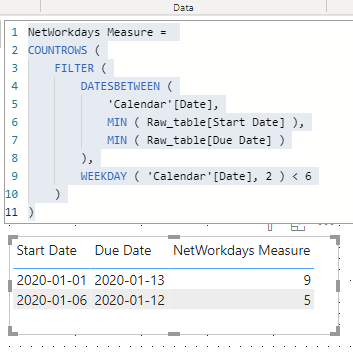
Hi, @Anonymous , you may want to try this measure,
NetWorkdays Measure =
COUNTROWS (
FILTER (
DATESBETWEEN (
'Calendar'[Date],
MIN ( Raw_table[Start Date] ),
MIN ( Raw_table[Due Date] )
),
WEEKDAY ( 'Calendar'[Date], 2 ) < 6
)
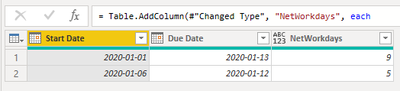
)In addition, here's a Power Query solution
let
Source = Table.FromRows(Json.Document(Binary.Decompress(Binary.FromText("i45WMtQ11DUyMDJQ0lEyNIaxY3WilcyQJIzgErEA", BinaryEncoding.Base64), Compression.Deflate)), let _t = ((type nullable text) meta [Serialized.Text = true]) in type table [#"Start Date" = _t, #"Due Date" = _t]),
#"Changed Type" = Table.TransformColumnTypes(Source,{{"Start Date", type date}, {"Due Date", type date}}, "fr"),
#"Added Custom" = Table.AddColumn(#"Changed Type", "NetWorkdays", each
List.Accumulate(
{0..Duration.Days([Due Date]-[Start Date])},
0,
(s,c) => if Date.DayOfWeek(Date.AddDays([Start Date], c), Day.Monday)>4 then s else s+1
)
)
in
#"Added Custom"| Thanks to the great efforts by MS engineers to simplify syntax of DAX! Most beginners are SUCCESSFULLY MISLED to think that they could easily master DAX; but it turns out that the intricacy of the most frequently used RANKX() is still way beyond their comprehension! |
DAX is simple, but NOT EASY! |
Is there a way to get the measure as a column? As I would like to be able to return the average of the number of days?
Also how would i implement the power query i am new to those and as such dont know how i would implement it with my tables rather than the Json?
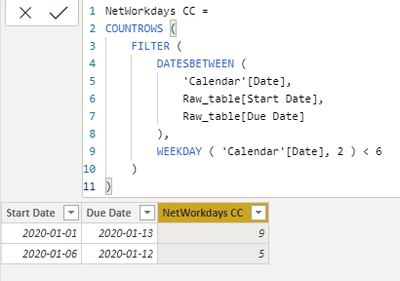
DAX formula for calculated column
NetWorkdays CC =
COUNTROWS (
FILTER (
DATESBETWEEN (
'Calendar'[Date],
Raw_table[Start Date],
Raw_table[Due Date]
),
WEEKDAY ( 'Calendar'[Date], 2 ) < 6
)
)| Thanks to the great efforts by MS engineers to simplify syntax of DAX! Most beginners are SUCCESSFULLY MISLED to think that they could easily master DAX; but it turns out that the intricacy of the most frequently used RANKX() is still way beyond their comprehension! |
DAX is simple, but NOT EASY! |
thank you but when i try i get the following error:
A circular dependency was detected: Raw_table[Column 2], Calendar[Date], Calendar[Calendar-0ae25540-d45c-4ff4-ac09-cd6af6c3ca4a], 13a0b372-8077-49fa-9674-c2b965903db3, Raw_New_Layout_[Task Name], Raw_New_Layout_[Raw_New_Layout_-f197bdcd-f316-4285-9ba6-931a37a888d8], Raw_table[Column 2].
A new Power BI DataViz World Championship is coming this June! Don't miss out on submitting your entry.
Share feedback directly with Fabric product managers, participate in targeted research studies and influence the Fabric roadmap.
| User | Count |
|---|---|
| 5 | |
| 4 | |
| 4 | |
| 3 | |
| 2 |
| User | Count |
|---|---|
| 11 | |
| 10 | |
| 7 | |
| 7 | |
| 6 |