Hi,
"Power Query" might be the ideal subforum for this question.
I do have a Data source from Excel with 2 tabs for some example companies. One tab Answers, another tab with CompanyInfo
In PowerBI I structured it like this:
1: Company Info. To connect the other tables via singular Name & ID. At the moment only 5 example-companies exist, but 20 companies will follow later...

-> my factTable
2: Company Filters. (Nearly) all Filter-values for the companies. Some Toggle-Filters (F1,F2), some single-options (F3,F4), some multi-options (F5, F6)
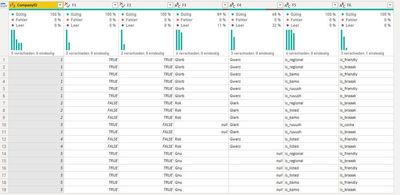
-> a dimTable to slice by
3: Answers (Values) AND two Filters which "belong" to these values: Segment, SubSegment
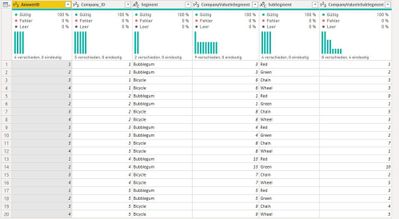
-> in between fact and dimTable. Because the values are "connected" to a Segment/ SubSegment I cannot (or at least: should not) distribute them to other tables
Model: To show values from FactsAndFilters filtered by Slicers from CompanyFiltersSingle changes I have to make the connection between my 3 tables bidirectional. But no conflict/circumnavigation takes place.
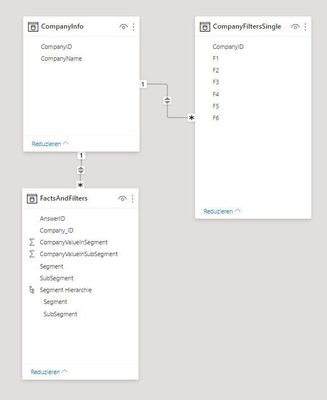
But: performance sucks. Is this due to this (bi-directional), or due to the number of slicers?
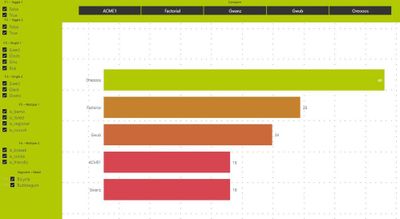
Could someone please show me a "better way" to structure A) the Excel and B) the Model?
https://www.dropbox.com/s/4stlfmky53m8z9x/Example8.pbix?dl=0
https://www.dropbox.com/scl/fi/3t4vhputoqcl2e7b4o8pz/Example8.xlsx?dl=0&rlkey=hiynv57oht647y0wnc4bys...


