cancel
Showing results for 
Search instead for 
Did you mean: 

The Power BI Data Visualization World Championships is back! Get ahead of the game and start preparing now! Learn more

Reply
KarineLago
Advocate I
Advocate I

Stop query refresh with Azure (paste values)

Hi guys!


Is there a way to stop this query from refreshing (connecting with Azure cognitive API) everytime I made a change in tables?

It's consuming transactions on Azure every time I close and apply (even when data was already obtained and nothing change in the table with it). I'm looking for something like paste values from Excel (sorry for the poor reference).


I need to share the .pbix file too and don't want to let my api key there. I really need an offline data.


(Source as table) as any =>
let
    JsonRecords = Text.FromBinary(Json.FromValue(Source)),
    JsonRequest = "{""documents"": " & JsonRecords & "}",

    JsonContent = Text.ToBinary(JsonRequest, TextEncoding.Ascii),
    Response =
        Web.Contents("https://westus.api.cognitive.microsoft.com/text/analytics/v2.0/sentiment?",
            [
                Headers = [#"Ocp-Apim-Subscription-Key"= "xxxxxxxxxxxxxxxxxxxxxx",
                           #"Content-Type"="application/json", Accept="application/json"],
                Content=JsonContent 
            ]),
    JsonResponse = Json.Document(Response,1252)
in
    JsonResponse


Thanks in advance!

From Brazil? Go to IntelExcel YT channel https://www.youtube.com/user/Intelxcel to learn Power BI.
1 ACCEPTED SOLUTION
v-qiuyu-msft
Community Support
Community Support

Hi @KarineLago,


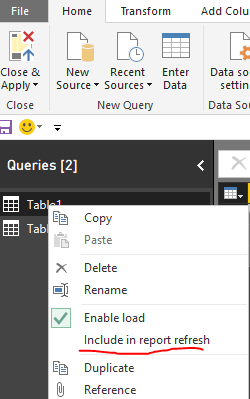
To stop the Power BI refresh the query, please try to uncheck Include in report refresh in Query Editor.


q1.PNG


As Power BI query doesn't provide encrypt API key, you can consider opening Advanced Editor and delete that key value, without clicking Apply button, just close the Query Editor. The data in report page should also be available.


Personally, as you use just want offline data without refresh, you can export Azure cognitive data to local files such as Excel, then you can get data from the Excel in Power BI desktop, it doesn't use API key or consume transactions.


Best Regards,
Qiuyun Yu

Community Support Team _ Qiuyun Yu
If this post helps, then please consider Accept it as the solution to help the other members find it more quickly.

View solution in original post

2 REPLIES 2
v-qiuyu-msft
Community Support
Community Support

Hi @KarineLago,


To stop the Power BI refresh the query, please try to uncheck Include in report refresh in Query Editor.


q1.PNG


As Power BI query doesn't provide encrypt API key, you can consider opening Advanced Editor and delete that key value, without clicking Apply button, just close the Query Editor. The data in report page should also be available.


Personally, as you use just want offline data without refresh, you can export Azure cognitive data to local files such as Excel, then you can get data from the Excel in Power BI desktop, it doesn't use API key or consume transactions.


Best Regards,
Qiuyun Yu

Community Support Team _ Qiuyun Yu
If this post helps, then please consider Accept it as the solution to help the other members find it more quickly.

Perfect. Thanks @v-qiuyu-msft!

From Brazil? Go to IntelExcel YT channel https://www.youtube.com/user/Intelxcel to learn Power BI.

Helpful resources

Announcements
Power BI DataViz World Championships

Power BI Dataviz World Championships

The Power BI Data Visualization World Championships is back! Get ahead of the game and start preparing now!

December 2025 Power BI Update Carousel

Power BI Monthly Update - December 2025

Check out the December 2025 Power BI Holiday Recap!

FabCon Atlanta 2026 carousel

FabCon Atlanta 2026

Join us at FabCon Atlanta, March 16-20, for the ultimate Fabric, Power BI, AI and SQL community-led event. Save $200 with code FABCOMM.