This is best Fabric, Power BI, SQL and AI community event. How do we know? The last event sold out! Save €200 with code FABCMTY200.
Register nowA new Data Days event is coming soon! This time we’re going bigger than ever. Fabric, Power BI, SQL, AI and more. Don't miss out.
Hi guys!
Is there a way to stop this query from refreshing (connecting with Azure cognitive API) everytime I made a change in tables?
It's consuming transactions on Azure every time I close and apply (even when data was already obtained and nothing change in the table with it). I'm looking for something like paste values from Excel (sorry for the poor reference).
I need to share the .pbix file too and don't want to let my api key there. I really need an offline data.
(Source as table) as any =>
let
JsonRecords = Text.FromBinary(Json.FromValue(Source)),
JsonRequest = "{""documents"": " & JsonRecords & "}",
JsonContent = Text.ToBinary(JsonRequest, TextEncoding.Ascii),
Response =
Web.Contents("https://westus.api.cognitive.microsoft.com/text/analytics/v2.0/sentiment?",
[
Headers = [#"Ocp-Apim-Subscription-Key"= "xxxxxxxxxxxxxxxxxxxxxx",
#"Content-Type"="application/json", Accept="application/json"],
Content=JsonContent
]),
JsonResponse = Json.Document(Response,1252)
in
JsonResponse
Thanks in advance!
Solved! Go to Solution.
Hi @KarineLago,
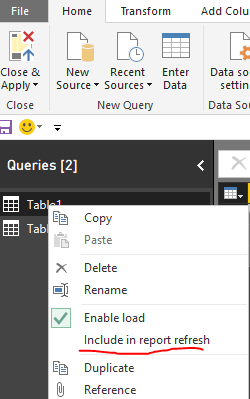
To stop the Power BI refresh the query, please try to uncheck Include in report refresh in Query Editor.
As Power BI query doesn't provide encrypt API key, you can consider opening Advanced Editor and delete that key value, without clicking Apply button, just close the Query Editor. The data in report page should also be available.
Personally, as you use just want offline data without refresh, you can export Azure cognitive data to local files such as Excel, then you can get data from the Excel in Power BI desktop, it doesn't use API key or consume transactions.
Best Regards,
Qiuyun Yu
Hi @KarineLago,
To stop the Power BI refresh the query, please try to uncheck Include in report refresh in Query Editor.
As Power BI query doesn't provide encrypt API key, you can consider opening Advanced Editor and delete that key value, without clicking Apply button, just close the Query Editor. The data in report page should also be available.
Personally, as you use just want offline data without refresh, you can export Azure cognitive data to local files such as Excel, then you can get data from the Excel in Power BI desktop, it doesn't use API key or consume transactions.
Best Regards,
Qiuyun Yu
Perfect. Thanks @v-qiuyu-msft!
Sign up to receive a private message when registration opens and key events begin.
If you have recently started exploring Fabric, we'd love to hear how it's going. Your feedback can help with product improvements.