cancel
Showing results for 
Search instead for 
Did you mean: 

We've captured the moments from FabCon & SQLCon that everyone is talking about, and we are bringing them to the community, live and on-demand. Starts on April 14th. Register now

Reply
Anonymous
Not applicable

Splitting Column with different headers

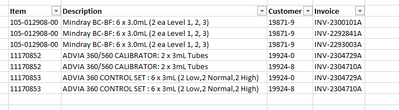
Hello, I am new to Power Query and I'm looking to reorganize this report but I'm running into the issue of splitting columns with different headers as show below.


Connor_H_0-1676480085798.png


Where I would like to have it set up like this.

Connor_H_1-1676480339774.png


Thank you for any help!


1 ACCEPTED SOLUTION

Hi,

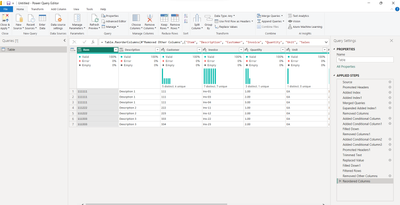
you can obtain your result applying the steps of the attached file

serpiva64_0-1676501242356.png

If this post is useful to help you to solve your issue, consider giving the post a thumbs up and accepting it as a solution!


View solution in original post

3 REPLIES 3
serpiva64
Solution Sage
Solution Sage

Hi,

instead of an image can you post sample data

Anonymous
Not applicable

ItemDescription           
111111Desciption 1           
CustomerInvoiceQuantity UnitSales Balance Cost value  Margin Contribution ratio
111Inv-011.00 EA100.00 50.00  50.00 50.00
 Inv-032.00 EA200.00 100.00  100.00 50.00
 Inv-043.00 EA300.00 150.00  150.00 50.00
Total    600.00 300.00  300.00 50.00
             
111222Description 2           
CustomerInvoiceQuantity UnitSales Balance Cost value  Margin Contribution ratio
222Inv-111.00 EA100.00 50.00  50.00 50.00
223Inv-122.00 EA200.00 100.00  100.00 50.00
Total    300.00 150.00  150.00 100.00
             
111333Description 3           
CustomerInvoiceQuantity UnitSales Balance Cost value  Margin Contribution ratio
333Inv-221.00 EA100.00 50.00  50.00 50.00
334Inv-232.00 EA200.00 100.00  100.00 50.00
Total    300.00 150.00  150.00 100.00


This is the original set up of the data, below is the desired outcome


ItemDescriptionCustomerInvoiceQuantityUnitSales BalanceCost ValueMarginContribution Ratio
111111Description 1111Inv-011EA100505050
111111Description 1111Inv-032EA20010010050
111111Description 1111Inv-043EA30015015050
111222Description 2222Inv-111EA100505050
111222Description 2223Inv-122EA20010010050
111333Description 3333Inv-221EA100505050
111333Description 3334Inv-232EA20010010050

Hi,

you can obtain your result applying the steps of the attached file

serpiva64_0-1676501242356.png

If this post is useful to help you to solve your issue, consider giving the post a thumbs up and accepting it as a solution!


Helpful resources

Announcements
New to Fabric survey Carousel

New to Fabric Survey

If you have recently started exploring Fabric, we'd love to hear how it's going. Your feedback can help with product improvements.

Power BI DataViz World Championships carousel

Power BI DataViz World Championships - June 2026

A new Power BI DataViz World Championship is coming this June! Don't miss out on submitting your entry.

Join our Fabric User Panel

Join our Fabric User Panel

Share feedback directly with Fabric product managers, participate in targeted research studies and influence the Fabric roadmap.

March Power BI Update Carousel

Power BI Community Update - March 2026

Check out the March 2026 Power BI update to learn about new features.