FabCon is coming to Atlanta
Join us at FabCon Atlanta from March 16 - 20, 2026, for the ultimate Fabric, Power BI, AI and SQL community-led event. Save $200 with code FABCOMM.
Register now!- Power BI forums
- Get Help with Power BI
- Desktop
- Service
- Report Server
- Power Query
- Mobile Apps
- Developer
- DAX Commands and Tips
- Custom Visuals Development Discussion
- Health and Life Sciences
- Power BI Spanish forums
- Translated Spanish Desktop
- Training and Consulting
- Instructor Led Training
- Dashboard in a Day for Women, by Women
- Galleries
- Data Stories Gallery
- Themes Gallery
- Contests Gallery
- QuickViz Gallery
- Quick Measures Gallery
- Visual Calculations Gallery
- Notebook Gallery
- Translytical Task Flow Gallery
- TMDL Gallery
- R Script Showcase
- Webinars and Video Gallery
- Ideas
- Custom Visuals Ideas (read-only)
- Issues
- Issues
- Events
- Upcoming Events
The Power BI Data Visualization World Championships is back! Get ahead of the game and start preparing now! Learn more
- Power BI forums
- Forums
- Get Help with Power BI
- Power Query
- Re: Split the total number of works to be done, an...
- Subscribe to RSS Feed
- Mark Topic as New
- Mark Topic as Read
- Float this Topic for Current User
- Bookmark
- Subscribe
- Printer Friendly Page

- Mark as New
- Bookmark
- Subscribe
- Mute
- Subscribe to RSS Feed
- Permalink
- Report Inappropriate Content
Split the total number of works to be done, and Allocate them on weekly basis
Hi,
I have the following Data in hand,
- Total Number of Tasks need to be done ( Tasks Column on the Screenshot)
- Total Amount of Hours that requires the work to be completed (Work In Numbers Column on the ScreenShot)
- Tenure of the Work (Start_date and Due_Date Column on the Screen Shot)
- Number of weeks (This value is rounded off) falls between the Work Tenure (No.Of Weeks Column on the Screenshot)
- Week Numbers of a Month/Year ( 1 till 5 week splits of January on the screenshot)
With above data in my hand, I would like to do the following
1. Divide the total Number of works to be done / Total Number of Weeks ( mentioned asWork in Numbers/ No.of Weeks on the Screenshot)
2. Allocate the Divided number of Works on the respective week numbers based on the Tenure of the Work
Week Number 1 - Represent Jan 2020 1st week (Jan 1- Jan 4)
Week Number 2 - Represent Jan 2020 2nd week (Jan 5- Jan 11)
Similarly the 5 weeks on the Month of January is given as ( 1 till 5 week splits of January on the Screenshot) .
Is this practically possible to implement this on PowerBI? If so Please provide some suggestions to get this done.
Thanks,
Govindaraj SV
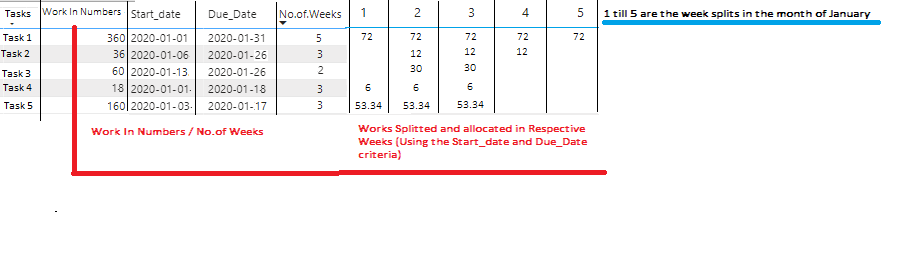
| Tasks | Work In Numbers | Start_Date | Due_Date | No.Of Weeks | 1 | 2 | 3 | 4 | 5 |
| Task 1 | 360 | 1/1/2020 | 31/1/2020 | 5 | 72 | 72 | 72 | 72 | 72 |
| Task 2 | 36 | 6/1/2020 | 26/01/2020 | 3 | 12 | 12 | 12 | ||
| Task 3 | 60 | 13/1/2020 | 26/01/2020 | 2 | 30 | 30 | |||
| Task 4 | 18 | 1/1/2020 | 18/01/2020 | 3 | 6 | 6 | 6 | ||
| Task 5 | 160 | 17/1/2020 | 17/01/2020 | 3 | 53.34 | 53.34 | 53.34 |
Solved! Go to Solution.


- Mark as New
- Bookmark
- Subscribe
- Mute
- Subscribe to RSS Feed
- Permalink
- Report Inappropriate Content
@Anonymous
let
    Source = Table.FromRecords(Json.Document(Binary.Decompress(Binary.FromText("i65WCkkszi5WsgLTCoZKOkrh+UXZCp55Cn6luUmpRUApYzMDHaXgksSikniXxJJUoFojAyMDXQNDIAKqdylNRRc3NlSq1UEz2gi70bhMNsNuspEZpsnG2EzG6WZDY+JNNsFmsqEFiaFhaIFpsilWk3EHNA5HG5or1cYCAA==",BinaryEncoding.Base64),Compression.Deflate))),
    chTypes = Table.TransformColumnTypes(Source,{{"Tasks", type text}, {"Work In Numbers", Int64.Type}, {"Start_Date", type date}, {"Due_Date", type date}},"en-GB"),
    addRec = Table.AddColumn(
                  chTypes,
                  "t",
                  each let period = List.Transform({Date.WeekOfMonth([Start_Date])..Date.WeekOfMonth([Due_Date])}, Text.From),
                           cnt = List.Count(period),
                           rec = [NoOfWeek=cnt]&Record.FromList(List.Repeat({Number.RoundUp([Work In Numbers]/cnt,2)},cnt), period)
                       in  rec
               ),
    result = Table.ExpandRecordColumn(addRec, "t", {"NoOfWeek"}&{"1".."5"})
in
    result
Is that what you want to achieve? If my code solves your problem, mark it as a solution
- Mark as New
- Bookmark
- Subscribe
- Mute
- Subscribe to RSS Feed
- Permalink
- Report Inappropriate Content
@Anonymous
#"addRec" = Table.AddColumn(#"Changed Type","t",each let period = List.Transform({Date.WeekOfYear([Start_date])..Date.WeekOfYear([Due_Date])}, Text.From),
cnt = List.Count(period),
rec = [NoOfWeek=cnt]&Record.FromList(List.Repeat({Number.RoundUp([Storypoints]/cnt,2)},cnt), period)
in rec
),
result = Table.ExpandRecordColumn(addRec, "t", {"NoOfWeek"}&List.Transform({1..52},Text.From))
- Mark as New
- Bookmark
- Subscribe
- Mute
- Subscribe to RSS Feed
- Permalink
- Report Inappropriate Content
@Anonymous
let
    Source = Table.FromRecords(Json.Document(Binary.Decompress(Binary.FromText("i65WCkkszi5WsgLTCoZKOkrh+UXZCp55Cn6luUmpRUApYzMDHaXgksSikniXxJJUoFojAyMDXQNDIAKqdylNRRc3NlSq1UEz2gi70bhMNsNuspEZpsnG2EzG6WZDY+JNNsFmsqEFiaFhaIFpsilWk3EHNA5HG5or1cYCAA==",BinaryEncoding.Base64),Compression.Deflate))),
    chTypes = Table.TransformColumnTypes(Source,{{"Tasks", type text}, {"Work In Numbers", Int64.Type}, {"Start_Date", type date}, {"Due_Date", type date}},"en-GB"),
    addRec = Table.AddColumn(
                  chTypes,
                  "t",
                  each let period = List.Transform({Date.WeekOfMonth([Start_Date])..Date.WeekOfMonth([Due_Date])}, Text.From),
                           cnt = List.Count(period),
                           rec = [NoOfWeek=cnt]&Record.FromList(List.Repeat({Number.RoundUp([Work In Numbers]/cnt,2)},cnt), period)
                       in  rec
               ),
    result = Table.ExpandRecordColumn(addRec, "t", {"NoOfWeek"}&{"1".."5"})
in
    result
Is that what you want to achieve? If my code solves your problem, mark it as a solution
- Mark as New
- Bookmark
- Subscribe
- Mute
- Subscribe to RSS Feed
- Permalink
- Report Inappropriate Content
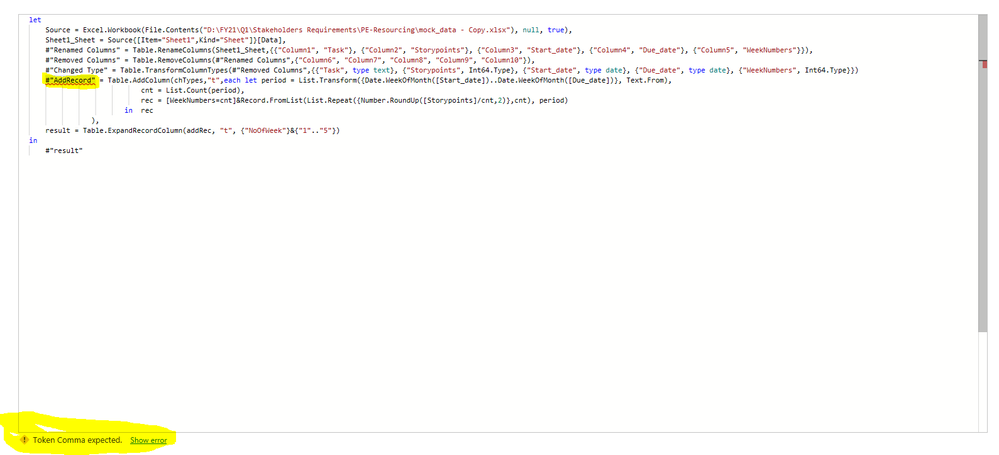
Tried the given suggestion, And I am ending upon the below error
- Mark as New
- Bookmark
- Subscribe
- Mute
- Subscribe to RSS Feed
- Permalink
- Report Inappropriate Content
@Anonymous
Modify it according to the picture above. If you can't correct it, send your code text and I will help you modify it
- Mark as New
- Bookmark
- Subscribe
- Mute
- Subscribe to RSS Feed
- Permalink
- Report Inappropriate Content
@ziying35 - Thank you so much for getting back. The suggestion is really working for me.
Can you please tell me , if the week numbers has to be on double digits, lets say for an year.
Week numbers would be from 1 to 52.
How to edit that value of week numbers. Directly changing the present end value of week number to 5 returns the following error.
Can you suggest how to handle this.
Expression.Error: The value isn't a single-character string.
Details:
Value=52
Thanks,
Govindaraj SV
- Mark as New
- Bookmark
- Subscribe
- Mute
- Subscribe to RSS Feed
- Permalink
- Report Inappropriate Content
@ziying35 , I tried exploring so i was able to get through what i need by making hte following Changes.
My changes are mentioned on Bold
#"addRec" = Table.AddColumn(#"Changed Type","t",each let period = List.Transform({Date.WeekOfYear([Start_date])..Date.WeekOfYear([Due_Date])}, Text.From),
cnt = List.Count(period),
rec = [NoOfWeek=cnt]&Record.FromList(List.Repeat({Number.RoundUp([Storypoints]/cnt,2)},cnt), period)
in rec
),
result = Table.ExpandRecordColumn(addRec, "t", {"NoOfWeek"}&{"1", "2", "3", "4", "5", "6", "7", "8", "9", "10", "11", "12", "13", "14", "15", "16", "17", "18", "19", "20", "21", "22", "23", "24", "25", "26", "27", "28", "29", "30", "31", "32", "36", "37", "38", "39", "40", "41", "42", "43", "44", "45", "46", "47", "48", "49", "50", "51", "52"})
And is there a way we can handle the above Bold Italic list to a better way? No.of Week to be Given in a different way thats more effective?
Thanks,
Govindaraj SV
- Mark as New
- Bookmark
- Subscribe
- Mute
- Subscribe to RSS Feed
- Permalink
- Report Inappropriate Content
@Anonymous
#"addRec" = Table.AddColumn(#"Changed Type","t",each let period = List.Transform({Date.WeekOfYear([Start_date])..Date.WeekOfYear([Due_Date])}, Text.From),
cnt = List.Count(period),
rec = [NoOfWeek=cnt]&Record.FromList(List.Repeat({Number.RoundUp([Storypoints]/cnt,2)},cnt), period)
in rec
),
result = Table.ExpandRecordColumn(addRec, "t", {"NoOfWeek"}&List.Transform({1..52},Text.From))
- Mark as New
- Bookmark
- Subscribe
- Mute
- Subscribe to RSS Feed
- Permalink
- Report Inappropriate Content
@ziying35 That did gave me what i wanted . Thanks a million. Closing the Threads by this as the need for the ask is now satisfied
- Mark as New
- Bookmark
- Subscribe
- Mute
- Subscribe to RSS Feed
- Permalink
- Report Inappropriate Content
Helpful resources

Power BI Dataviz World Championships
The Power BI Data Visualization World Championships is back! Get ahead of the game and start preparing now!

Power BI Monthly Update - November 2025
Check out the November 2025 Power BI update to learn about new features.

FabCon Atlanta 2026
Join us at FabCon Atlanta, March 16-20, for the ultimate Fabric, Power BI, AI and SQL community-led event. Save $200 with code FABCOMM.


