Don't miss your chance to take the Fabric Data Engineer (DP-700) exam on us!
Learn moreNext up in the FabCon + SQLCon recap series: The roadmap for Microsoft SQL and Maximizing Developer experiences in Fabric. All sessions are available on-demand after the live show. Register now
I have a spreadsheet where a cell contains multiple values in the format below.
vti_parserversion:SR|16.0.0.6105 vti_folderitemcount:IR|0 vti_charset:SR|utf-8 vti_author:SR|i:0i.t|00000003-0000-0ff1-ce00-000000000000|app@sharepoint vti_setuppath:SR|global\\v4.master UIVersion:SR|4 vti_generator:SR|Microsoft SharePoint vti_dbschemaversion:SR|16.0.113.0
Note, not every row contains the same amount values.
Since they're not delimited, what'd be a good way to split out these values into their own columns? For example, I'd like vti_parserversion to be the column header and SR|16.0.0.6105 is the value.
Solved! Go to Solution.
@erikboderek,
Check this code.
let
Source = Table.FromRows(Json.Document(Binary.Decompress(Binary.FromText("hZDBisIwEIZfpXhvSVCL9LSnBQ+CWPRSZYnpxAbaJEwmBaEPb4I9eOju/gNhmMx88zNNsxpJ/ziBHnAE9NqaetA9PLNvDJ5QELRVfZp4WbAYJWfb7GrSjLJ9C6gJBmmDoWp/mtj8JbvEo0VQIJXv5j4RqLO42KYrpgua2FvrPL05U4rnElL2oUk49+XjSnBWG5rZcX9wTlC3iH/09i76a9S4KQbhCTDOnfeXP06wmckPMBCLvxg/aInWW0VZnSwdPyy1dy87GMS/d+Z8XbDV7fYC", BinaryEncoding.Base64), Compression.Deflate)), let _t = ((type text) meta [Serialized.Text = true]) in type table [Column1 = _t]),
#"Changed Type" = Table.TransformColumnTypes(Source,{{"Column1", type text}}),
#"Split Column by Delimiter" = Table.ExpandListColumn(Table.TransformColumns(#"Changed Type", {{"Column1", Splitter.SplitTextByDelimiter("#(lf)", QuoteStyle.Csv), let itemType = (type nullable text) meta [Serialized.Text = true] in type {itemType}}}), "Column1"),
#"Changed Type1" = Table.TransformColumnTypes(#"Split Column by Delimiter",{{"Column1", type text}}),
#"Trimmed Text" = Table.TransformColumns(#"Changed Type1",{{"Column1", Text.Trim, type text}}),
#"Cleaned Text" = Table.TransformColumns(#"Trimmed Text",{{"Column1", Text.Clean, type text}}),
#"Split Column by Delimiter1" = Table.SplitColumn(#"Cleaned Text", "Column1", Splitter.SplitTextByDelimiter(":", QuoteStyle.Csv), {"Column1.1", "Column1.2"}),
#"Pivoted Column" = Table.Pivot(#"Split Column by Delimiter1", List.Distinct(#"Split Column by Delimiter1"[Column1.1]), "Column1.1", "Column1.2")
in
#"Pivoted Column"
Regards,
Lydia
@erikboderek,
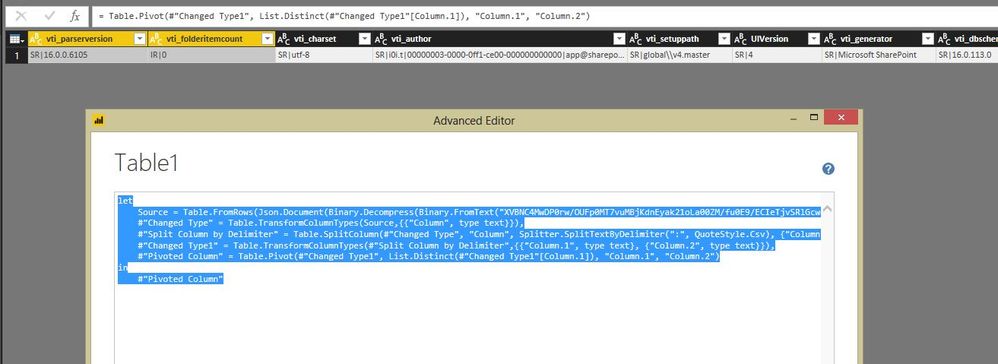
Add a blank query and paste the following code into the Advanced Editor of the blank query. If you doesn't get your expected result, please post more about your desired result.
let
Source = Table.FromRows(Json.Document(Binary.Decompress(Binary.FromText("XVBNC4MwDP0rw/OUFp0MT7vuMBjKdnEyak21oLa00ZM/fu0E9/ECIeTjvSRlGcwon5oZC2YGY6UasyJfaBoRZyklh6Dar01C9Q0YiTBwNY2YnfOFbEXeeQr0sxOK8LgV2ISdMj4viYxwISvi0PuQCEFDDj76wsK0PlnHCFrJETcuJzBpzbDzdG2vatY/HOYkGphFMO/G2/n+uSPZZlsYwTBcV7lIbpRVAneFV7n+qDS15R0M7P8dlMaRO7h6AQ==", BinaryEncoding.Base64), Compression.Deflate)), let _t = ((type text) meta [Serialized.Text = true]) in type table [Column = _t]),
#"Changed Type" = Table.TransformColumnTypes(Source,{{"Column", type text}}),
#"Split Column by Delimiter" = Table.SplitColumn(#"Changed Type", "Column", Splitter.SplitTextByDelimiter(":", QuoteStyle.Csv), {"Column.1", "Column.2"}),
#"Changed Type1" = Table.TransformColumnTypes(#"Split Column by Delimiter",{{"Column.1", type text}, {"Column.2", type text}}),
#"Pivoted Column" = Table.Pivot(#"Changed Type1", List.Distinct(#"Changed Type1"[Column.1]), "Column.1", "Column.2")
in
#"Pivoted Column"
Regards,
Lydia
Hi Lydia,
Thank you - this works pretty well. The issue I'm running into is that the values in some of the columns are throwing errors.
The error message says "There were too many elements in the enumeration to complete this operation." Based on other posts I've read, is this because there are duplicate values?
I tried pivoting through the UI and selecting "Don't Aggregate" but wound up with the same results.
Is there any possibility that you share me the problem data? I will test it in my Desktop.
Regards,
Lydia
@erikboderek,
Check this code.
let
Source = Table.FromRows(Json.Document(Binary.Decompress(Binary.FromText("hZDBisIwEIZfpXhvSVCL9LSnBQ+CWPRSZYnpxAbaJEwmBaEPb4I9eOju/gNhmMx88zNNsxpJ/ziBHnAE9NqaetA9PLNvDJ5QELRVfZp4WbAYJWfb7GrSjLJ9C6gJBmmDoWp/mtj8JbvEo0VQIJXv5j4RqLO42KYrpgua2FvrPL05U4rnElL2oUk49+XjSnBWG5rZcX9wTlC3iH/09i76a9S4KQbhCTDOnfeXP06wmckPMBCLvxg/aInWW0VZnSwdPyy1dy87GMS/d+Z8XbDV7fYC", BinaryEncoding.Base64), Compression.Deflate)), let _t = ((type text) meta [Serialized.Text = true]) in type table [Column1 = _t]),
#"Changed Type" = Table.TransformColumnTypes(Source,{{"Column1", type text}}),
#"Split Column by Delimiter" = Table.ExpandListColumn(Table.TransformColumns(#"Changed Type", {{"Column1", Splitter.SplitTextByDelimiter("#(lf)", QuoteStyle.Csv), let itemType = (type nullable text) meta [Serialized.Text = true] in type {itemType}}}), "Column1"),
#"Changed Type1" = Table.TransformColumnTypes(#"Split Column by Delimiter",{{"Column1", type text}}),
#"Trimmed Text" = Table.TransformColumns(#"Changed Type1",{{"Column1", Text.Trim, type text}}),
#"Cleaned Text" = Table.TransformColumns(#"Trimmed Text",{{"Column1", Text.Clean, type text}}),
#"Split Column by Delimiter1" = Table.SplitColumn(#"Cleaned Text", "Column1", Splitter.SplitTextByDelimiter(":", QuoteStyle.Csv), {"Column1.1", "Column1.2"}),
#"Pivoted Column" = Table.Pivot(#"Split Column by Delimiter1", List.Distinct(#"Split Column by Delimiter1"[Column1.1]), "Column1.1", "Column1.2")
in
#"Pivoted Column"
Regards,
Lydia
If you have recently started exploring Fabric, we'd love to hear how it's going. Your feedback can help with product improvements.
A new Power BI DataViz World Championship is coming this June! Don't miss out on submitting your entry.
Share feedback directly with Fabric product managers, participate in targeted research studies and influence the Fabric roadmap.
| User | Count |
|---|---|
| 5 | |
| 4 | |
| 3 | |
| 3 | |
| 2 |
| User | Count |
|---|---|
| 8 | |
| 6 | |
| 6 | |
| 6 | |
| 5 |