Don't miss your chance to take the Fabric Data Engineer (DP-600) exam for FREE! Find out how by attending the DP-600 session on April 23rd (pacific time), live or on-demand.
Learn moreNext up in the FabCon + SQLCon recap series: The roadmap for Microsoft SQL and Maximizing Developer experiences in Fabric. All sessions are available on-demand after the live show. Register now
Hi all,
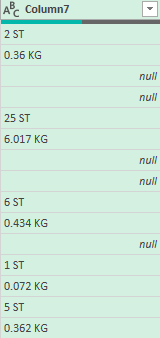
I'd like some help on splitting a column into two columns containing specific data. Right now, the column looks like this:
after the numerals, there's specific abbreviations: ST & KG.
I'd like to split the column into two columns One containing all the data with ST and one containing all the data with KG.
Can anyone help me make this happen?
Much obliged!
Solved! Go to Solution.
@Anonymous
Looks like your current last step is called #"Removed Columns2". If so, you'd need to add the steps after (in the Advanced editor), making sure the first step "col_" reads from the correct step and column:
col_ = #"Removed Columns2"[Column7],
KG_col = List.Select(col_, each Text.Contains(_, "KG")),
ST_col = List.Select(col_, each Text.Contains(_, "ST")),
res_ = Table.FromColumns({KG_col, ST_col}, {"KG", "ST"})
in
res_
If this does not work, do share your pbix
|
|
Please accept the solution when done and consider giving a thumbs up if posts are helpful. Contact me privately for support with any larger-scale BI needs, tutoring, etc. |
@Anonymous
Looks like your current last step is called #"Removed Columns2". If so, you'd need to add the steps after (in the Advanced editor), making sure the first step "col_" reads from the correct step and column:
col_ = #"Removed Columns2"[Column7],
KG_col = List.Select(col_, each Text.Contains(_, "KG")),
ST_col = List.Select(col_, each Text.Contains(_, "ST")),
res_ = Table.FromColumns({KG_col, ST_col}, {"KG", "ST"})
in
res_
If this does not work, do share your pbix
|
|
Please accept the solution when done and consider giving a thumbs up if posts are helpful. Contact me privately for support with any larger-scale BI needs, tutoring, etc. |
Hi @Anonymous
Place the following M code in a blank query to see the steps.
let
Source = Table.FromRows(Json.Document(Binary.Decompress(Binary.FromText("i45WMlTwdleK1YlWMtIzUggOATPBhDFMwkTPBEXCFCZhBhaOBQA=", BinaryEncoding.Base64), Compression.Deflate)), let _t = ((type nullable text) meta [Serialized.Text = true]) in type table [Column1 = _t]),
#"Changed Type" = Table.TransformColumnTypes(Source,{{"Column1", type text}}),
col_ = #"Changed Type"[Column1],
KG_col = List.Select(col_, each Text.Contains(_, "KG")),
ST_col = List.Select(col_, each Text.Contains(_, "ST")),
res_ = Table.FromColumns({KG_col, ST_col}, {"KG", "ST"})
in
res_
|
|
Please accept the solution when done and consider giving a thumbs up if posts are helpful. Contact me privately for support with any larger-scale BI needs, tutoring, etc. |
Hi,
Many thanks for the quick response! Would you be willing to go a little more in-depth as to what and where I have to place the M code to get my desired outcome (I'm very new to this)?
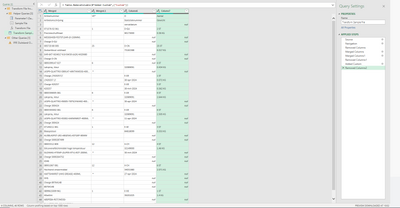
This is the situation as a whole.
Thanks again!
If you have recently started exploring Fabric, we'd love to hear how it's going. Your feedback can help with product improvements.
A new Power BI DataViz World Championship is coming this June! Don't miss out on submitting your entry.
Share feedback directly with Fabric product managers, participate in targeted research studies and influence the Fabric roadmap.
| User | Count |
|---|---|
| 5 | |
| 3 | |
| 3 | |
| 3 | |
| 2 |