
Join us at FabCon Atlanta from March 16 - 20, 2026, for the ultimate Fabric, Power BI, AI and SQL community-led event. Save $200 with code FABCOMM.
Register now!The Power BI Data Visualization World Championships is back! Get ahead of the game and start preparing now! Learn more
Hi All,
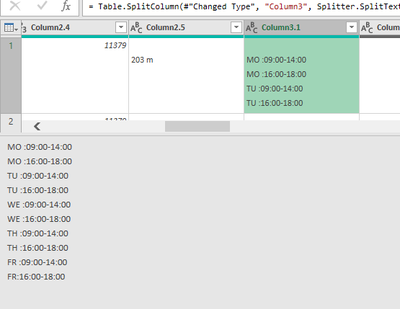
I need your assitance to split the below data to different columns like Weekday in one column and Hours in one column.
Expected format either of the 2 below.
Thanks for your assistance..
Solved! Go to Solution.
@bhaskarpbi999
You can split your data first, Text.Split("Text", "#(lf)") and then expand the list into new rows and then split the column with ":" delimiter. Attached a sample for your reference.
https://drive.google.com/file/d/1UzkpA9aohjDfwx8Sjnytox8bJJPdd5t2/view?usp=share_link
If the post helps please give a thumbs up
If it solves your issue, please accept it as the solution to help the other members find it more quickly.
Tharun
@bhaskarpbi999
You can split your data first, Text.Split("Text", "#(lf)") and then expand the list into new rows and then split the column with ":" delimiter. Attached a sample for your reference.
https://drive.google.com/file/d/1UzkpA9aohjDfwx8Sjnytox8bJJPdd5t2/view?usp=share_link
If the post helps please give a thumbs up
If it solves your issue, please accept it as the solution to help the other members find it more quickly.
Tharun
Thanks a lot for your assistance Tharun !
The Power BI Data Visualization World Championships is back! Get ahead of the game and start preparing now!
Check out the November 2025 Power BI update to learn about new features.
| User | Count |
|---|---|
| 10 | |
| 6 | |
| 5 | |
| 4 | |
| 2 |