cancel
Showing results for 
Search instead for 
Did you mean: 

The Power BI Data Visualization World Championships is back! Get ahead of the game and start preparing now! Learn more

Reply
RAHULBANDI
Helper II
Helper II

Specific Word Split Columns

Hi 

I have following Data-set


DATA

Right Issue of Fully Convertible Debentures 
Right Issue of Equity Shares 


Expected-Output


DATADATA1.1
Right Issue of Fully Convertible Debentures Right Issue
Right Issue of Equity Shares Right Issue
1 ACCEPTED SOLUTION
mussaenda
Super User
Super User

Hi @RAHULBANDI ,


All values on your data column has the same start?


There are multiple ways to achieve your DATA1.1


you can do like 

if Text.Contains(Text.Upper([DATA]), "RIGHT ISSUE")
then "Right Issue"
else 

null


View solution in original post

2 REPLIES 2
Lakshmi1294
Frequent Visitor

Hi,

 If you want to split left most side Values

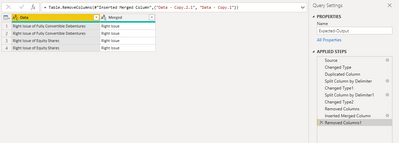
  First Duplicate the Column then split the column two times by Left most Delimiter 

  Now you can merge the two splitted Colums.You can get it now 

Lakshmi1294_0-1661174928623.png


mussaenda
Super User
Super User

Hi @RAHULBANDI ,


All values on your data column has the same start?


There are multiple ways to achieve your DATA1.1


you can do like 

if Text.Contains(Text.Upper([DATA]), "RIGHT ISSUE")
then "Right Issue"
else 

null


Helpful resources

Announcements
November Power BI Update Carousel

Power BI Monthly Update - November 2025

Check out the November 2025 Power BI update to learn about new features.

Fabric Data Days Carousel

Fabric Data Days

Advance your Data & AI career with 50 days of live learning, contests, hands-on challenges, study groups & certifications and more!

FabCon Atlanta 2026 carousel

FabCon Atlanta 2026

Join us at FabCon Atlanta, March 16-20, for the ultimate Fabric, Power BI, AI and SQL community-led event. Save $200 with code FABCOMM.