Join us at FabCon Atlanta from March 16 - 20, 2026, for the ultimate Fabric, Power BI, AI and SQL community-led event. Save $200 with code FABCOMM.
Register now!Learn from the best! Meet the four finalists headed to the FINALS of the Power BI Dataviz World Championships! Register now
Hi
I have following Data-set
DATA
| Right Issue of Fully Convertible Debentures |
| Right Issue of Fully Convertible Debentures |
| Right Issue of Equity Shares |
| Right Issue of Equity Shares |
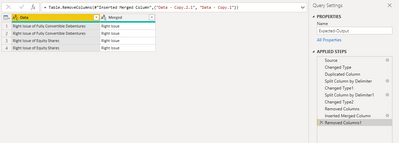
Expected-Output
| DATA | DATA1.1 |
| Right Issue of Fully Convertible Debentures | Right Issue |
| Right Issue of Fully Convertible Debentures | Right Issue |
| Right Issue of Equity Shares | Right Issue |
| Right Issue of Equity Shares | Right Issue |
Solved! Go to Solution.
Hi @RAHULBANDI ,
All values on your data column has the same start?
There are multiple ways to achieve your DATA1.1
you can do like
if Text.Contains(Text.Upper([DATA]), "RIGHT ISSUE")
then "Right Issue"
else
null
Hi,
If you want to split left most side Values
First Duplicate the Column then split the column two times by Left most Delimiter
Now you can merge the two splitted Colums.You can get it now
Hi @RAHULBANDI ,
All values on your data column has the same start?
There are multiple ways to achieve your DATA1.1
you can do like
if Text.Contains(Text.Upper([DATA]), "RIGHT ISSUE")
then "Right Issue"
else
null
Share feedback directly with Fabric product managers, participate in targeted research studies and influence the Fabric roadmap.
Check out the February 2026 Power BI update to learn about new features.