cancel
Showing results for 
Search instead for 
Did you mean: 

July 7 - July 17 | Round 2 of the Power BI Dataviz World Championships. Don't miss your chance! Learn more

Reply
nikostou
Regular Visitor

Sorting Data through Power Query Editor

Hi


I have a very big table that I have Imported from a SQL Database. I would like to filter the data on a specific column; "Company", so that I will only import rows that are from Company 1.

I have tried the filter function, but I see that my calculated table, which is using data from this big table, and that I have based my report on is still calculating across companies. I have also tried putting on a report filter in the Power BI report, but it still calculates across all companies.


I would like to filter the data already at the import since my amount of data is very large.


I hope you can help me!


Thank you in advance.

1 ACCEPTED SOLUTION

I tried refreshing all of my tables, that did not work.


Then I tried removing the filter and applying it again, that worked!

I have no idea why it worked, but I can live with that Smiley LOL


@ImkeF  Thank you for your time and your help!

View solution in original post

4 REPLIES 4
ImkeF
Community Champion
Community Champion

Make sure to apply the filter in the query editor and not in DAX.

I've you've done that and still get errors, please paste M-code or screenshots of what you've done.


Imke Feldmann (The BIccountant)

If you liked my solution, please give it a thumbs up. And if I did answer your question, please mark this post as a solution. Thanks!

How to integrate M-code into your solution -- How to get your questions answered quickly -- How to provide sample data -- Check out more PBI- learning resources here -- Performance Tipps for M-queries

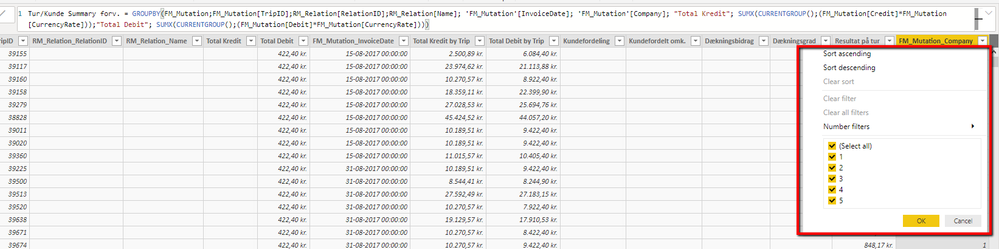
I have made the filter in the Query Editor, but as you see in the table the calculated table still finds companies 1 to 5. I the Query Editor I filtered on only Company 1.


2019-07-23_1550.png


The DAX string you see in the picture is the string I wrote to make the table. After this I added multiple calculated columns to it.


I have also tried to redo the table, but that did not help either.


Thank you for your help!

ImkeF
Community Champion
Community Champion

How about the source-table "FM_Mutation". Does is have the the companies as well? Have you refreshed it?

Imke Feldmann (The BIccountant)

If you liked my solution, please give it a thumbs up. And if I did answer your question, please mark this post as a solution. Thanks!

How to integrate M-code into your solution -- How to get your questions answered quickly -- How to provide sample data -- Check out more PBI- learning resources here -- Performance Tipps for M-queries

I tried refreshing all of my tables, that did not work.


Then I tried removing the filter and applying it again, that worked!

I have no idea why it worked, but I can live with that Smiley LOL


@ImkeF  Thank you for your time and your help!

Helpful resources

Announcements
FabCon and SQLCon Barcelona 2026

FabCon & SQLCon – Barcelona 2026

Join us in Barcelona for FabCon and SQLCon, the Fabric, Power BI, SQL, and AI community event. Save €200 with code FABCMTY200.

60 days of Data Days Carousel

Data Days 2026

Join Fabric Data Days 2026: 60 days of free live/on-demand sessions, challenges, study groups, and certification opportunities.

Power BI DataViz World Championships carousel

Power BI DataViz World Championships - June 2026

A new Power BI DataViz World Championship is coming this June! Don't miss out on submitting your entry.