We've captured the moments from FabCon & SQLCon that everyone is talking about, and we are bringing them to the community, live and on-demand. Starts on April 14th. Register now
Hello wise ones. I have a dataset that contains child class years and I want them to be in order, oldest to greatest. Ex. in the first row it should be 1982, 1992, 1994. Any idea of a way to do that in Power Query?
Solved! Go to Solution.
Hi, @danielrsnyder ;
You also could try it.
let
Source = Table.FromRows(Json.Document(Binary.Decompress(Binary.FromText("i45WMrS0NFHSAVIWRmDKEkTllebkKMXqgGQtLBDCRgYGhmiyUE0GECMMwIoMzZViYwE=", BinaryEncoding.Base64), Compression.Deflate)), let _t = ((type nullable text) meta [Serialized.Text = true]) in type table [#"Child Class of" = _t, #"Child Class of2" = _t, #"Child Class of3" = _t, #"Child Class of4" = _t]),
#"Changed Type" = Table.TransformColumnTypes(Source,{{"Child Class of", Int64.Type}, {"Child Class of2", Int64.Type}, {"Child Class of3", Int64.Type}, {"Child Class of4", Int64.Type}}),
#"Added Index" = Table.AddIndexColumn(#"Changed Type", "Group", 1, 1, Int64.Type),
#"Unpivoted Columns" = Table.UnpivotOtherColumns(#"Added Index", {"Group"}, "Attribute", "Value"),
#"Grouped Rows" = Table.Group(#"Unpivoted Columns", {"Group"}, {{"Sort", each Table.AddIndexColumn( Table.Sort(_,{{"Group", Order.Ascending}, {"Value", Order.Ascending}}), "sort",1,1), type table}}),
#"Expanded Sort" = Table.ExpandTableColumn(#"Grouped Rows", "Sort", {"Attribute", "Value", "sort"}, {"Attribute", "Value", "sort.1"}),
#"Removed Columns" = Table.RemoveColumns(#"Expanded Sort",{"Attribute"}),
#"Added Custom" = Table.AddColumn(#"Removed Columns", "Custom", each "Child Class of"& Text.From([sort.1])),
#"Removed Columns1" = Table.RemoveColumns(#"Added Custom",{"sort.1"}),
#"Pivoted Column" = Table.Pivot(#"Removed Columns1", List.Distinct(#"Removed Columns1"[Custom]), "Custom", "Value", List.Sum),
#"Removed Columns2" = Table.RemoveColumns(#"Pivoted Column",{"Group"})
in
#"Removed Columns2"
Thr orginal table.

and the final show:

Best Regards,
Community Support Team _ Yalan Wu
If this post helps, then please consider Accept it as the solution to help the other members find it more quickly.
Hi, @danielrsnyder ;
You also could try it.
let
Source = Table.FromRows(Json.Document(Binary.Decompress(Binary.FromText("i45WMrS0NFHSAVIWRmDKEkTllebkKMXqgGQtLBDCRgYGhmiyUE0GECMMwIoMzZViYwE=", BinaryEncoding.Base64), Compression.Deflate)), let _t = ((type nullable text) meta [Serialized.Text = true]) in type table [#"Child Class of" = _t, #"Child Class of2" = _t, #"Child Class of3" = _t, #"Child Class of4" = _t]),
#"Changed Type" = Table.TransformColumnTypes(Source,{{"Child Class of", Int64.Type}, {"Child Class of2", Int64.Type}, {"Child Class of3", Int64.Type}, {"Child Class of4", Int64.Type}}),
#"Added Index" = Table.AddIndexColumn(#"Changed Type", "Group", 1, 1, Int64.Type),
#"Unpivoted Columns" = Table.UnpivotOtherColumns(#"Added Index", {"Group"}, "Attribute", "Value"),
#"Grouped Rows" = Table.Group(#"Unpivoted Columns", {"Group"}, {{"Sort", each Table.AddIndexColumn( Table.Sort(_,{{"Group", Order.Ascending}, {"Value", Order.Ascending}}), "sort",1,1), type table}}),
#"Expanded Sort" = Table.ExpandTableColumn(#"Grouped Rows", "Sort", {"Attribute", "Value", "sort"}, {"Attribute", "Value", "sort.1"}),
#"Removed Columns" = Table.RemoveColumns(#"Expanded Sort",{"Attribute"}),
#"Added Custom" = Table.AddColumn(#"Removed Columns", "Custom", each "Child Class of"& Text.From([sort.1])),
#"Removed Columns1" = Table.RemoveColumns(#"Added Custom",{"sort.1"}),
#"Pivoted Column" = Table.Pivot(#"Removed Columns1", List.Distinct(#"Removed Columns1"[Custom]), "Custom", "Value", List.Sum),
#"Removed Columns2" = Table.RemoveColumns(#"Pivoted Column",{"Group"})
in
#"Removed Columns2"
Thr orginal table.
and the final show:
Best Regards,
Community Support Team _ Yalan Wu
If this post helps, then please consider Accept it as the solution to help the other members find it more quickly.
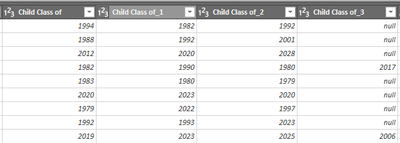
@v-yalanwu-msft Thanks for this, it worked great for my needs and got me to the solution I needed.
One of the problems with an Ascending Sort is that it will move the nulls to the start. To deal with that issue, I sort each row ascending; Remove the nulls; then pad the end of the list with nulls so each row will have the correct number of entries:
let
Source = Excel.CurrentWorkbook(){[Name="Table15"]}[Content],
#"Changed Type" = Table.TransformColumnTypes(Source,{{"Child Class of", Int64.Type}, {"Child Class of2", Int64.Type}, {"Child Class of3", Int64.Type}, {"Child Class of4", Int64.Type}}),
ColCount=Table.ColumnCount(#"Changed Type"),
colHdrs = Table.ColumnNames(#"Changed Type"),
//With Ascending sort, nulls will be at the start
// Note the padding to move them to the end
#"Sorted Rows" =
Table.FromRows(
List.Accumulate({0..Table.RowCount(#"Changed Type")-1}, {}, (state, current)=> state &
{List.Split(
List.Sort(
List.RemoveNulls(
Record.FieldValues(#"Changed Type"{current})), Order.Ascending) &
List.Repeat({null}, ColCount),
ColCount){0}}),
colHdrs),
Typed = Table.TransformColumnTypes(#"Sorted Rows", List.Transform(colHdrs, each {_, Int64.Type}))
in
Typed
This points to a bad source data format design. What are you actually trying to accomplish?
If you have recently started exploring Fabric, we'd love to hear how it's going. Your feedback can help with product improvements.
A new Power BI DataViz World Championship is coming this June! Don't miss out on submitting your entry.
Share feedback directly with Fabric product managers, participate in targeted research studies and influence the Fabric roadmap.
| User | Count |
|---|---|
| 5 | |
| 3 | |
| 3 | |
| 2 | |
| 2 |
| User | Count |
|---|---|
| 10 | |
| 8 | |
| 7 | |
| 7 | |
| 5 |